IPCT Introducing CCTV Mapper - Free design tool!

Mike

Staff member
Mar 9, 2014
3,060
3,090
New York
Hey everyone,

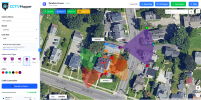
I've been extremely busy lately building this, which has been in the works for close to 3 years now (was on pause for most of that time due to life). I am happy to introduce CCTV Mapper, free to all IPCT members (with included premium packages for IPCT+ and IPCT Contributors), this tool will be part of the IPCT+ package and also available as a standalone service. As an installer, I got sick of paying to use other services to generate maps and I don't like the free versions, so I built my own. Please everyone check it out, just make sure to sign up with the same email you have on file with IPCT so you get the premium package if you're already an IPCT+ member or Contributor. You can visit the URL below or find the mapper under IPCT Tools.


CCTVMapper_Logo_Color_H.png
1764881667088.png


Thanks for all of the support, I hope some of you find this tool useful.

-Mike
 
This is great @Mike!

I really like that you can add switches, cables, etc.


Issues:
  • Lens size dropdown box is full of resolutions, not lens sizes.
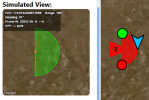
  • This text is barely legible at lower DPI scales:
    1764904915857.png
  • Pressing keyboard keys has weird behavior, seems to make this box appear around things randomly with no apparent purpose.

    1764905601285.png

    Logically, the delete key should bring up a dialog asking for confirmation to delete the selected device -- that is what I was trying when I noticed this.


Not to dump a lot of work onto you, but I already have a wish list.

Wish list:
  • Let the map zoom in much, much, (much) farther. I want to be able to zoom in so far that device icons take up less space than the real-life objects. This will make it far easier to work with a dense layout of devices.
  • Preferences page with choice of distance unit (meters/feet/yards/etc.).
  • More camera color choices.
  • Variable opacity for camera icon and FOV overlay (<input type="range">).
  • Allow a larger range of camera FoVs. For example there are a lot of dual sensor panoramic cameras now that can reach or slightly exceed 180 degree view, PTZs or varifocals that can zoom further than 10 degrees.
  • For a given target range and FOV, you should be able to calculate the frame width (in meters or other preferred distance unit) (and height if aspect ratio is known) and pixels per foot, to show somewhere, e.g. in that Simulated View window where you show the distance to target.

    I don't know the correct math for this, it isn't exactly trivial. Consider for example, a 180 degree cam would have a technically infinite horizontal frame width in meters at any distance from the camera.

  • Consider using HTML5 history API to add URL parameters to the current URL that reflect the map's pan and zoom position. Currently the saved project system makes this not entirely necessary but it could be good for people to share locations easily.
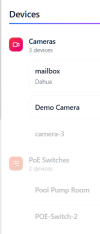
  • Consider putting an X in the corner of the device properties panel which can be clicked to unselect the device and return to the device list. I realize you can just click a blank part of the map to do this but it took a moment to realize that.

    1764905368773.png

  • In the Devices list view, items should be reorderable via click-and-drag. On touchscreens, long press to begin dragging. You can also make the device vibrate when dragging begins, as a nice form of immediate feedback to let the user know they've held long enough they can begin moving.

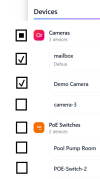
  • In the Devices list view, have an "Edit Visibility" mode that injects checkboxes next to each category and device so you can toggle their visibility on the map. Kind of like how in mobile apps, gmail for example, you can enter a multi-select mode which causes checkboxes to appear next to each email in a list.

    Here's a very crude mockup of what I mean.

    1764906682564.png

    Note the checkbox at the category level would be in an indeterminate state if the child objects are not all in the same state.

    Hidden items should still appear in the device list and be selectable (causing them to appear on the map while selected), but have lower opacity in the list when outside of Edit Visibility mode. E.g:

    1764906482367.png


  • An undo function (CTRL + Z or something) would be nice in case you accidentally drag something you didn't mean to. I know that is a can of worms to implement, and not a really big deal anyway.
 
Last edited:
Another few things.

Double right clicking the map for some reason zooms out.

I created a distance line. I notice it doesn't appear in the device list (not necessarily a problem, just an observation that not everything you put on the map appears in this list).

The context menu does not open when you right click the vertices of the distance line, which makes it unnecessarily tricky if there are a lot of vertices. Vertices should have a context menu with the same options as the line's context menu, plus the ability to delete the vertex. Currently I can find no way to delete a vertex but I can create new ones by dragging a blue dot on the line.

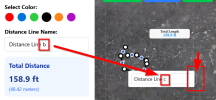
Renaming the line via its context menu, the name change does not take effect if you click out of the box without pressing Enter.

Also the text input overflows its container.

1764908386786.png
 
looks like it could be a nifty tool. i like bp2008's suggestions. am a bit worried that a thread for a brand new tool with a premium option hasnt gotten a dev reply in almost a month now. i know theres life, but if a paid option is out there, be nice to see regular activity and not already going the way of BIT. not trying to be rude, just sharing my thoughts due to money and subscriptions being a desired outcome.
 
  • Like
Reactions: looney2ns
I cant connect a PoE switch to another PoE switch.
Added to my bug sheet, thanks. Thanks for the suggestions as well, working on a bunch.

is there a one time fee license I can buy?
Not at the moment, but that's a good idea. Let me see what I can think of.

looks like it could be a nifty tool. i like bp2008's suggestions. am a bit worried that a thread for a brand new tool with a premium option hasnt gotten a dev reply in almost a month now. i know theres life, but if a paid option is out there, be nice to see regular activity and not already going the way of BIT. not trying to be rude, just sharing my thoughts due to money and subscriptions being a desired outcome.
That's a bit much, and not a valid comparison. BIT is FREE software that I built for myself and shared with the community over 10 years ago, which by the way, still works very well. Please remember, just because I don't respond all the time, doesn't mean I don't see what I'm subscribed to, bug reports, etc.
 
  • Like
Reactions: Holbs
That's a bit much, and not a valid comparison. BIT is FREE software that I built for myself and shared with the community over 10 years ago, which by the way, still works very well. Please remember, just because I don't respond all the time, doesn't mean I don't see what I'm subscribed to, bug reports, etc.
fair, but as a consumer, i dont know what you see until you respond.
 
  • Like
Reactions: Mike
Added to my bug sheet, thanks. Thanks for the suggestions as well, working on a bunch.


Not at the moment, but that's a good idea. Let me see what I can think of.


That's a bit much, and not a valid comparison. BIT is FREE software that I built for myself and shared with the community over 10 years ago, which by the way, still works very well. Please remember, just because I don't respond all the time, doesn't mean I don't see what I'm subscribed to, bug reports, etc.
For the BIT record... I just installed and used it over the weekend to include my weather station & macros on IP cameras. Yep, BIT still works for being 10 years old :)
 
  • Love
Reactions: Mike
Happy New Year all. My team and I are working on upgrades on CCTVMapper! Thanks for the support, ideas and patience!

is there a one time fee license I can buy?

I've decided I'm going to add this as a feature, I think it's a good idea. I'll let you know when it's ready and thanks again for the suggestion.

fair, but as a consumer, i dont know what you see until you respond.
Also fair, I will be more communicative with this project :) Thanks for the suggestion.
 
@Mike
It is better! Still a number of issues. Here's one:

I have an old "Blue Iris" object on the map, added long ago.

1772569045016.png

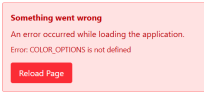
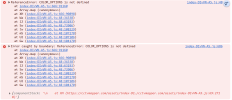
Clicking it yields this error:

1772569017790.png

1772569106305.png

Same error if I click that Blue Iris object in the devices list. But if I create a new Blue Iris object, the new one does not have this same bug.
 
  • Like
Reactions: looney2ns
More issues:
  • Poe Switches are invisible on the map.
  • Text in the Simulated View area is still really small which is a bit of an accessibility/readability issue. Consider moving it out of that canvas and just making that readout with normal HTML elements.

1772570086100.png
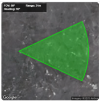
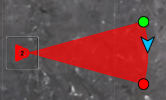
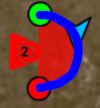
  • PPF and Frame width calculations are obviously using the wrong mathematical formulae. This is easily demonstrated by playing with FOVs near 180 degrees. The numbers output by the program diverge way too far from intuitive reality. I've given this some thought just now and I think you need to compute the arc length between the green and red handles on the FOV circle.

1772571248866.png

The length of the blue arc I've drawn above would be the frame width. PPF is just something like the Frame Width divided by the horizontal resolution of the camera.
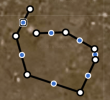
  • When a distance line is selected, right clicking the blue dots between vertices does not open the context menu.

1772571903933.png

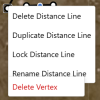
  • The Delete Vertex context menu item is ... well look ...
1772571940296.png
 
  • Like
Reactions: Mike and looney2ns
One last bug for now:
  • Right clicking an item and using the Duplicate function pops up the prompt to upgrade your service plan even if you are not actually at the object limit.


Remaining wish list items:
  • Let the map zoom in much, much, (much) farther. I want to be able to zoom in so far that device icons take up less space than the real-life objects. This will make it far easier to work with a dense layout of devices. Imagine trying to populate a space the size of a network rack (19 inches wide) with NVRs and switches, access points, and all the cabling.
  • Use HTML5 history API to add URL parameters to the current URL that reflect the map's pan and zoom position. Currently the saved project and sharing system makes this not entirely necessary but it could be good for people to share locations easily.
  • Undo function (GUI button and CTRL + Z) for simple actions such as moving an object.
  • Delete items in the devices list via context menu?
 
  • Like
Reactions: Mike and looney2ns
@Mike
It is better! Still a number of issues. Here's one:

I have an old "Blue Iris" object on the map, added long ago.

View attachment 239152

Clicking it yields this error:

View attachment 239151

View attachment 239153

Same error if I click that Blue Iris object in the devices list. But if I create a new Blue Iris object, the new one does not have this same bug.

Thanks for reporting all this, every issue you mentioned has been addressed! Wish list coming next.