Intermittent dropouts in the 24/7 ( 5232-16P-EI )

Chokolinho

Getting comfortable
Jul 15, 2024
708
672
Europe
Hello,
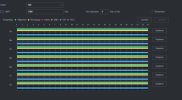
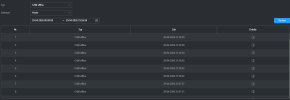
I'm having a problem with my new NVR and the three cameras connected to it via a PoE+ switch. Every now and then, about a minute of continuous recording is missing. This only happens with those three cameras, not with the ones connected directly to the NVR ports. Has anyone else had the same problem
 

Attachments

  • 67c38630ed200120b836ddec83f4bc6e.png
    67c38630ed200120b836ddec83f4bc6e.png
    2.9 KB · Views: 3
  • 41096313fb1fa6e3c0b66498e7834952.png
    41096313fb1fa6e3c0b66498e7834952.png
    5.1 KB · Views: 3
  • d6ef9adc555f262290b66f9a76506151.png
    d6ef9adc555f262290b66f9a76506151.png
    29 KB · Views: 4
  • e426b22140bd4832439dfa12fbcf971b.png
    e426b22140bd4832439dfa12fbcf971b.png
    12.1 KB · Views: 4
  • f3536d20109890a6f724173f238a3249.png
    f3536d20109890a6f724173f238a3249.png
    3.9 KB · Views: 4
  • Unbenannt.png
    Unbenannt.png
    33.5 KB · Views: 4
Any consistency like a switch auto reboot?

Is it a name brand switch or a cheap one that maybe overheats and reboots?
 
Ditto same switch

I tested mine per our conversation.
No dropouts on two 5442s for 14 hours so far

I wonder, is it related to events? MD/IVS ?
 
How is the camera settings set up? Default settings? Variable bitrate? Fixed bitrate? What size HDD?

Default camera settings are usually set up to provide the best video in ideal conditions meaning the FPS and bitrate is set VERY high.
HDD's have a finite amount of throughput they are able to do.... If you add all the "max bitrates" for the cameras then are you going over that the hard drive can handle? One scenario would be the cameras are set on variable bitrate. This means if the pixel in the image is not changing then it does not use extra data. When a person or vehicle or whatever comes into the camera's field of view, it would cause an increase of data. If the hard drive cannot write fast enough then that footage is not recorded. Note that during the liveview you would not notice any skipping or whatever. Only seen in playback as missing footage.
 
How is the camera settings set up? Default settings? Variable bitrate? Fixed bitrate? What size HDD?

Default camera settings are usually set up to provide the best video in ideal conditions meaning the FPS and bitrate is set VERY high.
HDD's have a finite amount of throughput they are able to do.... If you add all the "max bitrates" for the cameras then are you going over that the hard drive can handle? One scenario would be the cameras are set on variable bitrate. This means if the pixel in the image is not changing then it does not use extra data. When a person or vehicle or whatever comes into the camera's field of view, it would cause an increase of data. If the hard drive cannot write fast enough then that footage is not recorded. Note that during the liveview you would not notice any skipping or whatever. Only seen in playback as missing footage.
The only issue I'm having is with the cameras connected via the switch. The others, which are connected directly to the NVR, work without any problems. What I've noticed is that they sometimes just reboot on their own. I'll run some tests tomorrow and hope that fixes the problem.
 
  • Like
Reactions: bigredfish
As the other cameras connected directly to the NVR ports aren't having the problem, and my own testing shows same, I'm going to say there is some network gremlin.
Switch, cables? Something else on that network temporarily lighting up and grabbing the IP?
 
How is the camera settings set up? Default settings? Variable bitrate? Fixed bitrate? What size HDD?

Default camera settings are usually set up to provide the best video in ideal conditions meaning the FPS and bitrate is set VERY high.
HDD's have a finite amount of throughput they are able to do.... If you add all the "max bitrates" for the cameras then are you going over that the hard drive can handle? One scenario would be the cameras are set on variable bitrate. This means if the pixel in the image is not changing then it does not use extra data. When a person or vehicle or whatever comes into the camera's field of view, it would cause an increase of data. If the hard drive cannot write fast enough then that footage is not recorded. Note that during the liveview you would not notice any skipping or whatever. Only seen in playback as missing footage.

That aint it.
I run MAX bitrate and FPS on most of my 4k as well as 4MB cameras on the same NVR and have for 12 years without issue.

If it was a HD issue you would logically assume it would effect all cameras not just ones on a remote switch