

Bought a ANPR camera - iDS-TCM403-BI(G) to interface it to a third party software that listens on http port for ANPR events. Camera is supposed to directly send event data to http listener at an IP address, but the camera does not even have advanced network settings menu where http listening can be configured. It has only isapi and sdk listening configuration option. Paid 800 USD for the camera. Without http listening option, existing software cannot capture plate data. Is there a way to add this menu option through a specific firmware or set this option using some configuration tool?
iDS-TCM403-BI(G) ANPR camera with latest firmware has no menu option to set HTTP listening! SOS!
- Thread starter Raj Nambiar
- Start date
You are using an out of date browser. It may not display this or other websites correctly.
You should upgrade or use an alternative browser.
You should upgrade or use an alternative browser.
They don't mention this in the specs. HTTP listening is probably the easiest of all interfaces, we can get plate data without almost any coding. We don't need to study their APIs/SDKs. HTTP listening option is easy to implement in the linux box, and I thought the 2025 firmware would have this feature. In the pdf on http listening method did not mention that it wasn't available in all higher end ANPRs. Sellers/dealers have no idea what that is, and refused to open the box and show the screen.
Firmware version is a 2025 version, latest - V5.4.4 251216.
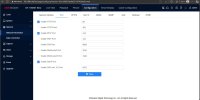
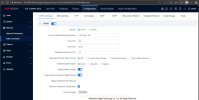
Firmware version is a 2025 version, latest - V5.4.4 251216.
They have websockets too, but no information or mention of it in the spec sheet or documentation websocket would be easy to implement.
Found a firmware from hikvision Europe which has a release note that says it has http listening. Release note from the same page attached.
But the firmware does not have camera model name as/in the firmware file name. Worried that If I upload this and if the camera crashes, camera might become dead. Please advice
But the firmware does not have camera model name as/in the firmware file name. Worried that If I upload this and if the camera crashes, camera might become dead. Please advice
Attachments
I don't have any equipment with the latest Hikvision firmware, but have you tested this out?
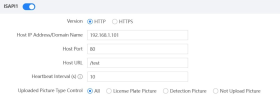
I know that section is called ISAPI, but those parameters look awfully like some sort of "HTTP listening" setup to me...
I know that section is called ISAPI, but those parameters look awfully like some sort of "HTTP listening" setup to me...

Thank you for replying. Really appreciate your help sir.
As you said, they do now what ISAPI is and HTTP listening is, and probably by mistake the title got changed to ISAPI. I do not know how ISAPI settings is other cameras look like. Do they look similar?
Anyway, as you have rightly pointed out, first thing I noticed about this settings was, this looked exactly like http listener host settings. So first thing I did was to set this, and test. But the camera sends no tcp packet when it captures a plate. There is an option to test capture, I used that option. (In the http listening pdf from hikvision pdf, there seems to be another button to test it, that is exactly how the test options are designed in embedded products, we ourselves do lot of embedded development including embedded linux. Here, there is no explicit option in the settings itself, but I used the 'capture' test button where it captures a plate and saves it. this is the only test option.)
As you said, they do now what ISAPI is and HTTP listening is, and probably by mistake the title got changed to ISAPI. I do not know how ISAPI settings is other cameras look like. Do they look similar?
Anyway, as you have rightly pointed out, first thing I noticed about this settings was, this looked exactly like http listener host settings. So first thing I did was to set this, and test. But the camera sends no tcp packet when it captures a plate. There is an option to test capture, I used that option. (In the http listening pdf from hikvision pdf, there seems to be another button to test it, that is exactly how the test options are designed in embedded products, we ourselves do lot of embedded development including embedded linux. Here, there is no explicit option in the settings itself, but I used the 'capture' test button where it captures a plate and saves it. this is the only test option.)

trempa92
Getting comfortable
Hence why i always go with series 7, it has everything. I always had troubles with this series. But nevertheless it has to have listener option.
If you are using .net, rather use HTTPContext instead of HTTPListener. As you can have multiple services on same port.
If you are using .net, rather use HTTPContext instead of HTTPListener. As you can have multiple services on same port.
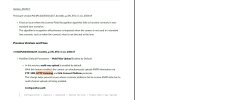
Hikvision UK portal has an option to check for different versions firmwares for the same camera. There, the new version firmware is available which is different from latest version firmware from other portals. Release notes file is Release note TCM403-BI_G camera_5.1.6_250519.pdf. In that pdf, it talks about a previous version. Let me copy paste test
Previous Versions and Fixes
DZP20250402249_itcm40x_g_EN_STD_5.1.6_250417
Modified Default Parameters – Multi-Way Upload Enabled by Default In this version, multi-way upload is enabled by default. With this feature enabled, the camera can simultaneously upload ANPR information via FTP,SDK,HTTP Listening , and Hik-Connect Platform protocols. This change helps prevent issues where customer platforms fail to receive ANPR data due to multi-channel upload not being enabled.
Configuration path: Configuration > Capture > Advanced > System Service > Enable Multi-way Upload
Do you think I should upload this firmware DZP20250402249_itcm40x_g_EN_STD_5.1.6_250417 ? There is a newer firmware listed on the same page - PJ14PC20250516247_itcm40x_g_EN_STD_5.1.6_250519 . Could I safely assume that PJ14PC20250516247_itcm40x_g_EN_STD_5.1.6_250519 (2) will have same features as DZP20250402249_itcm40x_g_EN_STD_5.1.6_250417 along with newer changes? As I mentioned, latest firmware listed in other portals of hikvision has a different name - Firmware__V5.4.4_251216_S3000692059
UK portal link :
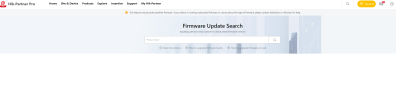
UK portal page screenshot is attached below. Release notes pdf is attached. Screenshot of pdf is attached.
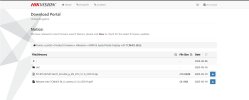
tldr : hikvision.com list the latest firmware version different from hikvision europe. In europe portal, they provide release notes that clearly mention http listening, but that firmware is different than what global website says. Can I flash the firmware hosted by europe website? Will it brick my camera? (I already flashed the camera with firmware downloaded from hikvision.com and it doesnt have the http listening)
Previous Versions and Fixes
DZP20250402249_itcm40x_g_EN_STD_5.1.6_250417
Modified Default Parameters – Multi-Way Upload Enabled by Default In this version, multi-way upload is enabled by default. With this feature enabled, the camera can simultaneously upload ANPR information via FTP,SDK,HTTP Listening , and Hik-Connect Platform protocols. This change helps prevent issues where customer platforms fail to receive ANPR data due to multi-channel upload not being enabled.
Configuration path: Configuration > Capture > Advanced > System Service > Enable Multi-way Upload
Do you think I should upload this firmware DZP20250402249_itcm40x_g_EN_STD_5.1.6_250417 ? There is a newer firmware listed on the same page - PJ14PC20250516247_itcm40x_g_EN_STD_5.1.6_250519 . Could I safely assume that PJ14PC20250516247_itcm40x_g_EN_STD_5.1.6_250519 (2) will have same features as DZP20250402249_itcm40x_g_EN_STD_5.1.6_250417 along with newer changes? As I mentioned, latest firmware listed in other portals of hikvision has a different name - Firmware__V5.4.4_251216_S3000692059
UK portal link :
UK portal page screenshot is attached below. Release notes pdf is attached. Screenshot of pdf is attached.
tldr : hikvision.com list the latest firmware version different from hikvision europe. In europe portal, they provide release notes that clearly mention http listening, but that firmware is different than what global website says. Can I flash the firmware hosted by europe website? Will it brick my camera? (I already flashed the camera with firmware downloaded from hikvision.com and it doesnt have the http listening)
Attachments
Last edited:
trempa92
Getting comfortable
Not downgrading. Hikvision has a different firmware that can be downloaded. I think I wasn't able to communicate well.
Latest firmware. I have given the full link to the page and details of firmware. They have a readme file for releases and the read me file specifically list http listening. I have uploaded the picture with http listening highlighted. Currently I have the latest firmware from hikvision global web site and it doesn't have http listening. My question is, 'Can I upload the firmware for this model, from UK website which has a readme file that lists http listening? Would it brick my camera? Does it have enough intelligence to check the firmware and say 'this can/cant be used for your camera' ? Should I attempt uploading the UK website firmware ?"
Latest firmware. I have given the full link to the page and details of firmware. They have a readme file for releases and the read me file specifically list http listening. I have uploaded the picture with http listening highlighted. Currently I have the latest firmware from hikvision global web site and it doesn't have http listening. My question is, 'Can I upload the firmware for this model, from UK website which has a readme file that lists http listening? Would it brick my camera? Does it have enough intelligence to check the firmware and say 'this can/cant be used for your camera' ? Should I attempt uploading the UK website firmware ?"
Tried upgrading the firmware to the version I found in UK website. It says uploading, but stops after sometime. Says low version. I guess it checks some version data before uploading.
Can anyone please help me by sending a sample http data (data the camera sends to port 80) from postman or netassist which I can use to write my parsing code? I understand that I need to reply ok 200 which my listener automatically does.
Can anyone please help me by sending a sample http data (data the camera sends to port 80) from postman or netassist which I can use to write my parsing code? I understand that I need to reply ok 200 which my listener automatically does.
Am I right in thinking you are struggling to get the camera to send HTTP requests at all?Can anyone please help me by sending a sample http data (data the camera sends to port 80) from postman or netassist which I can use to write my parsing code? I understand that I need to reply ok 200 which my listener automatically does.
In which case, what are you going to do with your parsing code, if you havent got the camera working as you want yet?


trempa92
Getting comfortable
I can only from series 7 :/ doesnt necesarily needs to be same as from this camera
i have few of your model on stock, maybe ill plug in 1 next week and give it a go.
i have few of your model on stock, maybe ill plug in 1 next week and give it a go.
See, the camera is for a customer in another country. I will parse the code, and it should work with a camera that he is about to purchase based on my recommendation. , I will ask him to buy a camera after checking the menu inside, making sure that it has http listener facility. Probably he has to buy a used camera if the seller is refusing to Open the box to show him the menu, or at least show him on a demo piece. We do this for other hardware, which send data to an http listener, though this is the first time we are connecting a camera. Most popular interfaces that work across different hardware are http data (json or XML) or direct socket data on TCP or UDP.
You buy a camera worth 800 USD, and then frantically look for a solution. Does hikvision help? No. They are supposed to be the largest camera seller now. Local seller has any technical knowledge? No. He says contact hikvision for support. When you contact the country distributor helpline, they have no idea what http listening is. They say "we wiLl send you links for SDK". You go to them firmware download page of hikvision europe and download the firmware that comes with readme file which speaks about http listening built in and try to upload the firmware, camera says 'this is lower version'. The only help I got was from guys who posted some helpful messages.
You buy a camera worth 800 USD, and then frantically look for a solution. Does hikvision help? No. They are supposed to be the largest camera seller now. Local seller has any technical knowledge? No. He says contact hikvision for support. When you contact the country distributor helpline, they have no idea what http listening is. They say "we wiLl send you links for SDK". You go to them firmware download page of hikvision europe and download the firmware that comes with readme file which speaks about http listening built in and try to upload the firmware, camera says 'this is lower version'. The only help I got was from guys who posted some helpful messages.
Thank you sir. Any help will be appreciated.I can only from series 7 :/ doesnt necesarily needs to be same as from this camera
i have few of your model on stock, maybe ill plug in 1 next week and give it a go.
trempa92
Getting comfortable
1 thing you can try
Add http listener data via PUT on
/ISAPI/Event/notification/httpHosts
Body
<?xml version="1.0" encoding="UTF-8" ?>
<HttpHostNotificationList version="2.0" xmlns="">
<HttpHostNotification>
<id>1</id>
<url>/acs_events</url>
<protocolType>HTTP</protocolType>
<parameterFormatType>XML</parameterFormatType>
<addressingFormatType>ipaddress</addressingFormatType>
<ipAddress>192.168.2.107</ipAddress>
<portNo>5000</portNo>
<httpAuthenticationMethod>none</httpAuthenticationMethod>
<Extensions xmlns="urn:selfextension siaext-ver10-xsd">
<intervalBetweenEvents>0</intervalBetweenEvents>
</Extensions>
</HttpHostNotification>
</HttpHostNotificationList>
I used this on acs devices, might aswell work on camera.
Add http listener data via PUT on
/ISAPI/Event/notification/httpHosts
Body
<?xml version="1.0" encoding="UTF-8" ?>
<HttpHostNotificationList version="2.0" xmlns="">
<HttpHostNotification>
<id>1</id>
<url>/acs_events</url>
<protocolType>HTTP</protocolType>
<parameterFormatType>XML</parameterFormatType>
<addressingFormatType>ipaddress</addressingFormatType>
<ipAddress>192.168.2.107</ipAddress>
<portNo>5000</portNo>
<httpAuthenticationMethod>none</httpAuthenticationMethod>
<Extensions xmlns="urn:selfextension
siaext-ver10-xsd"><intervalBetweenEvents>0</intervalBetweenEvents>
</Extensions>
</HttpHostNotification>
</HttpHostNotificationList>
I used this on acs devices, might aswell work on camera.
trempa92
Getting comfortable
See i work for ND and know what your are talking about, as i am also a developer of our integrations and softwares we sell along with Hikvision portfolio. There might be some ND's that only sell without any support.See, the camera is for a customer in another country. I will parse the code, and it should work with a camera that he is about to purchase based on my recommendation. , I will ask him to buy a camera after checking the menu inside, making sure that it has http listener facility. Probably he has to buy a used camera if the seller is refusing to Open the box to show him the menu, or at least show him on a demo piece. We do this for other hardware, which send data to an http listener, though this is the first time we are connecting a camera. Most popular interfaces that work across different hardware are http data (json or XML) or direct socket data on TCP or UDP.
You buy a camera worth 800 USD, and then frantically look for a solution. Does hikvision help? No. They are supposed to be the largest camera seller now. Local seller has any technical knowledge? No. He says contact hikvision for support. When you contact the country distributor helpline, they have no idea what http listening is. They say "we wiLl send you links for SDK". You go to them firmware download page of hikvision europe and download the firmware that comes with readme file which speaks about http listening built in and try to upload the firmware, camera says 'this is lower version'. The only help I got was from guys who posted some helpful messages.