
iDS-2CD7A46G0/P-IZHS not record road traffic events to the memory card
- Thread starter tcount
- Start date
You are using an out of date browser. It may not display this or other websites correctly.
You should upgrade or use an alternative browser.
You should upgrade or use an alternative browser.
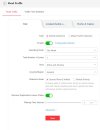
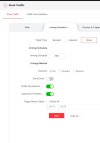
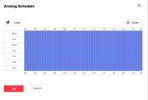
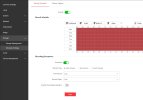

Can we see a picture of your Micro SD page? What does it say about your storage? Have you tested to see if it would even record full time? Just as a fall back to confirm that the Micro SD card isn't the issue?
What does your Logs say about your events? Does it say that there was an event to record?
What does your Logs say about your events? Does it say that there was an event to record?
Micro SD card is good. Tested record full time is good. Events did occurs and LP did take snapshots pictures but video won't record. Thanks.Can we see a picture of your Micro SD page? What does it say about your storage? Have you tested to see if it would even record full time? Just as a fall back to confirm that the Micro SD card isn't the issue?
What does your Logs say about your events? Does it say that there was an event to record?
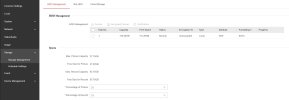
Might want to look at your Manual then. Sounds like the camera is doing what it was designed to do. Take snapshots of Plates and give that data in picture format, Most times cameras are in a format that a video could be unusable and taking a picture of the plate for storage is expected.
Now looking at your picture above the answer is in the answer I see as well. I was about to look up the manual when I looked over your pictures again seeing I had to go up looking for camera name.. Anyway picture 1 top left under the type of recordings it says it will record Snapshots of the plates the way you have it setup..
Now looking at your picture above the answer is in the answer I see as well. I was about to look up the manual when I looked over your pictures again seeing I had to go up looking for camera name.. Anyway picture 1 top left under the type of recordings it says it will record Snapshots of the plates the way you have it setup..
Attachments
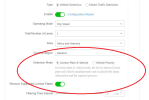

I changed that setting to Vehicle Priority and camera still not record video with event. I thought LPR camera can always take pictures and record video simultaneously to SD card. There is not much instruction in the manual with these settingMight want to look at your Manual then. Sounds like the camera is doing what it was designed to do. Take snapshots of Plates and give that data in picture format, Most times cameras are in a format that a video could be unusable and taking a picture of the plate for storage is expected.
Now looking at your picture above the answer is in the answer I see as well. I was about to look up the manual when I looked over your pictures again seeing I had to go up looking for camera name.. Anyway picture 1 top left under the type of recordings it says it will record Snapshots of the plates the way you have it setup..
 . Thanks.
PapaPhred
n3wb
Was this ever resolved?
Just got a new iDS 2CD7A46GO/P-IZHSY and with initial setup, I am getting the same issue. Many 9too many) snapshots of tags, grills, numbers printed on the side of trucks etc., but no videos being recordedYes, I realize this is close to a year old, but I'm hoping ;-)
Just got a new iDS 2CD7A46GO/P-IZHSY and with initial setup, I am getting the same issue. Many 9too many) snapshots of tags, grills, numbers printed on the side of trucks etc., but no videos being recordedYes, I realize this is close to a year old, but I'm hoping ;-)

trempa92
Getting comfortable
I never had an issue with my cameras, they all store videos of vehicle passages. As i use API to retrieve it i can generally get everytime a video with starttime and enddtime to match event time.
PapaPhred
n3wb
Thanks for answering and sorry to wake up an old thread like thisI never had an issue with my cameras, they all store videos of vehicle passages. As i use API to retrieve it i can generally get everytime a video with starttime and enddtime to match event time.
I believe I have come to understand this. First the large number of snapshots came from the VCA Road Traffic setting for "Filtering Time Interval" that defaulted to 1 min. This was allowing vehicles to be "re-detected" several times as it passed through the ROI. Set this to 5min and I get just the 2 shots of the vehicle and the tag cropped.
These are the designed action of the embedded VCA functions which does not record video. My reading says this is normal and that having a second "overview" camera to record video is the accepted method of getting video as the ALPR is typically zoomed in to capture the vehicle and tag as it passes through the detection box defined by the "Road Traffic" rule.
I have not tried yet, but to get the ALPR to record video too, I would either need to setup continuous recording or use one of the normal event triggers (motion etc. ) or an alarm input to trigger video. Using a second "Overview" camera lets the ALPR be focused on its intended job and provides a better more complete video of the vehicle passing.
At least that's how I understand it
Many thanks!!