- May 18, 2017
- 60
- 13
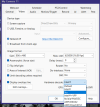
Tonight I looked at the BI5 system status and noted that the Intel GPU (i3-3470 has QuickShare) was not being utilized at all, on any of my 10 cameras. So after reading the BI help about video settings I selected one camera, went to its video settings, at the bottom right corner selected Intel and GPU "2". The camera video came back with a highly pixelated screen, then crashed and closed completely. The last BI5 update was about a month ago, can't tell which version at the moment. I tried re-opening BI several times but it only comes up briefly then closes again. I cannot get to the specific camera to change it back. I guess the trial was a mistake.
I have Windows 10, BI 5, have not rebooted the PC yet, thought I'd inquire with y'all first. Last resort would be to reinstall BI5 I suppose but I'll likely have to re-do all of my camera settings.
Any suggestions?
Thank you,
Ron
I have Windows 10, BI 5, have not rebooted the PC yet, thought I'd inquire with y'all first. Last resort would be to reinstall BI5 I suppose but I'll likely have to re-do all of my camera settings.
Any suggestions?
Thank you,
Ron