
How To Revert to previous versions on blue Iris
- Thread starter chewie
- Start date

You are using an out of date browser. It may not display this or other websites correctly.
You should upgrade or use an alternative browser.
You should upgrade or use an alternative browser.

SouthernYankee
IPCT Contributor


IAmATeaf
Known around here
Aronder
Young grasshopper

Aronder
Young grasshopper
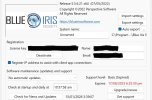

Thanks. I did the rollback and now the watermark is gone.
It's set to no automatic updates - should I set to no update prompts?
In About Blue Iris in Support Level it shows Expired and a date in red - what is that about?
If you are not going to pay for maintenance, then yes set it to no update prompts
The date in red is the day your maintenance expired. You can update to any version up to that date. Anything after will watermark.

looney2ns
IPCT Contributor
I just did a complete reinstall of v5 since v6 hosed up my setup. Make sure you have the license key handy before doing this. What I did was to do Export settings from the About tab of the Blue Iris Settings page. Then I closed BI and stopped the Service. Then I did an uninstall of v6 from Windows Add or Remove Programs. Then I deleted /Software/Perspective Software from both HKLM and HKCU sections of the registry, Then I deleted all Blue Iris folders under c:\Program Files. DO NOT DELETE your clips! Then I installed the FULL VERSION of BI 5 which I got from Blue Iris support and upgraded to the most recent STABLE version (ends in .73). It asked for License Key, which I entered. Then I did Imported settings on the About tab of the Blue Iris Settings page. That restored all my settings, including cameras and web server. Then I did a Delete/Regenerate of the Database to get all my clips back. Now I am waiting to see if my issue is resolved.