How to remotely reset the no signal counter with the app or UI3

dsego

n3wb
Oct 7, 2015
12
1
Does anyone have information on how to reset the "no signal" counter back to zero using either the app (Android) or browser (UI3)? I can do it through the Blue Iris management console, but I am not always at home to do it. It's much nicer to start from zero instead of trying to remember where the counter is, currently on version 6.0.1.13.
Thanks in advance.
 
Perhaps you could clarify what you are referring to as the "no signal" counter, is the counter you are looking at in the BI log or in the BI Status Camera tab or something else entirely?
 
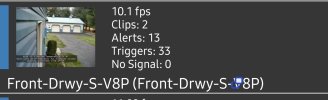
Screenshot_20260114_172001.jpgThe No Signal at the bottom. It shows how many times BI has lost signal from the camera. I rarely have a problem but it's a good indicator something happening.
 
If that counter is the same as the one in the BI log then there is a way to have it reset daily by changing the log file to restart each day, in the BI app open the status window, go to the log tab and change the log file name to be this "%Y%m%d.txt", a new log file will be created each day instead of each month which is the default, not sure if this is where that counter is getting its info from or not!
 
If that counter is the same as the one in the BI log then there is a way to have it reset daily by changing the log file to restart each day, in the BI app open the status window, go to the log tab and change the log file name to be this "%Y%m%d.txt", a new log file will be created each day instead of each month which is the default, not sure if this is where that counter is getting its info from or not!
Thanks, I will check into that.
 
I checked on my 3 systems and only one of them has any cameras with a no signal count, the same number is shown in the BI log as shows up in the camera list etc., so I quite confident that starting a new log file each day will effectively reset the no signal counter for each camera! I suspect that clearing the log file will also do that, but you would have to save the log file to avoid any loss of information before clearing it!

Edit, the no signal counter can also be reset from the "Camera" tab of the BI status window with out having to clear the actual log file, but that does not help if you want to do that remotely!
 
On a side note, the system that I was looking at had some very high loss of signal for a couple of cameras (643 & 401 for 1 day!) so I started to look at the camera config to try and find what the problem was. It did not take me long to notice that on the "Watchdog" tab, the option "Interpret monochrome video as a loss of signal" was selected, so I deselected it since the camera is configured to stay in colour mode all night, and there is no ambient light around when the nearest source of light is 1/2 mile away through the bush so the image is essentially black all night if it is cloudy!
 
  • Like
Reactions: looney2ns