How to block my IP cameras from the internet and my local network?

I have 2 LANs; one for cameras, one for local network. My challenge was getting the cameras to the right time. I built a Network Time Protocol (NTP) server from an Arduino Nano and a GPS module. (I see now you can do the same with an ESP device and Tasmota)

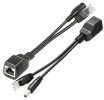
I have the poor man's version of POE, an adapter that injects the power that comes from the supplied power supply and at the other end extracts the power. Non-standard, won't do gigabit.

Think about this, the processing power of these cameras is nearly that of a PC. With the right software, they can do pretty much anything. I am concerned about "ET Phone home" Or Google who is currently being nice and asking you if they can usurp your network.

(Now all I have to do is fix my computer whose power supply failed yesterday.)
 
As an Amazon Associate IPCamTalk earns from qualifying purchases.
I have the poor man's version of POE, an adapter that injects the power that comes from the supplied power supply and at the other end extracts the power. Non-standard, won't do gigabit.
Just to clarify, if you're using a "supplied power supply", such as a 12VDC wall wart, aren't you instead using a passive POE injector and splitter?

Otherwise, your "supplied power supply" must be a POE switch or POE injector to work with the active POE splitter you linked....which has a 5VDC output, BTW.

Passive=POE-splitter-pair.jpg
 
As an Amazon Associate IPCamTalk earns from qualifying purchases.
Just to clarify, if you're using a "supplied power supply", such as a 12VDC wall wart, aren't you instead using a passive POE injector and splitter?

Otherwise, your "supplied power supply" must be a POE switch or POE injector to work with the active POE splitter you linked....which has a 5VDC output, BTW.

View attachment 235413
I think the answer is to your question is "yes". I have taken the power supply that comes with the camera (the 12VDC supplied power supply) and "inject" it into the ethernet cable. The 10/100 transmit/receive lines (1 [TX+], 2 [TX-], 3 [RX+] & 6 [RX-]) are the signal lines; the unused lines (4, 5, 7 & 8) are used as, in my case, +12VDC, +12VDC, GND, GND respectively. Thus the splitter breaks the lines out, but only has 4 wires on the male RJ45 connector. My cable runs are about 20m. I don't know how much IR loss I have, but not enough to cause a problem.

My switch is a standard switch. The injector (on the left) has its male RJ45 plugged into the switch and the power supply for the camera is plugged into the jack. A cat 5 cable is plugged into the female RJ45 on either end. The splitter (on the right) has its male RJ45 plugged into the camera and its plug is plugged into the camera power jack.

This implementation of POE was one of the first to be used and still shows up in the AF standard

Again, it only runs at 10/100 because the lines needed for gigabit are being used for power. If one requires gigabit speeds, the a gigabit POE switch is the way to go.

If one does not fully understand the ramifications of this method, I wouldn't recommend using it. Instead, find a PoE switch that matches the camera.

POE switches use one of the standards and the device on the other end has to be using the same standard.
 
As an Amazon Associate IPCamTalk earns from qualifying purchases.
  • Like
Reactions: TonyR
I have used the method and store-bought injector/splitter pairs many times to provide passive POE @ 12VDC to non-POE cameras. :cool:
 
because if you don't want them to network to the internet there are several ways from sub netting, the cameras to 255.255.255.128 and change the dhcp gateway (router address ), an ip address 192.168.1.129-192.168.1.254 to deny traffic to and from WAN in the router settings.
i did this today to isolate the 6 2.4G ip cameras all on wifi in various places in the yard. making the mask 255.255.255.128 works like a charm. one 'standby' computer has a static 2.4 wifi configuration matching this & is able to access all 6 with no problem & is unable to access the WWW. piece of pie w/ no extra hardware. BI sees all of them. thanks.
 
If you set the gateway address to an unassigned IP, it can't contact the outside internet. All traffic to the outside internet has to go through the gateway, which is usually the address of the router that is connected to the internet. The camera does require that the gateway subnet be the same as the camera's subnet. I set aside .254 for the gateway addresses, e.g. xxx.xxx.xxx.254. I realize the cameras could possibly search out the gateway address. I've fseen no indication that they attempt to do this.
 
If you set the gateway address to an unassigned IP, it can't contact the outside internet. All traffic to the outside internet has to go through the gateway, which is usually the address of the router that is connected to the internet. The camera does require that the gateway subnet be the same as the camera's subnet. I set aside .254 for the gateway addresses, e.g. xxx.xxx.xxx.254. I realize the cameras could possibly search out the gateway address. I've fseen no indication that they attempt to do this.
'hacking' ip addresses/masks is new to me. done LANs for a long time, but simple ones up to 100 or so users max in an office park (token ring). but with the WWW we do ethernet & WiFi mostly. anyway tech_junkie indicated that if the mask was the same as the gateway mask, they could or might eventually find it. so these are NOT the same with the .128 & since there are plenty of computers here, this is something to play with and learn about. the tplink gateway might just be able to do ip blocking, which sounds good also.

thx for the hints.
 
just wanted to add that for over a month now the WiFi PtZ ip cameras mounted outdoors have been using the 255.255.255.128 mask and function just fine with Blue Iris 6.0 software.

if the cameras need to be accessed, one computer has a wifi configuration with this mask & only sees these devices on the lan. the APs see all devices, even these.

so you don't need to do a hardware setup to isolate your network. as tech_junkie suggested these devices will NEVER see the gateway.
 
  • Like
Reactions: bigredfish
just wanted to add that for over a month now the WiFi PtZ ip cameras mounted outdoors have been using the 255.255.255.128 mask and function just fine with Blue Iris 6.0 software.

if the cameras need to be accessed, one computer has a wifi configuration with this mask & only sees these devices on the lan. the APs see all devices, even these.

so you don't need to do a hardware setup to isolate your network. as tech_junkie suggested these devices will NEVER see the gateway.
My brief stint working in network security made me paranoid, but that means "unfounded fears" ... my fears were quite founded. I just wrote and deleted a whole host of fears and decided to spare others from thinking about them, because, bottom line, you do what you can do and hope for the best. There is no perfect solution.
 
just wanted to add that for over a month now the WiFi PtZ ip cameras mounted outdoors have been using the 255.255.255.128 mask and function just fine with Blue Iris 6.0 software.

if the cameras need to be accessed, one computer has a wifi configuration with this mask & only sees these devices on the lan. the APs see all devices, even these.

so you don't need to do a hardware setup to isolate your network. as tech_junkie suggested these devices will NEVER see the gateway.

Except, people here have posted with results from sniffing software that some cameras have a gateway hardcoded in and will still try to access in internet via the common 192.168.1.1 regardless of what IP address the person put in for the camera and gateway.

Take away - do not make your router IP the common 192.168.1.1 address.
 
Last edited:
Except, people here have posted with results from sniffing software that some cameras have a gateway hardcoded in and will still try to access in internet via the common 192.168.1.1 regardless of what IP address the person put in for the camera and gateway.

Take away - do not make your router IP the common 192.168.1.1 address.
Or 192.168.0.1 - that is another extremely common default residential grade router address. I would suspect a device is programmed to try 192.168.1.1, it is probably hardcoded to try 0.1 as well.

It's also a good practice to not use these common residential IP address ranges if you plan on using a self hosted VPN to "remote" into your network. VPN connections won't work correctly if the remote network and the home's local network use the same network subnet. So if you use a common residential network subnet, there is a pretty high chance your VPN connection won't work at other residential locations (because they also use the default router setup).
 
Except, people here have posted with results from sniffing software that some cameras have a gateway hardcoded in and will still try to access in internet via the common 192.168.1.1 regardless of what IP address the person put in for the camera and gateway.

Take away - do not make your router IP the common 192.168.1.1 address.
thanks much for this. today this happened. no more .1 for the gateway.