Hikvision poe switch

Jan 13, 2025
21
0
rome
Hello guys
I'm designing a video surveillance system that use POE connection to simplify the cabling.
THe camera and the nvr will be connected to the same poe switch.
That switch also have to be connected to a router and to some access point to provide WiFi connection.
My question is about the switch to use. I've seen that hikvision has some switches for video surveillance, but I'm not sure if this is better to have a different switch that maybe support also vlan to better segregate the video surveillance traffic from all the other.
My idea is to don't use on hikvision the could feature but using a VPN to remotely access the system over a public IP.
So from security perspective using a VPN for accessing the nvr or camera should provide a first security layer.
Not sure if make sense use a powerful switches than hikvision provide.
Also maybe using a different switch than hikvision is a better choice from pricing perspective

Let me know your feedback on that

Thanks
Regards
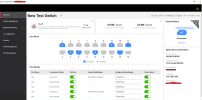
 
I would say the main selling point for using a Hikvision POE switch is for the higher POE power pool and the extend mode. For the extend mode there is a switch where if you turn it on, the max distance goes up to 820 feet depending on the cable quality and environment. Note that the throughput decreases to 10 mbps when this mode is on. If you don't really have that long of a cable run then just keep the feature off. You will be able to go up to 300 feet depending on cable quality and environmental interference. These switches more often will have a higher POE power pool and a higher temperature rating as people would put them in attics or NEMA boxes. They have many different models available. Some are only 10/100 with gigabit uplinks. Others are all gigabit. Some have high POE ports. Some managed and others unmanaged. Some have cloud access so you can use the app/client software to check on ports. There are features like POE watchdog which senses if the camera is running abnormally and would automatically reboot the port. It all depends on what you want to do with the switch. Your cameras aren't really going to need anything past 100mbps as I would say 85-90% of the cameras only have 10/100 ports and capabilities. This is listed in the camera's spec sheet. There are a few DeepInView cameras that have gigabit ports though but I doubt there is enough thoughput to fully saturate the port. But even on the most basic Hikvision switch, each POE port is able to output 30 watts... only limitation is the POE power pool itself.

Here is an example of what the cloud interface looks like...
1778685783572.png
 
Hello lewic,
in my case the the highest distance i've should be 100mt, they should be 380 feet if i'm not wrong. and probably i'm close to the POE limit, so to be sure i think i need to have a switch that support the POE+ to be sure to be able to power the camera
i'm also not sure about the cloud maneagebnility. my idea is to put all behind a VPN so it make no sense then managing trought the cloud i think.
and what about the use of vlan to segragate the traffic coming from camera/NVR and the traffic from the access point? it make sense for you or it is a fake problem?

thanks
regards
 
So cat cabling can reliably do 100 meters/328 feet depending on cable (CCA vs OFC), the quality of the terminations (RJ45 connectors) and if there are any environmental interference (running network cable in the wrong direction next to AC lines/shielding). This is the first thing. If going past this distance then can either turn on the extend mode (which most people would do) or put another switch/repeater to "boost" signal and send it up to another 100 meters. POE is just powering up your camera. So POE is up to 15 watts. POE+ is up to 30 watts. POE++ is 60 watts or high POE. These POE port I seen on some Hikvision switches are up to 90 watts. I would say the managed and cloud is something I don't really use on the switch so for me I would not pay the premium for it. I would say most people using the switch for camera traffic wouldn't touch the settings. It's only if you have mixed camera and computer traffic would this come in handy as you are able to set features like QOS, VLAN and link aggregation. VLAN is handy to separate the traffic between camera / computer data. This helps for security purposes and when the data gets saturated then it would slow down the network as a whole. Note that on some switches.... I don't remember seeing it on the Hikvision units but they are on some switches like from Uniview there is a physical switch to go from standard/extend/VLAN mode. On those the VLAN makes it so the ports on the switch is "invisible" to each other.
 
the cabling i will do should be far away from other electrical sources and this is also why i need to have POE. it is not too easy cable also power cable
and last but not least i would like to put the NVR, the switch and the router on a UPS to be sure that even in case of power loss all will work fine.
putting other switch in the meadle will complicate the power management and would be only for one camera at the moment (only one will be 100 meter far away. all the others will be 30 meter max)
i have to check the camera power consumption to see if POE+ is good. if yes i could use the POE+ or a repeater to manage that distance; maybe the repeater would be useful also to split the cable since 100mt are not so easy to cabling with only one cable and serveral turning

as you, i probably won't pay for cloud management unless it is mandatory to have feature like vlan management
if hikvision doesn't have vlan managementi i've probably to see other vendor.

from TP-Link i found this model that seems don't support vlan. it is not the first switch i see mentioned for mixed used (video surveillance and not) that don't have vlan support

thanks
 
The cloud management on the Hikvision switch is not a subscription so there is no charge. It is basically like a way to redirect and log into it for changing setting and looking at the status. Just like how your NVR and cameras would use Hik-Connect. Same concept.
POE+ should be enough for most cameras except for large PTZ's. Most cameras are only using about max 10 watts which this max is only at night when the white light or IR is on. If lighting is not on then I have seen it around 3.5 watts.

For switches... if you want VLAN then you would definitely need to have a managed switch. Anything unmanaged won't have that. Most of the time I just see people set up the VLAN from their router and not from the switch.
 
I'm not sure how to configure vlan on the router, I need to have a look at
I'm not convinced about the cloud management. Ok for the switched probably since only metadata and log are sent online
But for the camera video are sent. So I prefer to keep it off using a VPN to access the system

Anyway, probably having an hikvision switch or other vendor makes no difference for my use. It will be only from pricing perspective
 
i'm doing some research and...
for most of the hikvision switch as you said they are 10/100 Mb fast eth having enought bandwith probably for the camera. then they have one GbE port as uplink that will be good for me to connecto to the CPE router
but then all the other systems like the access point, computers and the CPE itself will be capped to the 100 Mb managed by the switch
maybe the switch DS-3E0518P-E (B) could be good for the POE ports and GbE connectivity without vlan support

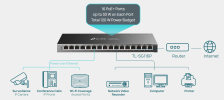
i had a look also at the TP-link model TL-SG116P which have 16 GbE POE ports, supporting the extended POE and the attached architecture is preatty similar to what i would like to implement

1778749248906.png
it doesn't support VLAN, looking at other models like the SG2016P it supports vlan but less POE ports. to have 16 POE ports higher models are needed like SG2428LP
honestly i don't know if it make sense going to higer model.

if you have any feedback to share on this model i will appreciate

thanks
 
Last edited:
If you would be using this switch for all network traffic then I would recommend that you pick up a switch that is at least gigabit for all the ports and not just the uplink. In order for you to have some sort of VLAN function to segregate networks then this switch would be managed. Other option would be to have VLAN done on the router side. If so then you would not need to do the VLAN on the switch itself which in turn lowers the cost as a managed switch would not be necessary. Let me fully understand the topology of your network.

Modem/Router -> POE Switch -> NVR/Cameras, Access Point, Computer Traffic

If this is correct then definitely have gigabit on all ports. You don't want the access point (CPE), NVR and all computers to be limited to 100 mbps max. The TP-Link you listed is not a true 16 port. Technically you only have 15 ports as you are utilizing one port as an uplink. As you don't have an uplink port then the throughput overall for getting data from the port used for connecting to the router may be limited. It all depends on how many devices you have overall on your network. For a basic setup then this should be good. For more of a "power user" then it will prove lacking.
 
Hello lewic,
you have to consider that this installtion will be in the same farm as the videosurveillance system.
so non video surveillance traffic (computer/access point, other) will be very limited in use as now

the network topology is as you descrived with the detail that the router will be a 4G/5G router because of the absed of cabled network provider
4G/5G Router -> POE Switch -> NVR/Cameras, Access Point, Computer Traffic

on the TP-Link i mentioned as i see all ports are 1 GbE, so yes, connecting one uplink to the router the overall port to be dedicated to the cameras, pc and accesso point will be 15. but the capacibility should be however 1 Gb on all ports
if i missed some point let me know and maybe some alternative switch to consider

thanks again :)
 
Are you able to log into the 4G/5G router to see any settings? Any settings on there that happen to be for VLAN? If so then you could just do VLAN on the router itself. The TP-Link will/should work for your usage. I just like to find switches with dedicated uplink ports due to bandwidth allocation purposes.
 
Actually I'm designing all the solution, so I don't have any system in place right now. I'll check on the router's spec to see if there is vlan support
But in any case will makes no difference on the switch choice
I could use the TP-Link I mentioned and then if the router supports clan add this extra layer to better segregate the different systems connected

Thanks again