Hikvision NVR separate motion detection and motion alert

Macpita

n3wb
Nov 4, 2025
3
1
Germany
Hey together,

i have the following NVR in use with about 40 cams:
iDS-9664NXI-M8/X

I have configured record on motion. It works, but i also want to send email alerts on motion (email is working too), but just off hours. Lets say it should record on motion 0-24 hours, but only send E-Mail alerts during 6pm and 4am.
Does anyone know how to achieve this, or is there any workaround i can do?
On NVR i can just set recording and alerting for both at the same time. I cannot seperate it.

One way i was thinking about is to record continously and set motion detection just for mail alerts. But this will need a huge amount of disk space...


Thank you very much
 
Perhaps another useful nugget for someone.

Howdy @Macpita

I don't send emails from my NVR so I can't test this... it doesn't sound right to me, but according to this very old thread, if you adjust the "Arming Schedule" for the hours you want email, event recording will still take place 24/7... if you haven't already, try adjusting the schedule and see what happens...

HikVision NVR email alerts -- only after hours


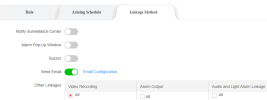
Maybe "Other Linkages" don't follow the "Arming Schedule"?

Screenshot 2025-11-04 115233.png
 
Hey johnfitz,

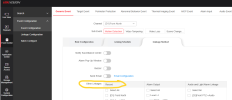
tried this already, does not work for me. In my case, either both is working - or not with the following settings:
1762328489045.png
1762328524912.png


Looks like there is no other way. I need to configure other perimeter protection like linecrossing for alert or recording.
 
  • Like
Reactions: johnfitz
I need to configure other perimeter protection like linecrossing for alert or recording.

That's a great idea/solution!... use motion detection 24/7 to record with no email notification and configure intrusion detection for off hours with email notification.
 
Hey together,

i came over a different solution which is kind of quick and dirty but seems like working as i wanted.
Sadly... after the whole research i found a similar thread in this forum :lmao::facepalm:

The solution: Scripting with ISAPI interface

With a bit research i figgured out that it is possible to send scripting commands to ISAPI interface by GET / PUT methods using curl.
For example with the following command you can get the current notification status by every channel:
Code:
GET http://192.168.XXX.XXX/ISAPI/Event/triggers/VMD-3/notifications

Result looks like this:
XML:
<?xml version="1.0" encoding="UTF-8" ?>
<EventTriggerNotificationList >
    <EventTriggerNotification>
        <id>record-3</id>
        <notificationMethod>record</notificationMethod>
        <dynVideoInputID>3</dynVideoInputID>
    </EventTriggerNotification>
    <EventTriggerNotification>
        <id>email</id>
        <notificationMethod>email</notificationMethod>
    </EventTriggerNotification>
</EventTriggerNotificationList>

Just removing the <EventTriggerNotification> Tag with <id>email</id> it just do what i want.

So for removing mail alert its like that
Code:
PUT http://192.168.XXX.XXX/ISAPI/Event/triggers/VMD-3/notifications
with the following body:
XML:
<?xml version="1.0" encoding="UTF-8" ?>
<EventTriggerNotificationList >
    <EventTriggerNotification>
        <id>record-3</id>
        <notificationMethod>record</notificationMethod>
        <dynVideoInputID>3</dynVideoInputID>
    </EventTriggerNotification>
</EventTriggerNotificationList>

This way i wrote a short batch file on a windows machine, which gets executed automatically and enables email notification for specific time period and disable it.

Tested and it works.
I think i will try it that way :)

Hope that i can help maybe some other people with that.