Hi all,
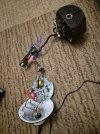
I have a Hikvision PTZ camera (model DS-2DE4425IW-DE) and I want to connect an Ethernet cable directly to the internal board, bypassing the original rotating pigtail/cable assembly. The reason is that the camera’s rotation mechanism was physically damaged, so the original cable path is no longer usable.
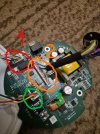
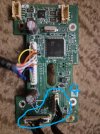
I’ve opened the camera and can see the internal boards and connectors, but I’m not sure which pins or wires correspond to the Ethernet data lines and PoE power.
I’ve attached detailed photos of the boards and wiring.
Can anyone provide a pinout, wiring diagram, or advice on how to safely connect the Ethernet cable directly to the board?
I want to connect 1 to 4, in the attached image.
Any help or experience with this model would be greatly appreciated!
Thank you!
I have a Hikvision PTZ camera (model DS-2DE4425IW-DE) and I want to connect an Ethernet cable directly to the internal board, bypassing the original rotating pigtail/cable assembly. The reason is that the camera’s rotation mechanism was physically damaged, so the original cable path is no longer usable.
I’ve opened the camera and can see the internal boards and connectors, but I’m not sure which pins or wires correspond to the Ethernet data lines and PoE power.
I’ve attached detailed photos of the boards and wiring.
Can anyone provide a pinout, wiring diagram, or advice on how to safely connect the Ethernet cable directly to the board?
I want to connect 1 to 4, in the attached image.
Any help or experience with this model would be greatly appreciated!
Thank you!