Help with UI3 and Tailscale

CCTVnewbie810

Getting the hang of it
Sep 30, 2025
119
43
USA
I have switched to TailScale from OpenVPN due to ATT fiber issues.
Do I need to change my LAN settings so that it accesses via the TailScale IP not the LAN IP?

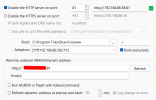
For some reason, since switching to Tailscale, I have to use the Local BI IP (192.168.1.239:81) to access UI3 when at home on the network and then when I am gone, connected to Tailscale, I have to use the UI3 link with tailscale IP (100.XXX.XX.42:81). Quite annoying...
1779397692629.png
 
For some reason, since switching to Tailscale, I have to use the Local BI IP (192.168.1.239:81) to access UI3 when at home on the network and then when I am gone, connected to Tailscale, I have to use the UI3 link with tailscale IP (100.XXX.XX.42:81). Quite annoying...
I've been using tailscale for awhile now and do not have to use a tailscale IP to access my home network. I have VPN on demand setup on my iPhone and can just use a local IP to access anything on my network regardless of my location.
 
I've been using tailscale for awhile now and do not have to use a tailscale IP to access my home network. I have VPN on demand setup on my iPhone and can just use a local IP to access anything on my network regardless of my location.
Weird I have the same setup on my iPhone and must use the tailscale IP when I am not home on the network. Then when I am home I cannot use the tailscale, only the local IP
 
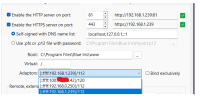
For 99.99% of users the "Bind exclusively" checkbox is just asking for issues since that prevents Blue Iris from accepting connections on all network interfaces. Leave it unchecked.

There's nothing that needs to change in Blue Iris to support Tailscale or any other VPN.

Tailscale IP addresses will only work from other devices that are also connected to Tailscale.

It is a bit of an advanced topic, but you can set up a "subnet route" in Tailscale that allows you to continue using the "LAN" IP address to connect to Blue Iris both when at home and when remote and connected via tailscale. Subnet routers · Tailscale Docs I would not recommend doing this unless your LAN IP address range is unique, because if it overlaps with hotel wifi or something, you may not have a good time.
 
There's nothing that needs to change in Blue Iris to support Tailscale or any other VPN.
If I leave BI's IP address (192.168.1.xxx) in BI's webserver fields, and try to connect from outside with Tailscale running, and use TS's IP to connect to UI3, that works fine in or out, but alerts in Pushover show the alert, the thumb, but If I select UI3 or Hi Res in Pushover it tries to connect to the same 192.168.1.xxx address but will not then show the clip or jpg... won't connect. If I use TS's IP in the webserver, it does.
 
Honestly, think I am just going to leave Tailscale connected on phone or just connect when needed. I don't think I can achieve using the same IP when on the LAN and when connected like I use to be able to with OpenVPN since Tailscale doesn't work the same way.