

Help setting up my dahua cameras for IVS recording to SD-Card

ur63

n3wb
May 28, 2024
22
1
Europe
Hello,
I hope it is ok to post here, asking for some support by the forum?

I am having a bit of difficulty to set up my Dahua/Empiretech cam's (IPC-T5442TM-AS, IPC-HDW5442TM-AS), in order to record IVS events properly.

Current status:
  • Cameras equipped with SD-Cards.
  • No NVR or other external recoding yet.
  • Smart Plan set up (IVS selected)
  • IVS set up (intrusion zone defined, etc - see picture attached)
  • Events are being recognized and are being captured - BUT only for less than 20sec. approx.

Expectation:
- Recording as long as event is valid (meaning, if I stay in intrusion zone for 1 minute, recoding should be of same length. If I stay in intrusion zone for 2hrs, recording should be two hours)

Is my expectation achievable at all? If so, how to / what to change in settings?

Any advise is welcome.

Apologies for my poor english.

Cheers from Germany
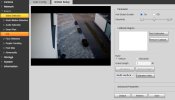


IVS Setup2.JPG

IVS Setup1.JPG
 
Last edited:
It will only record up to 300 seconds (5minutes) but will be less if no movement.

You would need to record continuously and that is not advised with just SD card as it will end up causing all kinds of issues.
 
  • Like
Reactions: ur63
Hello,
I hope it is ok to post here, asking for some support by the forum?

I am having a bit of difficulty to set up my Dahua/Empiretech cam's (IPC-T5442TM-AS, IPC-HDW5442TM-AS), in order to record IVS events properly.

Current status:
  • Cameras equipped with SD-Cards.
  • No NVR or other external recoding yet.
  • Smart Plan set up (IVS selected)
  • IVS set up (intrusion zone defined, etc - see picture attached)
  • Events are being recognized and are being captured - BUT only for less than 20sec. approx.

Expectation:
- Recording as long as event is valid (meaning, if I stay in intrusion zone for 1 minute, recoding should be of same length. If I stay in intrusion zone for 2hrs, recording should be two hours)

Is my expectation achievable at all? If so, how to / what to change in settings?

Any advise is welcome.

Apologies for my poor english.

Cheers from Germany
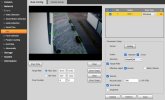


View attachment 235211

View attachment 235210
Buy a Recorder. Even a cheap one with Poe.
 
@wittaj and @Chokolinho - Thanks for the fast responses.

The limitation on recording to SD-Card is arbitrarily chosen by Dahua, or is there any technical explanation? From marekting perspective I can understand, though...

Will be glad to consider any additional advises or hints.
 
Last edited:
It will only record up to 300 seconds (5minutes) but will be less if no movement.
Setting IVS "Record Delay" to 300sec. does now always do a 300sec. recording of the event, even though the "real" event is much shorter.
Any idea what I have set up incorrectly?
Desired behavior still like in post 1 described.
 
What you want isnt possible.

The IVS rule trips one time. It doesnt matter if you sit in the intrusion zone for a week, it only saw one activation unless you move around enough to activate another "cross" or "appear" action

It isnt as smart of AI as you may think. It doesnt store that initial activation target in some database and say, "oh look the guy with the pink shoes and red shirt is still there"
Its rather dumb as far as AI goes.
It matches a profile of what a human should look like, activates on "cross" or "appears" and forgets everything a second later

You need an NVR and you need to record full time as well as on IVS Intelligent rules.
 
Last edited:
  • Like
Reactions: looney2ns
@bigredfish thanks for further explanation!

Just to be 110% sure I understood correctly:
The cam's are NOT capable of recording an IVS event only as long as present. In other words, an IVS event gets triggered and then recording takes place until the set "Record Delay" time elapses?

If so, this would be in contradiction to what @wittaj explained.
 
Sorry if I come across as stubborn or not really comprehending what I am told, but "It will only record up to 300 seconds (5minutes) but will be less if no movement." tells me something different.

Imagine, I am walking into the intrusion zone, walk around and go out. All within say 20sec. It still records 300sec. for no reason, from my perspective.
Probably my english is not good enough!
 
Sorry if I come across as stubborn or not really comprehending what I am told, but "It will only record up to 300 seconds (5minutes) but will be less if no movement." tells me something different.

Imagine, I am walking into the intrusion zone, walk around and go out. All within say 20sec. It still records 300sec. for no reason, from my perspective.
Probably my english is not good enough!
I would just record 24/7 and then check during an event.
 
  • Like
Reactions: Flintstone61
Sorry if I come across as stubborn or not really comprehending what I am told, but "It will only record up to 300 seconds (5minutes) but will be less if no movement." tells me something different.

Imagine, I am walking into the intrusion zone, walk around and go out. All within say 20sec. It still records 300sec. for no reason, from my perspective.
Probably my english is not good enough!

300 seconds is the max time allowed on the post event recording.
If you set that to 20 seconds it will record for 20 seconds. If you set it to 60 seconds it will record for 60 seconds after the initial trigger of the event.

In this example, the Tripwire at the edge of the steps is set to 20 second post recording. (ignore the Intrusion box as its not set for animals so it ignores the cat)
The cat trips it at 3:37:33
The Event (IVS) recording lasts exactly 20 seconds and is shown on the timeline.

The AI in a $160 camera can't anticipate, remember, or guess as to what will happen after or before that.

Thats the best I can do.
You have unrealistic expectations


View attachment Recording 2025-12-30 103718.mp4
 
  • Like
Reactions: Chokolinho
Happy new year to all.

@bigredfish thanks for your efforts, example and explanation!

All understood, but your example is based on Tripwire as trigger and not intrusion zone.
A tripwire is a simple "one time trigger", when passed by the object. This, of course, triggers the recoding routine and that's it. All it can do, is record the set "post-trigger time", called Record Delay.

What I am after, is the IVS Intrusion Zone Setup, which could be handled differently as the cam is capable of tracking a valid object (eg. Human) as long as in the view of the cam. Based on that, I thought the software would be smart enough to record based on that. Meaning: The object gets into the picture, the object moves into the defined intrusion zone, the object remains n seconds in the intrusion zone and walks out of the defined intrusion zone. As a result, I would have expected that the cam starts recording, when the valid object triggers the event (object moves into intrusion zone) and stops recording after n + X seconds (object is n seconds in intrusion Zone + X = set value of "Record Delay").
No magic, no AI, no nothing from my perspective.

Even less expensive Reolink cams (confirmed with RLC-811A) can do that trick, which I would call dynamic or adaptive recording time.
Rather disappointing that $160 Dahua cams cannot!

Perhaps @EMPIRETECANDY could help to shed some light on this?
 
Last edited:
".....the cam is capable of tracking a valid object (eg. Human) as long as in the view of the cam"
Bad assumption. It is not capable of that.
A PTZ would be. But even they have the problem of tracking targets that stop or momentarily are hidden from view. At some point the PTZ gives up and returns to its preset. Another activation is required for to ID and activate on a new target. I say "new" because even the best PTZ's don't "remember" the last target. They simply start the process of ID/Activate/Track all over again.
And even if we had a "dwell" time setting to keep the PTZ in position and waiting for the target to re-appear, it wouldn't work as the PTZ can't "remember" specific details of a target. It simply sees a human or vehicle etc. It does not recall "a human with purple shoes and blue hair", AND it has no IVS or other rules in the non-preset position to "activate" again regardless.


"....Even less expensive Reolink cams (confirmed with RLC-811A) can do that trick"

I'd like to see a real world example. I think you're mistaking a simple second trip/activation whether using something like SMD or an IVS Intrusion zone.


Dahua does have, on newer models, a couple of interesting new AI rules that have not been well exaplained or defined as far as I can tell
  • Stay Detection
  • Smart Object Detection
  • Face and Body detection
  • and of course the older "Loitering" detection
I havent tested any of these so can't say if they would provide the functionality you need.

Regardless, without full time recording, you WILL miss stuff.
 
Last edited:
If your camera has it, you may try "Stay Detection"

It works, but it only activates once on the target it initially identifies. It doesn't activate when I leave the scene long after the 10 seconds "stay time" I have set.
Notice when I come back into view after leaving it does it again. Once
But only 1X and it only records for the 20 seconds set in Post Recording

View attachment Recording 2026-01-01 101921.mp4
 
  • Like
Reactions: looney2ns
".....the cam is capable of tracking a valid object (eg. Human) as long as in the view of the cam"
Bad assumption. It is not capable of that.

1st of, I really appreciate your replies and support!

Watching your videos, your cat and you are being tracked (green box around cat/you ). Isn't that being done by your cam or do you have post-processing by another system? Perhaps I am wrong, but my assumption is, that my cams are with similar capabilities - not confirmed though.

PTZ is a different animal, with additional tracking capabilties. However, this is not what I am referring to, when writing "Tracking".

I am not aware of any "Stay Detection" on mx cams. However, I purchased two new cams. Both are S3-versions. So I will check when I install those. HOowever, I still need to handle the challenge for the others - older cams.

Reolink is pretty simple to set up and does not have that many dials to turn. These cams are not mine, so I am a bit hesitant to publish and recordings, but will see what I can do.
 
Keep in mind Dahua cams are more "prosumer" line where and SD card is more for backup than primary recording and it is expected that a VMS system will be doing the heavy lifting. With an intrusion box, I may get 5 triggered recordings for one event depending on how the object moved within the box, whereas the VMS just shows one event.

Reolink is consumer brand and they expect many of their cameras to be stand-alone.
 
Keep in mind Dahua cams are more "prosumer" line where and SD card is more for backup than primary recording and it is expected that a VMS system will be doing the heavy lifting. With an intrusion box, I may get 5 triggered recordings for one event depending on how the object moved within the box, whereas the VMS just shows one event.

Reolink is consumer brand and they expect many of their cameras to be stand-alone.
Sorry, but a more expensive cam should be capable of the basics, particularly if used stand-alone. Or is Dahua clearly stating "Do not use stand-alone"?
 
Should a Ferrari be good in the snow lol. Operating in the snow effectively is a basic feature for many of us....

Same with cameras - different customers, different expectations and uses.

The camera works well and your idea of "basic" is different than the expectation of the typical Dahua client.

There are many things with Dahua cams that we don't like, but a capable VMS system mitigates a lot of it.
 
Last edited:
We are getting a bit off topic.

Any thoughts about my videos and if/how to do with my Dahua's without NVR, VMS, or similar?