Help Needed: Hikvision DS-7732NI-ST Boot Loop - Looking for Full NAND Flash Dump (Board: DS-80088 REV 1.2)

May 22, 2026
3
0
Azerbaycan
Hello everyone,

I have a Hikvision DS-7732NI-ST NVR that is currently bricked and stuck in a constant boot loop. I need some assistance with a working flash dump or recovery files.

Current Situation & Symptoms:

  • I can successfully access the U-Boot console via the serial port (UART/TTL).
  • When looking at the boot logs, I see CRC checksum mismatches and DEF_CFG / config load errors right before the system resets.
  • I tried restoring the device using the official digicap.dav firmware via TFTP recovery. The file uploads successfully, but upon flashing and rebooting, the NVR goes straight back into the boot loop and fails to load the kernel.
Because of the persistent configuration errors and the flashing failure, I highly suspect that the original NAND flash memory has developed bad sectors or is physically degraded. I have already ordered a brand new, blank NAND chip to replace it.

However, since the new chip is completely empty, I need a functional Full Flash Dump to clone onto it using a programmer, or a specialized recovery firmware that includes the complete bootloader partition.

Device Details:

  • Model: DS-7732NI-ST
  • Main Board Silk Screen / Revision: DS-80088 REV 1.2
  • Flash Chip Type: MT29F2G08ABAEA (TSOP48 / SPI NAND)
Could anyone please share a working "Full Flash Dump" (.bin / .hex) or a known working recovery file for this specific board revision? Any help, dump links, or guidance would be highly appreciated.

Thank you in advance!
 
However, since the new chip is completely empty, I need a functional Full Flash Dump to clone onto it using a programmer, or a specialized recovery firmware that includes the complete bootloader partition.
If the existing bootloader is still functional, and includes the tftp recovery capability that allows valid firmware to be loaded, maybe try flashing the new chip with the contents of the existing chip and then loading the valid firmware using the tftp updater.
 
If the existing bootloader is still functional, and includes the tftp recovery capability that allows valid firmware to be loaded, maybe try flashing the new chip with the contents of the existing chip and then loading the valid firmware using the tftp updater.
Hi Alastair,

Thank you for the suggestion. I have followed a similar path, but I’ve hit a very specific wall that I hope you or someone here might recognize.

To give more context, this entire issue originally started right after a sudden power outage. The NVR went into a constant boot loop immediately after the power was restored, which led me to suspect that the file system or the NAND itself got severely corrupted during the improper shutdown.

Here is what I have done so far:

  • NAND Replacement: I successfully replaced the old NAND chip with a brand new MT29F2G08ABAEA.
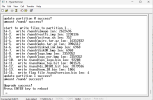
  • Full Erase: Using the U-Boot console, I performed a low-level erase of the entire NAND chip using the command hik_nand erase 0 0x10000000 to ensure no stale bad block tables or corrupted OOB data remained.
  • TFTP Recovery: I then used the update command via TFTP to flash the official firmware onto the clean chip. The process completes successfully.
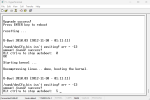
The Persistent Problem:Even with a brand-new, fully erased chip and a fresh firmware flash, the NVR is still stuck in a boot loop with the following error: /nand/devCfg.bin isn't existing! err = -13umount /nand/ success!

The err = -13 (Permission Denied) suggests that even though the file system is technically "new," the kernel cannot write the initial configuration files to the NAND partition. I suspect this is either a YAFFS2 mounting issue related to how the OOB/ECC is being handled by this specific U-Boot version, or some hardware-level security locking the /nand directory.

Since the bootloader is functional and resides on a separate SPI Flash, I can still run commands, but yaffs2_mount now causes the console to hang indefinitely.

At this stage, I believe a verified Full Flash Dump (.bin) from a working DS-80088 Rev 1.2 board is the only way to bypass how the kernel is initializing the file system.

Has anyone encountered this -13 error on a fresh NAND, and is there a way to force the kernel to initialize the partition with correct write permissions?

Thanks again for your help!
 

Attachments

  • Screenshot 2026-06-07 175425.png
    Screenshot 2026-06-07 175425.png
    28.6 KB · Views: 4
  • Screenshot 2026-06-07 175452.png
    Screenshot 2026-06-07 175452.png
    19.7 KB · Views: 4