

1.Overview
ONVIF Device Manager (ODM) is the best free, open-source, ad-free Windows tool for every IP camera DIYer. It helps you quickly verify whether your camera’s ONVIF service works properly, extract official RTSP stream URLs, test account authentication, and preview live streams.Most common camera connection issues (undiscoverable devices, authentication errors, invalid RTSP links, stream black screen) can be diagnosed and fixed with this tool.
Core Features
- One-click LAN IP camera discovery
- ONVIF protocol version & service compatibility verification
- Camera account permission & authentication test
- Official Main/Sub RTSP stream address extraction
- Real-time live preview & stream stability test
- Basic PTZ control and device information query
2. ODM Official Download & Installation
2.1 Official Download Link
This tool is open-source on SourceForge, no registration, no fees, no bundled software.Official URL: ODM
Simply open the link and click Download to get the latest version installer.
3. Full Step-by-Step Operation Guide
3.1 Discover All Online IP Cameras in LAN
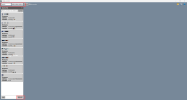
- Launch ONVIF Device Manager
- Click the "Refresh" button, Enter the camera's username and password, then click Login
- Wait 3-5 seconds for automatic LAN scanning
- All online ONVIF-supported cameras will appear in the left device list, showing IP address, MAC address and device model
3.2 Verify ONVIF Protocol Compatibility
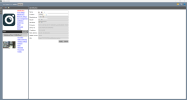
- Select your target camera from the left list
- Switch to the Identification tab
- Check manufacturer, firmware version, ONVIF version and core service items
3.3 Extract Official Main Stream & Sub Stream RTSP URLs
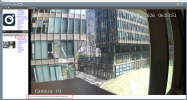
This is the most valuable function for IP camera DIY users:
- switch to the Live video
- ODM will automatically parse and display standard Main Stream and Sub Stream RTSP links
- Copy these official URLs directly for playback, recording software docking and secondary development
3.4 Live Stream Preview & Stability Test
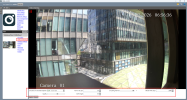
- On the Video streaming page, modify various parameters.
- Observe real-time video status
3.5 Extended PTZ Function Test
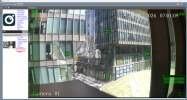
For PTZ cameras, ODM supports basic pan/tilt/zoom control and preset point query, which can quickly verify whether the PTZ function works normally.4. Common Issues & Troubleshooting
4.1 ODM cannot find any camera devices
- Confirm PC and camera are on the same LAN network segment
- Turn off Windows firewall and third-party antivirus software temporarily
- Restart camera power and re-click Discover
- Check network cable connection and camera online status
4.2 ONVIF service list is empty
- Log in camera web interface
- Enable ONVIF protocol
- Save settings and reboot the camera, then re-scan
4.3 User authentication failed
- Double-check username and password for typos
- Some cameras have independent ONVIF passwords, different from web login passwords
- Reset camera administrator permissions
4.4 Stream load failure / black screen preview
- Re-authenticate user credentials
- Switch between main stream and sub stream for testing
- Check camera video encoding parameters and network packet loss
- Check whether the camera video is H.264 or H.265
5. Practical Usage Tips
- Static IP First: Set camera static IP to avoid device loss caused by DHCP IP changes
- Firmware Update Check: Verify ONVIF status again after camera firmware upgrade
- Security Protection: Modify default camera accounts to prevent unauthorized ONVIF access