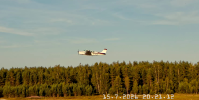
Hello, I have a timing question.
I want to take a JPG picture of an airplane flying at about 120 km/h during a landing.
The camera's field of view is 50m wide at the target distance.
At that time, the airplane is visible for about 1.5 seconds.
Video: 3840x2160 26 fps.
I would like BI to take a picture where the airplane is roughly in the middle of the picture, i.e. at 0.75 seconds.On the other hand, if the picture was taken at about 0.5 - 0.9 seconds, then the entire airplane would be in the picture at a speed of 100-140 km/h.
Now the settings are as follows, which most often result in two pictures. So what setting should I change so that I only get one picture?
Motion trigger make time 0.3 s
Motion End trigger if not re-triggered 0.3 s
JPEG each 0:00.9
pretrigger rec time 0 s
pretrigger play time 0 s
Video is not saved, which is the intention.
A solution could be if the option (when triggered each m:ss.s) had an option to take one picture after a selected time. But maybe by adjusting those earlier ones, that one picture would be successful.
I want to take a JPG picture of an airplane flying at about 120 km/h during a landing.
The camera's field of view is 50m wide at the target distance.
At that time, the airplane is visible for about 1.5 seconds.
Video: 3840x2160 26 fps.
I would like BI to take a picture where the airplane is roughly in the middle of the picture, i.e. at 0.75 seconds.On the other hand, if the picture was taken at about 0.5 - 0.9 seconds, then the entire airplane would be in the picture at a speed of 100-140 km/h.
Now the settings are as follows, which most often result in two pictures. So what setting should I change so that I only get one picture?
Motion trigger make time 0.3 s
Motion End trigger if not re-triggered 0.3 s
JPEG each 0:00.9
pretrigger rec time 0 s
pretrigger play time 0 s
Video is not saved, which is the intention.
A solution could be if the option (when triggered each m:ss.s) had an option to take one picture after a selected time. But maybe by adjusting those earlier ones, that one picture would be successful.