Full screen video streams are in slow motion post BI6 update

Aug 25, 2022
13
2
US
I updated to BI6 about a month ago, seemed to go pretty smoothly. I do have a persistent issue that I've been unable to resolve. Any full screen camera streams are laggy and in slow motion it's such a weird artifact happens in UI3 and the mobile app, the longer it runs the farther behind it gets. Frame rate is all over the place, used to be solid above 10fps with occasional dips, but now it jumps between 15 and 1. The multi-view is perfectly fine on UI3 and mobile. I reset the streaming profiles to default but that offered no change (thinking I just had some goofy setting). I use hardware acceleration with an Nvidia card and have for years without issue, but on or off doesn't seem to make a difference. Direct to wire where available, seems to help for a short time but breaks mobile full screen presenting only a black screen (I seem to remember it doesn't support h265?), but this suffers the same slow motion issue. It was VERY bad a few days ago, where the image was sooo far behind it was a different time of day, but the motion blocks still show on screen. I can't find any combination of setting to make things better or worse, this seems to affect mobile and UI3 the same. No other system or camera changes have changed, network is solid as a rock so I'm pretty sure it's not a network issue. Thoughts on what else I can check? Really want to make sure I've covered my bases before going to support.

Also to reiterate BI5 was fine, the issue only presented right after the upgrade. I'm also on the latest "edge" update, was hopeful it was just a bug that was being worked through, but as of 6.0.4.7 the issue persists. Also system utilization is low, nothing is spiking or anything. CPU 20-35%, GPU 15-20%, RAM 47%. This is running inside a VM in Proxmox, but I don't see any resource constraints anywhere host, server side, or client side.

Let me know what else I might provide that might help you help me.
 
Hardware acceleration has been known to cause dumb issues like this sometimes in Blue Iris.

When you tried turning off hardware acceleration, are you talking about encoding or decoding or both? When turning off hardware accelerated decoding, each camera instance needs to be restarted before it takes effect (in case you were using the global toggle). Verify it is off by looking for hyphens in the "HA" column of Blue Iris Status > Cameras.

1776697005516.png

Direct to wire does work with H.265 in UI3 in many cases now. I am not sure about mobile apps yet. But using direct to wire you are likely to run into more compatibility issues (especially with H.265 streams) so I generally recommend disabling it if you have any live single camera playback issues. Remember direct to wire is not guaranteed to be used if you have it enabled. It only works with live single camera views. Not recordings. Not group views. Not H.265 unless supported by the client app (UI3 being the client app in this case).

It was VERY bad a few days ago, where the image was sooo far behind it was a different time of day, but the motion blocks still show on screen.

I have questions about this.

Are you saying Blue Iris was adding motion overlays relevant to the current time, but the video was far behind in time? What app was this in? If you can get a screen recording of this, I am sure it would be very interesting to Blue Iris support.

UI3 detects when the video is lagging behind and shows a warning (orange clock icon) and if the delay exceeds a configurable time period (60 seconds by default) then it restarts the stream. So if you were seeing such a huge amount of delay in UI3, that means Blue Iris was sending old video and pretending it was new.

But without a screen recording we can only make guesses.
 
Last edited:
Hardware acceleration has been known to cause dumb issues like this sometimes in Blue Iris.

When you tried turning off hardware acceleration, are you talking about encoding or decoding or both? When turning off hardware accelerated decoding, each camera instance needs to be restarted before it takes effect (in case you were using the global toggle). Verify it is off by looking for hyphens in the "HA" column of Blue Iris Status > Cameras.

View attachment 242279

Direct to wire does work with H.265 in UI3 in many cases now. I am not sure about mobile apps yet. But using direct to wire you are likely to run into more compatibility issues (especially with H.265 streams) so I generally recommend disabling it if you have any live single camera playback issues. Remember direct to wire is not guaranteed to be used if you have it enabled. It only works with live single camera views. Not recordings. Not group views. Not H.265 unless supported by the client app (UI3 being the client app in this case).

> It was VERY bad a few days ago, where the image was sooo far behind it was a different time of day, but the motion blocks still show on screen

I have questions about this.

Are you saying Blue Iris was adding motion overlays relevant to the current time, but the video was far behind in time? What app was this in? If you can get a screen recording of this, I am sure it would be very interesting to Blue Iris support.

UI3 detects when the video is lagging behind and shows a warning (orange clock icon) and if the delay exceeds a configurable time period (60 seconds by default) then it restarts the stream. So if you were seeing such a huge amount of delay in UI3, that means Blue Iris was sending old video and pretending it was new.

But without a screen recording we can only make guesses.

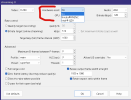
By hardware acceleration I mean "hardware assist" under the streaming configuration.

Yea under stats for nerds I see that h.265 is working in UI3 with D2W enabled, but it still suffers from the slowdown for some reason. But with this enabled and a D2W profile selected in mobile a full screen playback only presents a black image.

On the motion blocks on a waaaay behind stream. Notifications still show the correct image, and multi-view still shows the correct image and timing. I actually didn't check if there was a recording, it might still be in my history from last week, so I can check, don't want to post here, but I can have it ready for support. Something feels super wonky, I just can't figure out what is wrong.
 
By hardware acceleration I mean "hardware assist" under the streaming configuration.

I am not familiar with this. Can you screenshot?

Yea under stats for nerds I see that h.265 is working in UI3 with D2W enabled, but it still suffers from the slowdown for some reason. But with this enabled and a D2W profile selected in mobile a full screen playback only presents a black image.

Weird compatibility issue I guess. H.265 is likely to never be as robust as H.264 in web browsers. And even H.264 has issues sometimes.

On the motion blocks on a waaaay behind stream. Notifications still show the correct image, and multi-view still shows the correct image and timing. I actually didn't check if there was a recording, it might still be in my history from last week, so I can check, don't want to post here, but I can have it ready for support. Something feels super wonky, I just can't figure out what is wrong.

This doesn't make sense to me. If you contact support about it, I think it would be a good idea to include a screen recording showing it behaving incorrectly so they know what you're talking about.


Multi-view (group views) use sub streams if you have those configured, and sometimes main and sub streams can get out of sync for unknown reasons. Are you using sub streams in your configuration? Can you screenshot the Blue Iris Status > Cameras window so we can see the frame rates and keyframe intervals? (censor the camera names/addresses if you want)

In particular the frame rates should usually be the same between main and sub stream, and at least 10 FPS works best in my experience (that is to say, frame rate below 10 FPS can have issues with dual streaming). Best recommendation for keyframe interval is to have it at "1.0" (which in most cameras web interfaces means assigning it the same number as the frame rate. E.g. "15 FPS" and "15" i-frame interval).
 
Went and watched the recording on the video I mentioned, it's not in slow motion but it's super low frame rate between 0-2fps. It's nearly unusable footage, I was selling a lawn mower and the guy rode past the full field of view, I probably only got three frames with him. If he'd been doing something nefarious that'd be tough to do much with. Something feels super borked here. I don't understand what's happening.
 
I am not familiar with this. Can you screenshot?


Weird compatibility issue I guess. H.265 is likely to never be as robust as H.264 in web browsers. And even H.264 has issues sometimes.


This doesn't make sense to me. If you contact support about it, I think it would be a good idea to include a screen recording showing it behaving incorrectly so they know what you're talking about.


Multi-view (group views) use sub streams if you have those configured, and sometimes main and sub streams can get out of sync for unknown reasons. Are you using sub streams in your configuration? Can you screenshot the Blue Iris Status > Cameras window so we can see the frame rates and keyframe intervals? (censor the camera names/addresses if you want)

In particular the frame rates should usually be the same between main and sub stream, and at least 10 FPS works best in my experience (that is to say, frame rate below 10 FPS can have issues with dual streaming). Best recommendation for keyframe interval is to have it at "1.0" (which in most cameras web interfaces means assigning it the same number as the frame rate. E.g. "15 FPS" and "15" i-frame interval).
1776709419560.png

1776709719504.png

does this help?
 
That helps yeah.

Oh, for some reason they labeled the hardware acceleration dropdown "Hardware assist" in that panel, I didn't realize that.

The encoder settings all look fine (which they should; they look like the defaults!).

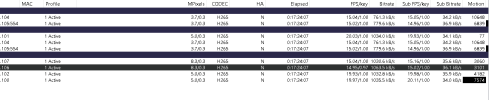
The status screenshot shows proper, consistent setup of codecs, frame rates, and iframe intervals. And bit rates. Nothing looks abnormally low in a way that would indicate there's a decoder problem.

What file format are you recording clips in (Camera Settings > Record > File format and compression)?

BVR is the format pretty much everyone uses. I've tried recording to MP4 format before and frankly Blue Iris's MP4 writing capabilities are awfully buggy and could cause horrible playback frame rate like you describe, but I think it is very unlikely that you've configured it this way so the problem is likely something more difficult to identify.
 
That helps yeah.

Oh, for some reason they labeled the hardware acceleration dropdown "Hardware assist" in that panel, I didn't realize that.

The encoder settings all look fine (which they should; they look like the defaults!).

The status screenshot shows proper, consistent setup of codecs, frame rates, and iframe intervals. And bit rates. Nothing looks abnormally low in a way that would indicate there's a decoder problem.

What file format are you recording clips in (Camera Settings > Record > File format and compression)?

BVR is the format pretty much everyone uses. I've tried recording to MP4 format before and frankly Blue Iris's MP4 writing capabilities are awfully buggy and could cause horrible playback frame rate like you describe, but I think it is very unlikely that you've configured it this way so the problem is likely something more difficult to identify.

Yea using BVR and Direct to disk, yea it's so strange, feels like a bug, but if I'm the only one experiencing it then it feels like someone in my environment, but I'm stumped a bit lol.
 
I do see that you are currently using Nvidia hardware decoding on all those cameras. I do not know if that is in a good functional state right now but my past experience with Blue Iris's hardware acceleration says you just shouldn't use it anymore.
Yea was trying to reduce CPU utilization, it's never really caused me an issue in the past, I imagine it's nearly 5-6 years of use maybe, but maybe something changed with BI6?
 
Well I know BI 6 broke and then fixed (months later) the Nvidia hardware encoding. I don't know what if anything changed with decoding.

I really don't know what else could be wrong to cause this. Everything you've shown or told me about your configuration seems like it should be fine.

Seems warranted to get some screen recordings and email BI support. If they suspect there is a UI3 issue they will loop me in on the email (I'm the UI3 developer). But since you say it also affects the mobile apps, I suspect the issue isn't related to UI3 at all.
 
  • Like
Reactions: borked4days
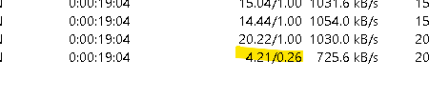
I did just notice a weird thing watching my camera status while I play a full screen stream in UI3. It tanks the frame rate in the camera status as well. When I stop watching it comes back up to a stead state.

1776712621073.png