Plan
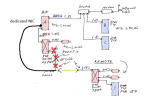
The Spring plan is to extend the BI network from the present home location to another home down the block. An Ubiquiti RF link will be added to the POE switch on the .55 subnet side of the system. Three Dahua cameras will be added at the remote location all on the same .55 BI subnet.
Issues
1) How to prevent the remote home from accessing the Dahua login screen for the three remote cameras or my 25 cameras? i.e. if they connect a computer to their remotely located POE switch on the .55 subnet
If "Advanced IP Scanner" is connected to the remote POE switch (.55) all of the camera's IP and MAC addresses are displayed along with all of the IP addresses on my .1 home LAN.
2) How to add UI3 on 192.168.1.132:81 to the subnet (.55) via the Ubiquiti remote link? i.e. so that the remote user can connect their computer to the remote POE switch and view UI3 in place of using TailScale
3) How to isolate all my home LAN .1 traffic so that only UI3 is available on the remote end? i.e. access to only 192.168.1.132:81 and no other traffic or IP address should be accessible
4) How to prevent the internet from appearing on the .55 subnet or .1 network? i.e. if the remote home connects their LAN to the subnet switch
5) How to block any LAN snooping from the present home to the remote home or the other way around? i.e. most likely from 192.168.1.1 on both ends assuming the remote home is also using the same router IP address.
Using Blue Iris with two NICs. One NIC is on 192.168.1.1 (home LAN) to other home connected Window's computers and the other BI NIC is used for the cameras on 192.168.55.xxx.
No internet is available on either NIC on the Blue Iris computer. Plus no BI camera traffic is going through the home router.
However, the router is exposed to UI3 for in home LAN access via a second NIC in the BI Windows computer. In addition, for home use, a TailScale client in exit mode has been added to the Asus router to view UI3 on a cell phone as the BI computer will not support TailScale without an internet connection.
Overall Goal
Provide a high level of security so that the remote home location can not, under any circumstances, access any traffic on the BI (.55) Ubiquiti link or .1 LAN with the exception of UI3 on 192.168.1.132:81.
If the above goal is not possible, then only allow remote home access to the three cameras (login screen-password required) at the remote location. i.e remote cameras IP would be 192.168.55.132, 192.168.55.134 and 192.168.55.136 But no login screen access to my cameras from 192.168.55.1 to 192.168.55.100 are to be permitted.
Or if not possible, then deny access to all subnet (.55) cameras at the remote home.
Priorities
1) Secure the subnet on .55 first.
2) If adding UI3 to the remote home is not feasible then abandon this scenario and look at other solutions for remote camera viewing. Perhaps using TailScale as a fallback position.
Suggestion and comments as to the next steps would be most appreciated.
The Spring plan is to extend the BI network from the present home location to another home down the block. An Ubiquiti RF link will be added to the POE switch on the .55 subnet side of the system. Three Dahua cameras will be added at the remote location all on the same .55 BI subnet.
Issues
1) How to prevent the remote home from accessing the Dahua login screen for the three remote cameras or my 25 cameras? i.e. if they connect a computer to their remotely located POE switch on the .55 subnet
If "Advanced IP Scanner" is connected to the remote POE switch (.55) all of the camera's IP and MAC addresses are displayed along with all of the IP addresses on my .1 home LAN.
2) How to add UI3 on 192.168.1.132:81 to the subnet (.55) via the Ubiquiti remote link? i.e. so that the remote user can connect their computer to the remote POE switch and view UI3 in place of using TailScale
3) How to isolate all my home LAN .1 traffic so that only UI3 is available on the remote end? i.e. access to only 192.168.1.132:81 and no other traffic or IP address should be accessible
4) How to prevent the internet from appearing on the .55 subnet or .1 network? i.e. if the remote home connects their LAN to the subnet switch
5) How to block any LAN snooping from the present home to the remote home or the other way around? i.e. most likely from 192.168.1.1 on both ends assuming the remote home is also using the same router IP address.
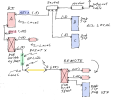
Using Blue Iris with two NICs. One NIC is on 192.168.1.1 (home LAN) to other home connected Window's computers and the other BI NIC is used for the cameras on 192.168.55.xxx.
No internet is available on either NIC on the Blue Iris computer. Plus no BI camera traffic is going through the home router.
However, the router is exposed to UI3 for in home LAN access via a second NIC in the BI Windows computer. In addition, for home use, a TailScale client in exit mode has been added to the Asus router to view UI3 on a cell phone as the BI computer will not support TailScale without an internet connection.
Overall Goal
Provide a high level of security so that the remote home location can not, under any circumstances, access any traffic on the BI (.55) Ubiquiti link or .1 LAN with the exception of UI3 on 192.168.1.132:81.
If the above goal is not possible, then only allow remote home access to the three cameras (login screen-password required) at the remote location. i.e remote cameras IP would be 192.168.55.132, 192.168.55.134 and 192.168.55.136 But no login screen access to my cameras from 192.168.55.1 to 192.168.55.100 are to be permitted.
Or if not possible, then deny access to all subnet (.55) cameras at the remote home.
Priorities
1) Secure the subnet on .55 first.
2) If adding UI3 to the remote home is not feasible then abandon this scenario and look at other solutions for remote camera viewing. Perhaps using TailScale as a fallback position.
Suggestion and comments as to the next steps would be most appreciated.
Last edited: