

Using the very latest version of BI and trying to export video files but the exported files doesn't show the BI date and time banner. Never had this problem before and I require it for sending the video files to the police. Am I missing something?
Export of video files not showing date and time bar.
- Thread starter Tinbum
- Start date
You are using an out of date browser. It may not display this or other websites correctly.
You should upgrade or use an alternative browser.
You should upgrade or use an alternative browser.

Where do i find that?Make sure the text overlay box is checked.
Attachments
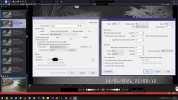

Bruce_H
Getting comfortable
I have read other posts where people want to send videos to the police and say that the time date stamp needs to be directly from the cameras, so that it can not be claimed that the the video was modified, would adding the text overlay not be considered modification of the original video?
I have read other posts where people want to send videos to the police and say that the time date stamp needs to be directly from the cameras, so that it can not be claimed that the the video was modified, would adding the text overlay not be considered modification of the original video?
That is correct.
The biggest reason not to use the BI is that the attorney and law enforcement members here have said that having BI add the overlay constitutes a manipulation/modification/altering of the video after the fact and in a lawsuit, a good defense lawyer would claim the video has been altered to try to get it dismissed in court.
The reason being you could overlay any time you want on it after the fact.
Sure a camera could have the wrong date and time too, but that cannot be altered after the fact.
It would suck to have great video of a crime and have it tossed on a technicality.
Now how often that happens or the likelihood, who knows.
Plus when you export video, if you are having BI add the time, you are re-encoding the video, and that is inefficient and takes more storage than not re-encoding and depending on the size of the export, could take a long time.
Having BI add the time does use some CPU% as well, although now with substreams it isn't as big of an impact as before.
Bruce_H
Getting comfortable
Can we not get side tracked please.
The police have seen my video on the computer and also checked to see that the time shown was the actual time by calibrating with a know time. They have exported copies but the time/time bar is missing. I can give them the complete hour of video but for 5 cameras they are big and they will also have to get BI to view it.
The police have seen my video on the computer and also checked to see that the time shown was the actual time by calibrating with a know time. They have exported copies but the time/time bar is missing. I can give them the complete hour of video but for 5 cameras they are big and they will also have to get BI to view it.
And as I mentioned, it might be a bug since you said you are on the latest BI version and your export shows the text overlay box checked. Send an email to BI support per the directions in the BI help file.
Not many here run the latest version and even fewer use BI overlay, so you probably found something nobody has come across yet.
Not many here run the latest version and even fewer use BI overlay, so you probably found something nobody has come across yet.
Bruce_H
Getting comfortable
I just finished testing the text overlay on exports and even though I do not have them set to display live I was able to turn them on and have them show when exporting to both MP4 and AVI formats, I am running BI V 6.0.1.18, and the issue reported by @Tinbum is not present on my system!
In that case, I would suggest to the OP that they toggle the check box and reboot system and try again.
Bruce_H
Getting comfortable
As a clarification I did find that there was a problem getting the AVI export to work, I rebooted my system and the problem resolved itself, so a reboot may be worth a try!
