Enable/Disable "Notify Surveillance Center" via ISAPI

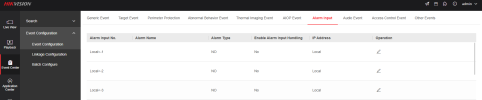
I don't use it, but the NVR has functionality specifically designed to get a signal from an alarm system...

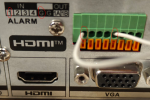
Does your alarm system have an output that could be tied to the NVR "Alarm Input"? Then you could use...
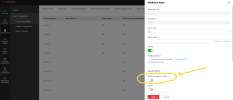
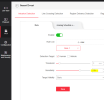
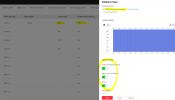
Screenshot 2025-11-06 094000.png

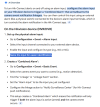
Screenshot 2025-11-06 094036.png
 
One more thought... if you don't have an output from the alarm system or can't run a wire from the alarm system to the NVR, maybe you could configure the "Alarm Input" the way you want and then use ISAPI to toggle "Alarm Type" between NO/NC (normally open, normally closed) mimicking the signal from the alarm system.
 
I don't use it, but the NVR has functionality specifically designed to get a signal from an alarm system...

Does your alarm system have an output that could be tied to the NVR "Alarm Input"? Then you could use...

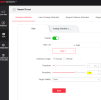
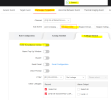
View attachment 231873

View attachment 231875
Maybe I didn't understand how "Alarm Input" works. If I close the contact, it simply communicates to "Notify Surveillance Center" that the contact has been closed, but how does it send notifications from the cameras?
 
Maybe I didn't understand how "Alarm Input" works. If I close the contact, it simply communicates to "Notify Surveillance Center" that the contact has been closed, but how does it send notifications from the cameras?

I don't use it so I'm sure either... I assumed this would allow someone to turn notifications on/off with their alarm system... seems like something lots of alarm system users would want to do... I will try to read further...
 
  • Like
Reactions: 123456
To reproduce the problem:
I tested on a DS-7616NI-M2 with Firmware Version V5.04.066 build 250620

For example, go to the camera settings and set the sensitivity to 71; it was previously 70, and save it.
1762959204105.png


Now go to the NVR, "Linkage Method," enable or disable "Notify Surveillance Center," and save it.
1762959312705.png


If you go back to the camera, you'll see that the sensitivity has returned to 70, meaning the NVR has also overridden the camera's "Rules Configuration" settings
1762959473123.png
 
  • Like
Reactions: johnfitz
^^^
I just tried that here and got the same result as you... :(

Does your alarm system have an output that could be tied to the NVR "Alarm Input"?

I still think if your alarm system has an output that this would be the best way to accomplish what you are trying to do... Does your alarm system have an output that could be tied to the NVR "Alarm Input"?


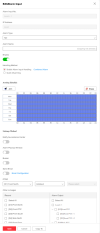
Screenshot 2025-11-12 111730.png

Screenshot 2025-11-12 111440.png


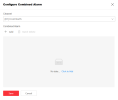
Screenshot 2025-11-12 113126.png
 
I still think if your alarm system has an output that this would be the best way to accomplish what you are trying to do... Does your alarm system have an output that could be tied to the NVR "Alarm Input"?
I think if I connect an output of my alarm to activate an "alarm input" in the NVR this sends the notification when the alarm input becomes NO or NC but it does not enable\disable the "Notify Surveillance Center" function in the linkage method of the camera in the NVR
 
I think if I connect an output of my alarm to activate an "alarm input" in the NVR this sends the notification when the alarm input becomes NO or NC but it does not enable\disable the "Notify Surveillance Center" function in the linkage method of the camera in the NVR

We seem to be reading this differently?

Screenshot 2025-11-12 111730.png
 
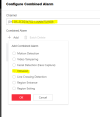
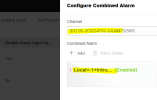
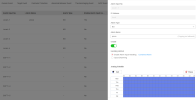
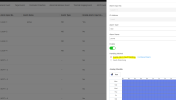
I've done some tests, and the "combined alarm" doesn't seem to work:

Without configuring the "combined alarm," when contact 1 closes, I receive a notification and a buzzer.
1763024215215.png
1763023577618.png

If I add the "combined alarm" camera with "intrusion," I receive no notification or buzzer when contact 1 is closed and the camera triggers an intrusion event.!!!
1763023748786.png

1763023465165.png
 

Attachments

  • 1763023425885.png
    1763023425885.png
    68.6 KB · Views: 1
  • 1763023512697.png
    1763023512697.png
    60.7 KB · Views: 0
Last edited:
I just keep assuming that the functionality is there... switch that pair on/off to turn notifications on/off... I'm guessing you're still investigating... please post updates! I don't have an alarm system (per se), but I might hook a SPST switch up to my NVR if you don't get this working!
 
I just keep assuming that the functionality is there... switch that pair on/off to turn notifications on/off... I'm guessing you're still investigating... please post updates! I don't have an alarm system (per se), but I might hook a SPST switch up to my NVR if you don't get this working!
Hi, and thanks for your support.
As I wrote in the previous post, I tried activating the "combined alarm" with the intrusion event camera, but it didn't work.
You can also try closing the contact as I did in the first photo and setting the "combined alarm" with a camera.
If it works for me, the contact remains closed when the alarm is activated.
 
  • Like
Reactions: johnfitz
You can also try closing the contact as I did in the first photo and setting the "combined alarm" with a camera.
If it works for me, the contact remains closed when the alarm is activated.

I will try, might be a few days before, but I will... the connection looks easy, but the software/menus seem convoluted!... I still think that the software was intended just for this... alarm system turns on then turn on notifications, off turn off...

I haven't looked yet, but this can't be the first time someone is trying to figure this out. Not sure where this falls on the fire/wheel/pyramids/moon-landing timeline, but it can't be new!
 
  • Like
Reactions: 123456
I will try, might be a few days before, but I will... the connection looks easy, but the software/menus seem convoluted!... I still think that the software was intended just for this... alarm system turns on then turn on notifications, off turn off...

I haven't looked yet, but this can't be the first time someone is trying to figure this out. Not sure where this falls on the fire/wheel/pyramids/moon-landing timeline, but it can't be new!
To be clear...
I close the contact when the alarm is armed, not activated.
This way, with "combined alarm," if the camera detects an intrusion, it should send a notification. However, if the alarm is disarmed, the contact is open, even if the camera detects an intrusion, it won't send a notification.
 
  • Like
Reactions: johnfitz