DS-2DE4A425IWG-E - Cant motion track.

ComfySofa

Young grasshopper
Oct 22, 2020
48
10
UK
Hi there.

As above i cant seem to get it to motion track...it used to....a while ago i had to reset it, i re-entered all the setting (as i remembered) in the 'VCA' smart event area but it doesnt motion track....strangely if i go back into the settings and then into VCA its almost as if its working as it starts to move.

Could anyone suggest anything....

Another question on the subject of motion tracking (which ive never understood) is that if youve got a camera that moves [a PTZ] then all the lines that you set up are kind of irrelevant once the camer moves....never understood that! :)

Cheers to anyone that takes a stab at it.
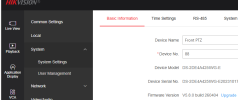
 
Howdy @ComfySofa ...

I have the same camera.

As above i cant seem to get it to motion track...it used to....a while ago i had to reset it, i re-entered all the setting (as i remembered) in the 'VCA' smart event area but it doesnt motion track

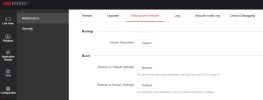
First, by any chance, did you recently install this firmware update "Release 260404"?...

Screenshot 2026-05-19 143452.png


I did, and smart tracking stopped working until did "Reset to Default Settings" and set everything up again from scratch...

Screenshot 2026-05-19 141112.png


Another question on the subject of motion tracking (which ive never understood) is that if youve got a camera that moves [a PTZ] then all the lines that you set up are kind of irrelevant once the camer moves....never understood that! :)

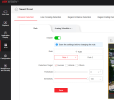
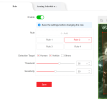
The "lines" you set for VCA events are relative to the saved camera position for each "Rule"... so if you pan/tilt/zoom the camera you will see that the "lines" are still where they are supposed to be... by default, there is only one "Rule"... each "Rule" has its own PTZ position saved... if you add a second rule, it's camera position is wherever the camera was pointed when the "Rule" is saved...

Screenshot 2026-05-19 141616.png


strangely if i go back into the settings and then into VCA its almost as if its working as it starts to move

What you are seeing there is the camera moving to the saved "Rule 1" position when you go back into the VCA setting page like above.

In my example above, the camera moves from one position to another as I hit "Rule 1" or "Rule 2". So, before you add/save rules, you move the camera position to where you want it, probably a preset (but does not have to be), and that is the position that is saved for that rule.


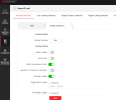
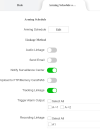
Of course, make sure you have "Tracking Linkage" turned on for the VCA event...

Screenshot 2026-05-19 143128.png


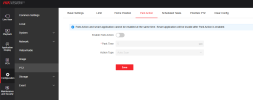
Also, make sure "Park Action" is turned off... instead, use "Scheduled Tasks" if you want the camera to "Park" at a preset or run a "Patrol", etc. ...

Screenshot 2026-05-19 142710.png

Screenshot 2026-05-19 142900.png


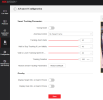
"Smart Tracking Parameters" can be set in the "Advanced Configuration" menu....

Screenshot 2026-05-05 082632.png

Screenshot 2026-05-05 082534.png


Let me know how it goes! :)
 
Last edited:
Wow - thanks very much all of you for pitching in.... im on this firmware.... is there any newer than this one??


V5.8.0 build 231109

Ill go back through what youve all said now....i must confess ive never really understood how the tracking works....i thought that you draw a line and if something is within that box or crosses the line it followed??

Edit: just found the firmware - ill flash that now and reset it...
 
  • Like
Reactions: johnfitz
Firmware flashed.....ive set something....just waiting for something to drive past the house...! Thanks again for all the help....if i can understand the above im hoping to make a bit more use of it... in that i can get it to track more stuff...
 
  • Like
Reactions: johnfitz
Sure - no prob....d'y know nothing has gone past the house since i set it!!
Edit - car went past but it didnt see it (id already shut my laptop down) sods law....

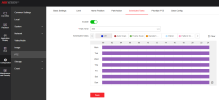
Heres a screenshot of my settings....without giving my location away i drew a big sqaure around tbe whole screen for the detection area....

1779225309403.png
1779225446335.png
 
  • Like
Reactions: johnfitz
Come on man, speak English, or I'll have to translate everything you say on google... :lol:

Screenshot 2026-05-19 172339.png

i drew a big sqaure around tbe whole screen for the detection area

Yes, that's how I have mine setup also... I assume you are using the intrusion detection VCA (not region entrance)?

Try setting "Threshold" to 0 and "Sensitivity" to 100 as that will make the camera most likely to activate the event... you don't have to leave it that way if you are getting false positives, just to test.

Also, are you using all 4 of those rules? If not, probably best to delete rules 2, 3, and 4 and focus on getting rule 1 working first.

Even if the camera does not start tracking, can you tell if the event is being triggered... are you getting an intrusion detection alert? (since you have this set)...

Screenshot 2026-05-19 173414.png