Does Hikvision SADP tool work remotely?

pakito_

n3wb
Oct 6, 2015
9
0
Sydney, AUS
Hi All,

I am trying to find cameras remotely via Hikvision SADP tool.

I am able to reach the cameras via typing its IP on the web browser however the camera stream is going through a VPN.

Does anyone know if SADP works through a VPN tunnel?

kInd Regards,

Pakito_
 
The HikVision SADP tool uses layer 2 protocols to discover and identify their camera in a subnet. Because its layer 2 it won't outside of the directly connected LAN.

We were asked his a lot by CCTV companies so we developed a solution, which we call "Remote Pathway". Basically you purchase a firewall and service from us, the firewall is installed on the site with the cameras. This allows you to then run a layer 2 VPN on your laptop or PC from pretty much anywhere in the world to connect to the remote site. Once connected your SADP is able to discover and identify and interact with the cameras on the remote site. In simple terms your PC/laptop is now connected as if its on the same LAN as the cameras.

Very handy for companies where they have one or 2 sites extremely far away and want to just ship a replacement camera to a local CCTV installer, all that installer has to do is cable it up, no need to be giving out passwords etc.

I've seen one company do exactly this from a PC in Ireland to a site in Seattle.

So if you really need to get remote access it is possible just contact www.netcelero.com for details.
 
I wonder if a TAP CONNECTION vpn might work. Curious if anyone has tried it?
 
Hi, more then 6 years passed, i cannot find any other thread, or posted solution - workaround.
What are the possibilities so use SADP tool, to discover devices on remote side by using VPN ? It would make remote support a lot easier for us. Thanks
 
It uses an UDP multicast, the VPN network can be configured to allow it and it will work. Regardless of what previous comments wrote. I managed to do it via zerotier.
Not all VPN tunnels allow it, you need to have access to VPN configurations.

It sends UDP packet
0x3c, 0x3f, 0x78, 0x6d, 0x20, 0x76, 0x65,
0x72, 0x73, 0x69, 0x6f, 0x6e, 0x3d, 0x22, 0x31,
0x2e, 0x30, 0x22, 0x20, 0x65, 0x6e, 0x63, 0x6f,
0x64, 0x69, 0x6e, 0x67, 0x3d, 0x22, 0x75, 0x74,
0x66, 0x2d, 0x38, 0x22, 0x3f, 0x3e, 0x3c, 0x50,
0x72, 0x6f, 0x62, 0x65, 0x3e, 0x3c, 0x55, 0x75,
0x69, 0x64, 0x3e, 0x37, 0x34, 0x46, 0x31, 0x45,
0x44, 0x33, 0x37, 0x2d, 0x35, 0x45, 0x38, 0x32,
0x2d, 0x34, 0x33, 0x45, 0x38, 0x2d, 0x39, 0x41,
0x36, 0x31, 0x2d, 0x36, 0x36, 0x46, 0x43, 0x44,
0x33, 0x32, 0x39, 0x32, 0x36, 0x45, 0x32, 0x3c,
0x2f, 0x55, 0x75, 0x69, 0x64, 0x3e, 0x3c, 0x54,
0x79, 0x70, 0x65, 0x73, 0x3e, 0x69, 0x6e, 0x71,
0x75, 0x69, 0x72, 0x79, 0x3c, 0x2f, 0x54, 0x79,
0x70, 0x65, 0x73, 0x3e, 0x3c, 0x2f, 0x50, 0x72,
0x6f, 0x62, 0x65, 0x3e

to

239.255.255.250 on port 37020

response by cameras are on dynamic port.


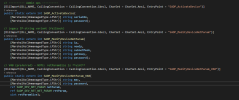
Even if you dont manage the Discovery which is what i wrote above, you can do a multithreaded /capabilities ISAPI hit on range of addresses, the responses turn on the list and use SADP SDK do to the rest of the stuff SADP can do via port 8000 look at the attachment bellow

1766344390703.png
 
  • Like
Reactions: normel and johnfitz
