Hi!
I have a DAHUA system with 9 cameras: 4x IPC-HFW3849T1-AS-PV-PRO, 3x IPC-HDW3849H-AS-PV-PRO and 2x IPC-PDW3849-A180-AS-PV.
NVR is NVR5216-EI2.
I have been strugling for few days with settings on all cameras as i have problems with DMSS playback which is skipping recorded videos - green recordings and blue (motion) recordings.
Recording is turned on for General and motion on all cameras 24/7.
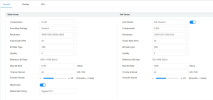
I managed to find settings for 4x IPC-HFW3849T1-AS-PV-PRO and 3x IPC-HDW3849H-AS-PV-PRO, where i hade to change Encoding strategy from AI to general, set FPS to 20 nad CBR and Bit rate to 4096.
For now playback on these 7 cameras is quite OK, but i can`t find the right settings for 2x IPC-PDW3849-A180-AS-PV, which are 180 degree cameras with 2 lenses.
I found it best to leave settings on default for these 2 cameras , but still i have problems with skipping playback all the time on green recordings and blue (motion recordings). Usually when there is motion recorded (blue) it starts playing it, and then just skips a lot of video and starts playing next motion,…
Sometimes i can get green recording to play then again it skips a lot fo video and jums to some motion whic is also skipped…
On all cameras there are latest Firmwares installed an NVR also with latest Firmware.
I tried also with VPN connection from my android phone, and here all works smoothly even with default settings on all cameras.
So problem is only using P2P service, where playback is skipping videos and i can`t find the right settings for 2x 180 degree cameras.
Doeas anyone have these same cameras and have normal DMSS playback?
Thank you!
I have a DAHUA system with 9 cameras: 4x IPC-HFW3849T1-AS-PV-PRO, 3x IPC-HDW3849H-AS-PV-PRO and 2x IPC-PDW3849-A180-AS-PV.
NVR is NVR5216-EI2.
I have been strugling for few days with settings on all cameras as i have problems with DMSS playback which is skipping recorded videos - green recordings and blue (motion) recordings.
Recording is turned on for General and motion on all cameras 24/7.
I managed to find settings for 4x IPC-HFW3849T1-AS-PV-PRO and 3x IPC-HDW3849H-AS-PV-PRO, where i hade to change Encoding strategy from AI to general, set FPS to 20 nad CBR and Bit rate to 4096.
For now playback on these 7 cameras is quite OK, but i can`t find the right settings for 2x IPC-PDW3849-A180-AS-PV, which are 180 degree cameras with 2 lenses.
I found it best to leave settings on default for these 2 cameras , but still i have problems with skipping playback all the time on green recordings and blue (motion recordings). Usually when there is motion recorded (blue) it starts playing it, and then just skips a lot of video and starts playing next motion,…
Sometimes i can get green recording to play then again it skips a lot fo video and jums to some motion whic is also skipped…
On all cameras there are latest Firmwares installed an NVR also with latest Firmware.
I tried also with VPN connection from my android phone, and here all works smoothly even with default settings on all cameras.
So problem is only using P2P service, where playback is skipping videos and i can`t find the right settings for 2x 180 degree cameras.
Doeas anyone have these same cameras and have normal DMSS playback?
Thank you!