Hi,
I’m using a Dahua setup with a DHI-NVR5216-XI and several HDW3849H-AS-PV-PRO cameras.
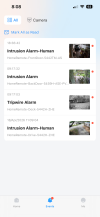
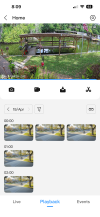
In the DMSS iOS app, I don’t get any preview thumbnails for events in the playback / event list. The gallery view just shows generic entries without showing the actual trigger image (person/vehicle etc.).
What I would like:
A gallery/event list where I can already see the snapshot/thumbnail of the triggering event (similar to what the NVR web interface shows with AI snapshots).
What I have already checked:
Thanks!
I’m using a Dahua setup with a DHI-NVR5216-XI and several HDW3849H-AS-PV-PRO cameras.
In the DMSS iOS app, I don’t get any preview thumbnails for events in the playback / event list. The gallery view just shows generic entries without showing the actual trigger image (person/vehicle etc.).
What I would like:
A gallery/event list where I can already see the snapshot/thumbnail of the triggering event (similar to what the NVR web interface shows with AI snapshots).
What I have already checked:
- Recording is working (continuous + event)
- AI events (SMD / human detection) are detected correctly
- Push notifications work
- Snapshots seem to exist on the NVR (visible via web interface / AI search)
- Is it possible in DMSS (iOS) to enable event thumbnails in the event list or gallery view?
- Does this depend on specific settings (e.g. snapshot linkage, video vs live push, substream, etc.)?
- Or is this simply a limitation of the DMSS app?
Thanks!