
DMSS App and IOS 26
- Thread starter Chase
- Start date

You are using an out of date browser. It may not display this or other websites correctly.
You should upgrade or use an alternative browser.
You should upgrade or use an alternative browser.


sunny0101786
Getting the hang of it
- Jul 15, 2017
- 143
- 35
Works just fine on my iPhoneBefore I update my iPhone to IOS 26 (the latest) can anyone confirm if the latest version of the DMSS app works fine with it?
How about the WireGuard App?
Thank you


flynreelow
Known around here
- Dec 12, 2016
- 1,713
- 1,595
Only half on topic, but in case anyone is wondering...
Hik-Connect app and L2TP VPN are working fine on iOS 26 also.
Hik-Connect app and L2TP VPN are working fine on iOS 26 also.

I had a customer end of last week who could not see the "download" or "install" button on the iOS store. Had to send him in a round about fashion to Cnet to download the iOS DMSS App for some reason.
Unsure if it was customer error or not.
Unsure if it was customer error or not.
flynreelow
Known around here
- Dec 12, 2016
- 1,713
- 1,595
Def sounds like user error.I had a customer end of last week who could not see the "download" or "install" button on the iOS store. Had to send him in a round about fashion to Cnet to download the iOS DMSS App for some reason.
Unsure if it was customer error or not.

bigredfish
Known around here

18.7 is available under software update as well as 26 at the bottom of the page. I don’t understand why they’re going from 18 to 26 though. I assume the new phones will come with 26
I don’t understand why they’re going from 18 to 26 though.
26 is probably for 2026... they bumped all products up to 26 at the same time iOS, TV OS, watch OS, etc.
bigredfish
Known around here

NMGMarques
n3wb
Is it just for me, or is it no longer possible to open DMSS directly from the call screen? In previous versions, when someone rang, DMSS would announce it on iPhone as an incoming call and you could click the 3 dots at the bottom left and open DMSS from there. Now, the option still exists, but DMSS won't launch from that option anymore. I am currently on iOS 26 and running latest DMSS.
flynreelow
Known around here
- Dec 12, 2016
- 1,713
- 1,595
maybe check under the app notifications to see if u need to check a box to allow this.Is it just for me, or is it no longer possible to open DMSS directly from the call screen? In previous versions, when someone rang, DMSS would announce it on iPhone as an incoming call and you could click the 3 dots at the bottom left and open DMSS from there. Now, the option still exists, but DMSS won't launch from that option anymore. I am currently on iOS 26 and running latest DMSS.
NMGMarques
n3wb
I've been having the issue since the update to 26, and had already checked the notifications. Today was the last straw so I really dove into it after my post. I tried several things. In the end, what worked was to go into the iOS settings and into the storage. Selected DMSS and offloaded the app. Waited for it to clear out the app and only the data remained (easy to spot as it went from 400 megs to about 3). Then I reinstalled the app from the same place. After that I just jumped into the app and presto blamo - it works!maybe check under the app notifications to see if u need to check a box to allow this.
I thought I'd post here in case anyone stumbles on this in the future and has a similar issue.
Switching gears and since I am here, I do have another question... an issue that I still haven't managed to figure out or solve. We have 2 devices currently installed.
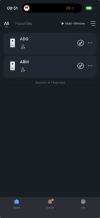
The issue is that when someone rings the doorbells, whichever one it was, the incoming call on the iPhones was always DMSS, so no way to know which of the doorbells was ringing. An issue, since we only answer ADG between 0800 and 1700 hours and ARM should be answered by our warehouse. Since they were all coming in as DMSS, we were forced to answer all calls, and then call down to the warehouse to alert them when the doorbell was the one from the warehouse so they could open it. You'll say to just disable it on the devices that don't need it, but we can't because after 1700 hours, once the warehouse workers leave, we have to answer the calls between that time and 1900 hours.
Things changed some months ago and from one day to the next, all of a sudden, we started getting calls from the doorbells and they started to appear as ARM and ADG, which I was glad to finally see happen. The problem is that most times they seem to be switched. Calls from ADG sometimes appear as ARM and vice-versa.
Does anyone know a fix for this? Is there a way to get this to work properly?
NMGMarques
n3wb

Arjun
IPCT Contributor
Arjun
IPCT Contributor
The developer is not Dahua - its a private entity, and they want Cloud Access. I tried accessing one of my cameras via VPN, and it encountered a network error even though I was manually configuring the IP during the setup process.It’s still there for me
During initial setup, it managed to change the IP of the camera in interest (even though the camera had a STATIC IP). The camera went offline. The crap app stated that if camera was inaccessible after configuration then I would have to do a hard reset of the camera which is complete nonsense - the camera reappeared on my main network instead of my isolated network and had a different IP assigned. Thank goodness for Ubiquiti picking up on this. I reconfigured the network IP of that camera on my isolated VLAN, and I am back in business. The DMSS app is shady, I had my account deleted after shortly creating it and cleared all cache and uninstalled the app.
Will never know why the original app was removed from the app store.

Arjun
IPCT Contributor
Do you have the direct link to the app to make sure I installed the correct one?hmm yeah I can’t help you with any of that. I’ve never had to create an account to use the app.