Did I just buy the wrong camera for the job? Newbie again.

oldspyguy

Young grasshopper
Jan 8, 2026
45
21
Cold North
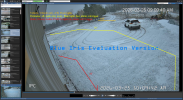
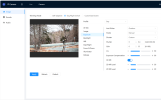
I received my IPC-T54PRO-A5 and am impressed with the night vision and on board intelligence. This camera was chosen to provide an escalation response to the approach to my shop by using three IVS tripwires as shown in the picture.
From my initial testing the IVS and camera outputs work fine for that task.
1774450183844.png
But L
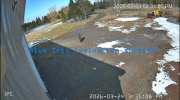
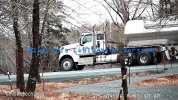
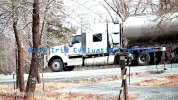
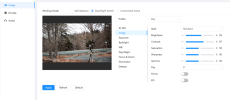
I was hoping to have a bit better detail at 50’ to recognize a person or somewhat catch a licence plate just enough to read it not capture it but the image was not what I expected. I got the 3.6 lens but probably should have used the lens calculator to get the DORI information . Duh.
1774450183859.png

I will keep this camera just for the triggers and eventually into home automation.
The night vision is great.

Still learning.....
 
  • Like
Reactions: mat200
You
I received my IPC-T54PRO-A5 and am impressed with the night vision and on board intelligence. This camera was chosen to provide an escalation response to the approach to my shop by using three IVS tripwires as shown in the picture.
From my initial testing the IVS and camera outputs work fine for that task.
View attachment 240592
But L
I was hoping to have a bit better detail at 50’ to recognize a person or somewhat catch a licence plate just enough to read it not capture it but the image was not what I expected. I got the 3.6 lens but probably should have used the lens calculator to get the DORI information . Duh.
View attachment 240591

I will keep this camera just for the triggers and eventually into home automation.
The night vision is great.

Still learning.....
You need a Z4E for id at 50feet.
 
I received my IPC-T54PRO-A5 and am impressed with the night vision and on board intelligence. This camera was chosen to provide an escalation response to the approach to my shop by using three IVS tripwires as shown in the picture.
From my initial testing the IVS and camera outputs work fine for that task.
View attachment 240592
But L
I was hoping to have a bit better detail at 50’ to recognize a person or somewhat catch a licence plate just enough to read it not capture it but the image was not what I expected. I got the 3.6 lens but probably should have used the lens calculator to get the DORI information . Duh.
View attachment 240591

I will keep this camera just for the triggers and eventually into home automation.
The night vision is great.

Still learning.....

yup ..

I was hoping to have a bit better detail at 50’ to recognize a person or somewhat catch a licence plate just enough to read it not capture it but the image was not what I expected. I got the 3.6 lens but probably should have used the lens calculator to get the DORI information . Duh.


Use the DORI equation Luke ..

The equation to calculate the Radius (the distance in feet) for identification for 100 ppf as discussed above: Radius = (( Horizontal Res / 100 ppf ) * ( 360 / H FOV Angle ))/2*Pi
50' = (( Horizontal Res / 100 ppf ) * ( 360 / H FOV Angle ))/2*Pi

using Max outputs 4MP (2688×1520)


50 = (( 2688/100 ) * ( 360/H FOV ))/2*Pi

50*2*Pi = (( 2688/100 ) * ( 360/H FOV )) = ( 26.88 * (360/ HFOV))
50*2*Pi / 26.88 = (360/H FOV)

314 / 26.88 = 11.68 = (360/ H FOV)

H FOV = 360 / 11.68 = 30.8 ..

so you need about 30 degree FOV for this sensor to get enough pixels on target at 50' for a possible ID image

in the daytime with a good 8MP sensor camera you'll have a bit more range at that FOV .. or wider FOV at 50'

a 2MP camera is about 1/2 the FOV of a 8MP camera ( same aspect ratio ), the 4MP camera is in between those 2
 
  • Like
Reactions: oldspyguy
Use the DORI equation Luke ..
Yes master :facepalm: , did that after I seen the image. Wont be doing that again.
I bought that camera for the IVS and inputs/outputs as its primary task. There are other cameras closer to that end of the shop that I can get the detail needed.
Lot to learn.....
Thanks
 
  • Like
Reactions: mat200
Yes master :facepalm: , did that after I seen the image. Wont be doing that again.
I bought that camera for the IVS and inputs/outputs as its primary task. There are other cameras closer to that end of the shop that I can get the detail needed.
Lot to learn.....
Thanks

You've got a good camera, just need another one to help get what you are looking for.

I would look to get good coverage on the driveway to pavement pad / parking area as it seems most would go through that route
 
  • Like
Reactions: oldspyguy
I have a 4K Hikvision clone with varifocal lens 12mm on the far end to deal with that. There are three more cameras they drive by to get into the shop. 1200' to the road. Even have 433mhz triple pir beam sensors that trigger back to the rack.
My neigbors call me "A security Enthusiast" lol
Thanks, This next step I am taking is a big one. Coming from old school to IVS and BI at the same time.
 
Last edited:
  • Like
Reactions: mat200
I am sure you have seen it, but if not, here is a thread I put together with the most commonly recommended camera to IDENTIFY based on DISTANCE.

As you are learning, one camera cannot be the be all, see all.

 
  • Like
Reactions: mat200
Please consider the 5442 series (Andy's 54IR) vs the 54PRO

Its a better camera all around. The only advantage of the 54PRO is the white lights and mic/speaker

From and image quality standpoint it is vastly inferior to the 54IR series
 
Been testing [ and reading/learning] the 54IR on a test board and I like it out of the box. the PRO seems brighter but more jagged image but I need to learn how to dial in cameras for day/night as I am sure I can get a better image after that.
Been reading a lot about that but would appreciate a bit of guidence when I post the FOV and camera settings.
Four IPCT cameras so far, You guys are costing me money lol
 
  • Haha
Reactions: mat200
Remember brighter isn't always better. The goal of these cameras are to capture freeze-frame quality images of a perp or vehicle.

The PRO suffers from what we call the Reolink or other consumer grade cameras - they know they naïve typical homeowner favors bright static images and the firmware has been designed to provide a bright static image at the expense of blur motion with lower light. Just look at TVs on display at the store - people migrate towards the brightest one, but it may not actually be the best image quality.

In terms of getting the most out of the camera, here is my "standard" post that many use as a start for dialing in day and night that helps get the clean captures and help the camera recognize people and cars.

Start with:

H264
8192 bitrate
CBR
15FPS and iframes if using 3rd party VMS (30 if using NVR is ok)


Every field of view is different, but I have found you need contrast to usually be 6-8 higher than the brightness number at night.

We want the ability to freeze frame capture a clean image from the video at night, and that is only done with a shutter of 1/60 or faster. At night, default/auto may be on 1/12s shutter or worse to make the image bright.

In my opinion, shutter (exposure) and gain are the two most important parameters and then base the others off of it. Shutter is more important than FPS. It is the shutter speed that prevents motion blur, not FPS. 15 FPS is more than enough for surveillance cameras as we are not producing Hollywood movies. Match iframes to FPS. 15FPS is all that is usually needed.

Many people do not realize there is manual shutter that lets you adjust shutter and gain and a shutter priority that only lets you adjust shutter speed but not gain. The higher the gain, the bigger the noise and see-through ghosting start to appear because the noise is amplified. Most people select shutter priority and run a faster shutter than they should because it is likely being done at 100 gain, so it is actually defeating their purpose of a faster shutter.

Go into shutter settings and change to manual shutter and start with custom shutter as ms and change to 0-8.3ms and gain 0-50 (night) and 0-4ms exposure and 0-30 gain (day)for starters. Auto could have a shutter speed of 100ms or more with a gain at 100 and shutter priority could result in gain up at 100 which will contribute to significant ghosting and that blinding white you will get from the infrared or white light.

Now what you will notice immediately at night is that your image gets A LOT darker. That faster the shutter, the more light that is needed. But it is a balance. The nice bright night static image results in Casper blur and ghost during motion LOL. What do we want, a nice static image or a clean image when there is motion introduced to the scene?

In the daytime, if it is still too bright, then drop the 4ms down to 3ms then 2ms, etc. You have to play with it for your field of view.

Then at night, if it is too dark, then start adding ms to the time. Go to 10ms, 12ms, etc. until you find what you feel is acceptable as an image. Then have someone walk around and see if you can get a clean shot. Try not to go above 16.67ms (but certainly not above 30ms) as that tends to be the point where blur starts to occur. Conversely, if it is still bright, then drop down in time to get a faster shutter.

You can also adjust brightness and contrast to improve the image. But try not to go above 70 for anything and try to have contrast be at least 7-10 digits higher than brightness.

You can also add some gain to brighten the image - but the higher the gain, the more ghosting you get. Some cameras can go to 70 or so before it is an issue and some can't go over 50.

But adjusting those two settings will have the biggest impact. The next one is noise reduction. Want to keep that as low as possible. Depending on the amount of light you have, you might be able to get down to 40 or so at night (again camera dependent) and 20-30 during the day, but take it as low as you can before it gets too noisy. Again this one is a balance as well. Too smooth and no noise can result in soft images and contribute to blur.

Do not use backlight features until you have exhausted every other parameter setting. And if you do have to use backlight, take it down as low as possible.

After every setting adjustment, have someone walk around outside and see if you can freeze-frame to get a clean image. If not, keep changing until you do. Clean motion pictures are what we are after, not a clean static image.

 
  • Like
Reactions: mat200