Hi all,
this would be my first post here .
I have several mainly Dahua cams in my system and lately i installed at a friend of mine and here on my parkingspot the same camera (DH-SDT4E425-8P-GB-APV1)
The image is pretty good, also the auto tracking works decent untill this happens.
The older model EOL cam i have has i think autotracking v2 and this should be V3 but that cam works flawlessly this one not so much.
Some camera info:
Device Model
DH-SDT4E425-8P-GB-APV1
ONVIF Version
23.12(V3.1.0.1734191)
System Version
V3.200.0000019.1.R, Build Date: 2024-12-19
Web Version
V5.01.0.2160692
PTZ Version
V2.401.0000001.84.RHNGC_240105_49361
Algorithm Version
1.0.3
Security Baseline Version
V2.4
H5Player Version
V3.01.1
What i have done is setup the camera,
Step 2
Went to Panoramic linkage and selected
What happens is when for example a car drives into the tripwire border, it follows, and person gets out walks away, its in a sort of loop and it does not stop until i press the zoom or a preset in PTZ then it returns after X minute and works like should again.
( i have seen this behaviour also on the wall at my friends cam, here you can see a little video where it is focussed somewhere on a wall after it tracked a car and stays in the loop)
Made a recording of my screen where it does this and it doesn't stop from itself.
Does anyone know or has the same experience with this ?
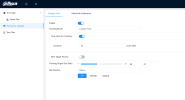
Hereare the screenshots of my settings:
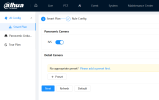
next:
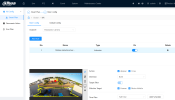
And here is the video:
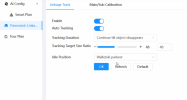
( I might have a "solution" that is set a max time for tracking instead of the options :
But at the - Custom option you can set the time and it should aways go back to the desired preset location but still this should not behave like this does it ?)
this would be my first post here .
I have several mainly Dahua cams in my system and lately i installed at a friend of mine and here on my parkingspot the same camera (DH-SDT4E425-8P-GB-APV1)
The image is pretty good, also the auto tracking works decent untill this happens.
The older model EOL cam i have has i think autotracking v2 and this should be V3 but that cam works flawlessly this one not so much.
Some camera info:
Device Model
DH-SDT4E425-8P-GB-APV1
ONVIF Version
23.12(V3.1.0.1734191)
System Version
V3.200.0000019.1.R, Build Date: 2024-12-19
Web Version
V5.01.0.2160692
PTZ Version
V2.401.0000001.84.RHNGC_240105_49361
Algorithm Version
1.0.3
Security Baseline Version
V2.4
H5Player Version
V3.01.1
What i have done is setup the camera,
- set a preset
- then go to AI
- from there SMART PLAN and made a rule
- i used Tripwire and selected a box
- did not put a minimum size in , and maximum size is the whole screen.
- turn on direction both
- turn on human filter and vehicle
- turn on action appear and cross
Step 2
Went to Panoramic linkage and selected
- enable
- auto tracking
- follow until xx
- size
What happens is when for example a car drives into the tripwire border, it follows, and person gets out walks away, its in a sort of loop and it does not stop until i press the zoom or a preset in PTZ then it returns after X minute and works like should again.
( i have seen this behaviour also on the wall at my friends cam, here you can see a little video where it is focussed somewhere on a wall after it tracked a car and stays in the loop)
Made a recording of my screen where it does this and it doesn't stop from itself.
Does anyone know or has the same experience with this ?
Hereare the screenshots of my settings:
next:
And here is the video:
( I might have a "solution" that is set a max time for tracking instead of the options :
- Continue till object dissapears
- Track untill objets tracked by detail camera dissapear
But at the - Custom option you can set the time and it should aways go back to the desired preset location but still this should not behave like this does it ?)
Last edited: