

Design - Video Streaming for Curling Facility

Froostix

n3wb
Nov 28, 2019
7
1
Canada
Hi folks!

I have been asked to design and install a video streaming system for a facility that hosts curling events. I have never installed system like that before but I have a background in computer networking. After a lot of research on the internet and on this forum, I finally came up with an idea for my design and wanted to submit it to you for comments.

The curling facility is made of 2 ice sheets. Each sheet has a circular target on both ends which makes a total of 4 targets. 1 camera will be installed above each target. 2 more cameras will be installed back to back, in the middle of the rink, each one looking in opposite direction towards an end of the rink. The goal here is to provide a view of the players. This makes a total of 6 cameras. The customer has 3 monitors: 1 large on which he wants to be able to see all cameras and 2 smaller screens which will only display one camera. System has to be user-friendly so that they can easily change the display of each screen (even though smaller screens will mainly remain unchanged and only main screen configuration will be changed).

I came up with the following design (picture attached): 6 IP cameras + PoE NVR. NVR is connected to a switch via its LAN port. Each monitor has an Ethernet/HDMI RasberryPi connected to the switch. The idea is that a lightweight web browser will be lauched on each Raspberry to access the NVR Browser Page. The desired cameras will then be displayed on each monitor.
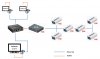
IPCameraDesign.JPG

My questions are the following:
1°) Do all NVR are accessible via a web browser ? I read a few NVR datasheets but this is never clearly mentioned... Since I never handled on of these, I was wondering if Web Browser Access Page is a basic feature on NVRs?
2°) Is each display customizable for each browser connection (Is it a user-based system with credentials or other)? The whole point of the design is to be able to have different display on multiple monitors and I would not want to have a bad surprise when the time comes...
3°) The link between the NVR and the switch will support 6 HD video streams. From your experience, is 1000BaseT Ethernet enough or did you have any bad experience ?
4°) Have you used RaspberryPi for similar installs? Are they reliable for this usage and how do they handle the intense video flow?
5°) I would like to use a reliable IPCamera brand. I have read that Hikvision, Amcrest and Axis are some of the main players. Do you have any recommendation that would fit a small project like this one?

Thank you for your help!
Salutations from Canada
 
Distances and lighting would be helpful
 
1- Yes, but there are other programs such as Dahua's SmartPSS that allows more flexibility for what you want vs logging directly into the NVR
2- Yes user with creds.
3- Outta my league
4- Outta my league
5- Likley many opinions. Axis is a top brand, but generally 3X+ more expensive than HiK or Dahua - not necessarily 3x quality
 
1) Yes, but don't count on raspberry pi being powerful enough to handle an NVR's web interface (and if your NVR requires a browser plugin, it won't run on pi anyway).
2) Yes
3) Absolutely it is enough. Each video stream is likely to be less than 10 Mbps (the bit rate limit varies by camera model and sometimes also by the chosen resolution, and frame rate).
4) I use a raspberry pi 2 (old model) to feed cameras to an attached 1080p monitor using a program called "omxplayer". Once in a while, a video stream freezes and the "omxplayer" application needs to be restarted. Often enough that I programmed my pi to automatically restart the players if their CPU usage drops to 0 for too long and also twice a day on a schedule. In addition to this, sometimes the pi simply crashes (black display, unresponsive) and needs power cycled.
5) Hikvision or Dahua would be good. Amcrest is mostly rebranded Dahua cameras these days. Axis is kind of overpriced and I have no experience with them.

For specific recommendations, you'll need to specify more requirements.

A) 1080p? 4K? In-between?
B) Do you need to record? If so, how much?
C) Do you need any cameras to support audio input (microphone)?
D) What will the lighting be like?
E) Is there a need for frame rates above 30 FPS? (TV/movies are typically 24-30 FPS, which most IP cameras can do)
F) What kind of horizontal field of view will be appropriate for each camera?
G) What is the budget for Cameras / NVR like?


If you look around this forum, you'll find lots of people buy cameras from @EMPIRETECANDY and a lot of people install Blue Iris on a Windows PC instead of using a traditional NVR. I know that Blue Iris would make it pretty easy to do the multi-monitor setup you want, but it isn't very efficient at drawing video to the screen so it may be advisable to limit the display resolution to 1080p. (higher than 1080p resolution cameras can still be beneficial for zooming in)
 
Hi guys!
Thank you so much for your replies, this helps me a great deal! :)

To answer your questions:
- Lighting is excellent in the facility. Very bright lighting from 3-meter ceiling.
- Distance: furthest camera to NVR would be approx. 60 meters; NVR to monitors distance will be between 40 and 60 meters
- Recording is nice to have if budget allows, but not mandatory
- 1080p or lower / 30fps will fit the bill
- No audio required
- The only two cameras that may require wide-angle are the ones that will be used to film the players. Cameras will have to span 10 meters wide at 25 meters away. Not sure if wide angle is required for that?
- Budget for cameras/NVR/... is approx. $US1500.

I had a look at both Dahua's Smart PSS and Blue Iris. I am still not sure if they can do what I am looking for: different displays on multiple monitors. How would that work? For you to understand where I am at, here is my thinking path:
- I first wanted to have 3 independent video outputs on my NVR, but it seems that most NVRs have only 1VGA/1HDMI output (high-end models for up to 24 channels offer only 2 HDMI outputs!!!). I found some topics where people use HDMI splitters but in my case splitting won't work as I want each monitor to be different. I gave up the "simple" video outputs solution.
- I then thought about a server-client architecture where my NVR (or software NVR) would act as a server and monitors would be clients, all hooked up with Ethernet to the same switch. RaspberryPi running a WebBrowser as clients looked inexpensive but you say it is unlikely that they will handle the charge...

What would be the way to go then? A real computer behind all monitors? That sounds expensive... Or would Blue Iris on a Windows computer and RaspberryPi's accessing BI NVR via a web browser work better than accessing a traditional NVR web interface (and no need for a web plug in with Blue Iris)?
I'm sure I am missing something here!

Thanks again for your help!
 
Last edited:
Ok I am getting tangled up here... I guess my main questions are:
- Would a RaspberryPi 4 be powerful enough to access a NVR Web Interface?
- Is it less resource-demanding to access Blue Iris web interface than any other NVR web interface?

I am leaning towards an NVR+Cameras package sold by Hikvision or Dahua unless Blue Iris provides better performance with RaspberryPi...

@bp2008: I saw in another post that you were using several instances of omxplayer on a Pi2 for 7 different feeds. Are you using any kind of NVR or are you accessing each camera directly from your Pi2?
 
I think the Pi's would be fine if you were running BI with the web interface. It may be a cheaper way to go for your monitor positions.
 
Thanks for your reply mikeynags!
I have designed one system with IP cameras, and another one with analog. It seems cheaper with analog DVR + cameras but less flexible than NVR + IP Cameras.
It looks like the biggest gap is in the cameras. Hard to find reasonnably priced IP cameras for PoE / 30fps / HD(720p/1080p) / 70-80°angle...
 
I would look at @EMPIRETECANDY for pricing. Plenty of models in your price range and specs for 720P/1080P @30fps video. He has an AliExpress and Amazon store. You can find more info in the vendor section of the forum.
 
Did a curling club last season with pretty much this brief. The cameras and the network arethe easy part. The screens are what will eat your time.

1. NVR web access. Most have it, but it's built for somebody checking a site for twominutes, not a screen running six months. Expect plug-in requirements, quiet drops tosubstream once you open a few tiles, idle timeouts, and a firmware cap on concurrent liveview sessions. Three browsers on one NVR all day will find that cap.

2. Custom layout per screen. This is your real problem. NVR live view gives you itslayouts on that session, and per-user saved views are an afterthought no club volunteer isgoing to touch. What they want is TV 1 on sheets 1-2, TV 2 on 3-4, big screen on whateverdraw is running, and somebody who isn't you able to change it. I looked hard for somethingoff the shelf — NVR web view, VMS clients, signage players, the prosumer gear thatadvertises multiview. It's all either a fixed quad or costs more per screen than the camerayou're putting on it. Leave yourself room in the quote here.

3. Gigabit for 6 streams. Fine. Six cameras at 4-8 Mbps is around 50 Mbps, you'renowhere near the edge. Bandwidth isn't what bites you, decoding is — size against what eachscreen has to decode and stitch nonstop. Keep cameras and displays on the same subnet, andput the switch on a UPS. Nobody's on site to restart anything.

4. Pi behind each monitor. Fine for a demo, rough for a season. A browser with a few HDtiles is what a Pi is worst at: you end up software decoding, it runs hot, frame pacing getsugly, memory creeps over a few days. Add SD card wear and a crashed browser with nobodythere to hit reload, October to April, no IT on site. If you go that way, plan for awatchdog and auto restart, real storage, a nightly reboot, and some way to know a screen isdead before the club calls you. Also worth thinking about: three PCs behind three TVs isthree mounts, three power drops and three things to support, and they'll want a fourthscreen next year.

5. Cameras. On the Canada angle: the federal government ordered Hikvision Canada to ceaseoperations over national security. That's the company's Canadian operation, not a ban onowning the gear, and a private curling club isn't a government site with a procurement list.If your client has public money or a compliance requirement attached, stay off the brandcompletely. If they don't, the practical reality is that most of what's affordable in thisclass is Hikvision or Dahua silicon under somebody else's label, and that's what I'd beusing. Just know what you're actually buying.

Axis if the budget carries it. Otherwise whatever you already stock and can support, becauseon this job the brand matters a lot less than how you set them up.

On ice: fast motion on a big white surface is worst case for auto anything. Auto exposurehunts, WDR smears, and DNR turns a moving rock into a comet. Lock exposure, DNR down or off,and test it with bodies actually on the ice — an empty rink looks great and tells younothing. Give it bitrate and keep the GOP short, CBR on the overheads; the smart codec modesare tuned for a scene where nothing moves and come apart on a sliding rock. And watch yourlatency, the lounge can see the real ice through the glass. More than about a second behindand they'll tell you it's broken no matter how good the picture is.

Happy to answer anything else.