
Damn... My storage drive died. : ( Which of the WD Purple drives do I want now?
- Thread starter Mike A.
- Start date

You are using an out of date browser. It may not display this or other websites correctly.
You should upgrade or use an alternative browser.
You should upgrade or use an alternative browser.

I think if you go over 8TB they all spin at 7200 right? anybody? anybody? Bueller?
at 8TB you can get 5640 Rpm drives and 7200 Drives.
below 8TB i think they're all 5640 or 5400....
My 7200 is in my bedroom, it has some churning at times.
the 5640 of course is quietly going on, at the Condo in a noisy ass room with a whirring Cisco enterpise POE switch.
I lernt me something there ....about noise.
the drives oughta be in opposite locations.
at 8TB you can get 5640 Rpm drives and 7200 Drives.
below 8TB i think they're all 5640 or 5400....
My 7200 is in my bedroom, it has some churning at times.
the 5640 of course is quietly going on, at the Condo in a noisy ass room with a whirring Cisco enterpise POE switch.
I lernt me something there
....about noise.the drives oughta be in opposite locations.
Last edited:


this guy seems to have selection and availability and a reasonable score for his seller rating, considering volume, and the statistical probably of chronic malcontents.
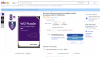
The 14TB WD Purple Pro drive in my BI server, is nearly silent. It's a 7200 RPM drive which I though would be fairly noisy, but that is not the case. The case fan is noisier and that needs to change.

- May 6, 2017
- 4,210
- 7,094
Found a 14TB open box on Amazon Warehouse for $160. Had to take a chance on it at that price. See how it looks and the hours and all when it comes tomorrow. If not good, easy return.

fenderman
Staff member
- Mar 9, 2014
- 36,891
- 21,417
If noise is important to you I would search for the drives that are reviewed to have low noise. It doesnt have to be a purple.Looks good so far. I also was wondering about drive noise but seems quiet here too. It chunked some while doing the SMART test but just running BI with a bunch of cams writing to it, I don't hear it at all.
- May 6, 2017
- 4,210
- 7,094
Not that important in my case but someone had mentioned above so I was confirming that mine's also very quiet. Less noisy than the 5400 WD white drive that I was using.
- May 6, 2017
- 4,210
- 7,094
I retract what I said about this drive being quiet. It is most of the time but now and then it starts chunking like crazy and is kind of noisy.
Not sure what's causing it when it does. BI records silently most all the time. I turned off Defender from looking at the drive. Disabled indexing. Not sure what else to check.
ETA: Turned off defrag now too. Looked to be running when I checked performance manager even though the drive is basically new. See if that does anything.
Not sure what's causing it when it does. BI records silently most all the time. I turned off Defender from looking at the drive. Disabled indexing. Not sure what else to check.
ETA: Turned off defrag now too. Looked to be running when I checked performance manager even though the drive is basically new. See if that does anything.


Yes defrag is a killer on these drives. When I first began with IPCAMS I did not know that. Had really bad performance. But once I found out how to turn off defrag, never had an issue again.
- May 6, 2017
- 4,210
- 7,094

In Windows 11, it looks like this. You can go to "Advanced View", and turn off the automated scheduler completely. 10 may look different. With every version, they clip away more control over shit it seems like.
This may have been why my x drive was sometimes noisier than others.
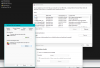
This may have been why my x drive was sometimes noisier than others.
Last edited:
- May 6, 2017
- 4,210
- 7,094
It's the same in 10. That does seem to have stopped it. Haven't heard it chunk once since disabling. Back to nice and quiet again.
