Dahua SD49225T-HN PTZ repair log

CamCrazy

Getting comfortable
Aug 23, 2017
885
742
UK
I am in the process of an attempted repair on one of my SD49225T-HN ptz cameras, believe the network socket has corroded, certainly one of the spring connectors has gone bad. Shall make notes on here for the pin out/colour mapping of the 8 core network cable and also list the replacement I got from Amazon, with associated cable mapping. Fingers crossed it is this and not on the board level! If I provide 12v to the power jack it spins up and initiates as normal, the cat5 connector will not give it any life at this point.

So far I cut the cables and mapped pins etc, will solder and shrink wrap the cables tomorrow or day after and hope that it does the job. My only concern is that in the past this camera has gone off for an hour or two, then worked for weeks or even months after that. Makes me think it is likely something on the board, but anything is possible. It had been working fine most recently until there was a power outage and it never came back on since then!

For those who don't use it, be sure to apply dielectric silicone grease when installing any IP cam, outdoors at least. Maybe it was the rush to fit this one being my first PTZ but I never did apply any grease, still it lasted for 7 years which is not bad. More to come when I progress, including cable mappings.
 
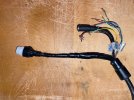
OK, this went on hold for a while! finally soldered the wires today, including clear heat shrink on all individual cables and then larger piece surrounding. Tight and fiddly job but I have done worse :lol:

I will wrap it generously in electrical tape once tested, this is still 50/50 whether it fixes the problem but for the sake of a couple of hours total work it will be worth a shot!

Excuse the dirt on original PTZ cable, that is what 7+ years looks like and yes I will seal the corner mounting plate properly this time when either this or a new PTZ goes up, of course plenty silicon grease will be added as well.

As I type this it is clear that the orange to orange and white cable does not have proper solder coverage :wow: which is not great, should have dipped them in flux and/or sanded first, damn it, did check most and they looked OK. Hopefully it will be enough to hold, the individual heat shrink has heat activated glue inside so that combined with the outer and then taping should keep it together. That is going to bug the hell out of me now, don't really want to risk cutting the outer heat shrink away as I cannot replace that at this stage! The takeaway from this is check individual cables which I thought I had!!
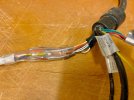
Was thinking about using wire ferules and crimping, probably a better way to go and I do have some but it is also more bulky. The soldered wires were twisted before soldering, then heat shrink so fingers crossed for a good outcome. Worst case if it does fail at some point I will know to crimp, if it's good enough for NASA (I believe?!?) then crimping should be the prefered method I suppose. :thumb:

Will plug it in later and test. Will also list wiring layout for others if anyone else attempts the same.


IMG_3883.jpg
 
Last edited:
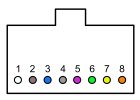
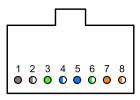
The 49225 network connector pin out is as expected for a standard RJ45 connector/socket arrangement:

1 - Brown
2 - Brown/White
3 - Green
4 - Blue/White
5 - Blue
6 - Green/White
7 - Orange
8 - Orange/White

49225PTZ-RJ45 Pinout.jpg
 
Last edited:
Repair was succesful, decided against cutting it open to rework just the one cable, probably do more harm than good. That is one down and one to go, cable mapping of the replacement cable to follow and link also.

IMG_3893.jpg
 
Last edited:
Last edited:
As an Amazon Associate IPCamTalk earns from qualifying purchases.
Final push and the PTZ is installed again today, bracket was looking a bit bare this last few weeks but complete again now! seems to be working fine so far.

I had a 54ProZE running in its place since removing the 49225 (not on the same corner bracket!) so it was a bit odd switching from 4MP colour to 2MP IR. Reminded me how good the starlight PTZ's are though, amazing things, the ability to move the camera anywhere never gets old. :clap:

Waiting on an additional POE+ switch coming this week, then I can add a few more semi retired cameras back onto the system, and a couple of new ones to come. Will be moving onto the second 49225 repair but probably do that beginning of next year, assuming it will be either RJ45 connector fail or corroded socket, similar to this one. The second one has done a LOT more work though, used to be on IVS triggers so moving multiple times a day, maybe 300-400 for several years, although it was north facing so tended to get less severe weather.
 
  • Like
Reactions: Chokolinho
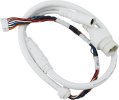
Cable I used below to repair this PTZ, basically cut the tail end as long as possible then strip back accordingly.
No criticism of your post intended here. I just have to wonder about humorous ad copy like this:

  • 10 core 10 pin design, the cable uses 10 independent cores and 10 pin connectors, supports high-speed data transmission, and has strong stability.
  • Ethernet cables are suitable for devices that require efficient transmission, such as IP cameras and surveillance systems, to ensure that network signals are interference-free.
 
When I've had to repair these connectors in the past, I used an RJ45 keystone jack available at most hardware stores. Seems a lot easier than soldering. Of course the connector is not as easy to weatherproof after that.

The SD49225T-HN had/has lots of reliability problems in my experience. Fortunately they have a button for factory reset, which is fairly easy to access by removing the 4 screws on the back of the black ball shaped section containing the lens. There's a video below showing where it is. In my experience making it actually reset takes longer than the 5 or 10 seconds shown in the video. I had to do this literally last week after one SD49225T-HN stopped working. The web interface acted like the camera had not been activated, but the activation process would not complete until it was factory reset via that reset button.

 
No criticism of your post intended here. I just have to wonder about humorous ad copy like this:

  • 10 core 10 pin design, the cable uses 10 independent cores and 10 pin connectors, supports high-speed data transmission, and has strong stability.
  • Ethernet cables are suitable for devices that require efficient transmission, such as IP cameras and surveillance systems, to ensure that network signals are interference-free.

Well technically there were 10 pins, and although I didn't count the cable cores there could well have been 10 also. Which really just leaves the 'strong stability' which I am guessing you were probably referring to. The efficient transmission and interference free are probably dressing it up a bit :lmao: :lmao:
 
When I've had to repair these connectors in the past, I used an RJ45 keystone jack available at most hardware stores. Seems a lot easier than soldering. Of course the connector is not as easy to weatherproof after that.

The SD49225T-HN had/has lots of reliability problems in my experience. Fortunately they have a button for factory reset, which is fairly easy to access by removing the 4 screws on the back of the black ball shaped section containing the lens. There's a video below showing where it is. In my experience making it actually reset takes longer than the 5 or 10 seconds shown in the video. I had to do this literally last week after one SD49225T-HN stopped working. The web interface acted like the camera had not been activated, but the activation process would not complete until it was factory reset via that reset button.


That is a fair comment, once I realised the entry point was basically resin? sealed I soon decided not to mess with that. I would rather solder repair the cable and ensure the weather sealing of the camera is left untouched. We have quite a bit of rain and wind here, temps don't go much above 35 degrees celsius max so heat isn't crazy, but so far my two 49225's have been running pretty solid for 7-8 years now, one also had very heavy use on an IVS trigger for half of that time at least. Might have got lucky with mine, might also be relatively low ambient, normally doesn't go above 25 degrees in the summer, much cooler generally. Mine will have the odd :brainfart: where they need a power cycle from the POE switch but otherwise all good.