Dahua keeps dropping Frames Per SEcond (FPS) to around 5 - 6 even though it's programmed to do 25.

Oct 6, 2025
18
5
South Africa
My Dahua keeps dropping FPS to around 5-6, even though it's programmed to do 25.

If I restart the camera, it goes back to normal.

I have another camera of the exact same model, and it never does it.

What causes this? And how to fix it?
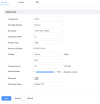
1771926474476.png
Device Model
DH-SD6AL445GB-HNV-IR

ONVIF Version
23.12(V3.1.0.1734191)
System Version
V3.200.0000018.2.R, Build Date: 2024-06-17
Web Version
V5.01.0.1921243.TA
PTZ Version
V2.401.0000001.54.RHNDZ_221117_43280
Algorithm Version
2.0.2
Security Baseline Version
V2.4
H5Player Version
V3.01.1
 
Do you mean it reverts in the web interface or in the recording? If you set the parameters in the web interface using Edge Browser or similar, you may find that those settings aren't retained for long after you close it. Best to use IE for settings although some report sucess with Blue Moon.

If the web interface is showing 25fps even after you've reopened it but the recording is still low on frames, I suspect a network bottleneck eg faulty cable etc.
 
I ingest the feed through Python. And that shows 5-6.
Also, it's streaming to Youtube, and that also then shows that very stuttery 5-6 FPS. But as soon as I switch it off and on, both go back to smooth 25fps
 
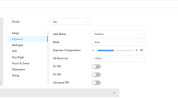
show Your camera image/video settings.. especially exposure settings...

if the exposure is too long (like 1/6s) at night then you will get only 6 frames per second...

Also what are IR settings.. if there is too low IR, then exposure will be slow..

it's dark PTZ camera with small sensor (1/2.8") and big zoom (45x)... it needs lot of light / IR to work...
 
If it is starving for power it can drop the FPS.

Depending on the camera, H265 and some other smart or SSA codec could be dropping the FPS. Make sure to use H264 and no smart codec options.
 
View attachment 238694

Hi,
I don't think it's the exposure, as when we restart the camera, the FPS returns to normal.

without some night video footage showing the problem with 6fps and some visible vehicle/human movement on it (to see what exposure time was used by camera and what light/IR situation was on scene) - it's hard to help you...

you can try update firmware to latest one, try to downgrade encoder to h264 or even try to do configuration default to factory and configuration from scratch...

for more ideas show the video footage..