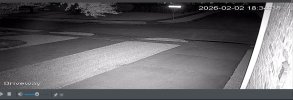
I have added a Dahua IPC-HFW5231E-Z12E Camera to monitor an intersection, ten feet off ground, excellent video, great clarity.
While setting up I used the Smart Plan with People, Vehicles, Etc. And it was recording everything, even blocks away and tree leaves moving.
I lowered the sensitivity level to Medium, Low and it helped however the neighbor has a motion detection light that illuminates the street sign across the street triggering hundreds of emails for the camera.
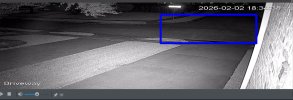
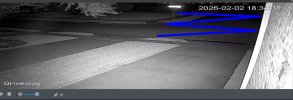
I tried changing to IVS from SMD, but it also sends false alarms. included is a photo of the sign and how it triggers alarm emails. I have tried limiting the hours of the camera function from dawn until dusk with no luck.
I am looking for a direction such as, scheduling, sensitivity, filter, hours for recording, currently grasping at light and it's effect on the AI of the camera.
While setting up I used the Smart Plan with People, Vehicles, Etc. And it was recording everything, even blocks away and tree leaves moving.
I lowered the sensitivity level to Medium, Low and it helped however the neighbor has a motion detection light that illuminates the street sign across the street triggering hundreds of emails for the camera.
I tried changing to IVS from SMD, but it also sends false alarms. included is a photo of the sign and how it triggers alarm emails. I have tried limiting the hours of the camera function from dawn until dusk with no luck.
I am looking for a direction such as, scheduling, sensitivity, filter, hours for recording, currently grasping at light and it's effect on the AI of the camera.