We have a Dahua DVR that we can log into remotely, manage remotely via the web interface, but at the local level, cannot be interfaced with via usb mouse. The view that it is stuck on is a PTZ camera.
What has been tried:
-tried 4 different mice in each usb port on the dvr with known working mice tested. the optical lasers on the mice light up, indicating they are receiving power
-adjusted user/account permissions for each user on the dvr and deleted extra unnecessary accounts. There was previously a user group on the system whose access only extended to PTZ but "camera" was unchecked. This made me think the existing accounts on the DVR were locked down to only have access to PTZ cameras, or at least the one it was stuck on, but I have since edited every user to have all permissions, deleted extra users that were unnecessary, checked the remaining accounts to make sure they were not a part of that limited user group, which even if they were, the user group was changed to include all permissions. One important thing to mention, every time I reboot this DVR, it skips the login and just automatically goes to this view, it doesn't even ask for a user/account to log into, which is strange. I was thinking maybe it was just a corrupt or stuck account, and if I deleted all unnecessary accounts or edited their permissions I could fix the issue. The DVR is still stuck on this one camera.
-I have edited the "PTZ Type" option in the "PTZ" category tab in the setup menu to be controlled remotely instead of locally. I can move around the camera, I see it locally on the DVR moving around, the DVR and cameras aren't frozen, it just isn't responding to mouse clicks and won't go back to the grid view of all the cameras. There are 3 accounts left on the DVR that I cannot get rid of 888888, admin and default. I know some accounts will always be there, local accounts that will never go away, but in some Dahua DVRs that I've worked on, I've only seen one, maybe two, not three accounts. Usually it's just admin that you cannot remove, but I can't remove default user or 888888. I'm only trying to remove them in the case that they are corrupted accounts that are auto logging in, if the fix is something else it doesn't matter.
I'm still fairly new at interacting with these Dahua DVRs, so I don't know all of the features, the ins and outs yet. Is there a setting or a checkbox I'm missing somewhere that would lock down the DVR locally to just one camera with no ability to view a context menu or click out of said camera, yet continue to automatically login without asking for credentials, even after a reboot?
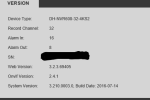
DVR model information in the attached image
What has been tried:
-tried 4 different mice in each usb port on the dvr with known working mice tested. the optical lasers on the mice light up, indicating they are receiving power
-adjusted user/account permissions for each user on the dvr and deleted extra unnecessary accounts. There was previously a user group on the system whose access only extended to PTZ but "camera" was unchecked. This made me think the existing accounts on the DVR were locked down to only have access to PTZ cameras, or at least the one it was stuck on, but I have since edited every user to have all permissions, deleted extra users that were unnecessary, checked the remaining accounts to make sure they were not a part of that limited user group, which even if they were, the user group was changed to include all permissions. One important thing to mention, every time I reboot this DVR, it skips the login and just automatically goes to this view, it doesn't even ask for a user/account to log into, which is strange. I was thinking maybe it was just a corrupt or stuck account, and if I deleted all unnecessary accounts or edited their permissions I could fix the issue. The DVR is still stuck on this one camera.
-I have edited the "PTZ Type" option in the "PTZ" category tab in the setup menu to be controlled remotely instead of locally. I can move around the camera, I see it locally on the DVR moving around, the DVR and cameras aren't frozen, it just isn't responding to mouse clicks and won't go back to the grid view of all the cameras. There are 3 accounts left on the DVR that I cannot get rid of 888888, admin and default. I know some accounts will always be there, local accounts that will never go away, but in some Dahua DVRs that I've worked on, I've only seen one, maybe two, not three accounts. Usually it's just admin that you cannot remove, but I can't remove default user or 888888. I'm only trying to remove them in the case that they are corrupted accounts that are auto logging in, if the fix is something else it doesn't matter.
I'm still fairly new at interacting with these Dahua DVRs, so I don't know all of the features, the ins and outs yet. Is there a setting or a checkbox I'm missing somewhere that would lock down the DVR locally to just one camera with no ability to view a context menu or click out of said camera, yet continue to automatically login without asking for credentials, even after a reboot?
DVR model information in the attached image