CPU usage after upgrading to BI 6 ?

hotwheels498

Getting the hang of it
Jun 24, 2018
51
32
West Virginia
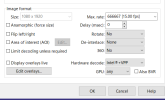
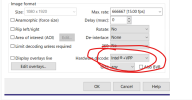
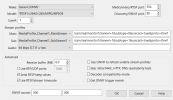
I did the upgrade to 6 from 5 and now i have very high CPU usage. I have 15 camera that i have had on this BI setup for several years now. With version 5 my CPU usage would always be in the 25 to 35% range, after the upgrade to 6 it is running 75 to 85%. I went thru and double checked all my cameras are using Intel HW acceleration with 15 fps. below is the typical config of my cameras in BI
Any ideas or suggestions ?
1767478964438.png
1767479034437.png
 
Have you confirmed the CPU usage with Taskmanger? Turn off the hardware decode on all your cameras, it is not needed is you are using sub streams, post back if that improves things! Are you using the internal AI?
 
  • Like
Reactions: gwminor48
Hardware aceleration could be your issue. It used to be the go to to use CPU decoding, but then it no longer became necessary and in some past BI builds I believe it actually started to raise resource usage. As the hardware that decodes it is your CPU architecture, it's possible it's acceleration that's causing the issue. Turn it off and see what the usage is like then. You can always turn it back on if it's worse still.
 
  • Like
Reactions: gwminor48
I believe that is what I and @CCTVCam are recommending! If your CPU load does not go down then it is a simple matter of changing it back!

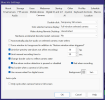
If you don't want to change it on all cameras I think that it can be disabled globally on this screen by setting the "Hardware accelerated decode" to "No", a restart of BI and the service will be required before it takes effect!

Screenshot 2026-01-05 140850.png
 
If you don't want to change it on all cameras I think that it can be disabled globally on this screen by setting the "Hardware accelerated decode" to "No", a restart of BI and the service will be required before it takes effect!

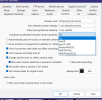
The global setting only affects cameras where "Hardware decode" is still set to "Default".

Then restarting the BI service is technically optional. The change would also take effect if you manually restart each of the affected cameras. That just gets unwieldy beyond a few cameras.
 
I had confirmed in task manager that it was BI consuming the processor.

Changed the cameras in BI to Hardware Decode = No

CPU now down around 25% . This appears to have corrected it. Has been several years since i had to actually really check anything in BI it has just done its thing, lol

Thanks for the support
 
1767645024373.png