

Always wanted to get temp, wind, rain etc on all my camera displays but just never had the time to fiddle with BIT, Weather Underground, and Blue Iris Overlays.
Now, I have time to fiddle!
I do have my own weather station.
Following the help file from BIT, created a Weather Underground account so my weather station is registered.
Received the API keys.
Inputted in the required info for BIT and Overlay macro setup.
Went into a single Blue Iris camera and inputted the required overlay commands (%1, %2, etc).
Whalla! My PTZ test camera had the overlays going perfectly.
I tried the COPY TO button on the PTZ camera setting, left alone the FROM PROFILES 2, selected TARGET for all cameras, selected just the OVERLAYS check mark, hit OK ...all cameras reset. Yet, only 3 out of 20 took the overlays.
Have tried to COPY TO towards individual cameras, no go.
Kinda at a loss Really do not want to go into each specific camera 17x's to setup macros.
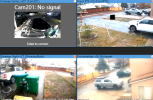
(dont mind the Driveway Centerx201 No Signal camera... I bought new Ubiquiti Ultra max gateway router and in the process of setting up whole new IP Scheme). But as you can see, the EntranceHigh x26 did not take the copied overlays like Driveway, Right did.
I've tried various methods of copying, and now I forget what I've done
Now, I have time to fiddle!
I do have my own weather station.
Following the help file from BIT, created a Weather Underground account so my weather station is registered.
Received the API keys.
Inputted in the required info for BIT and Overlay macro setup.
Went into a single Blue Iris camera and inputted the required overlay commands (%1, %2, etc).
Whalla! My PTZ test camera had the overlays going perfectly.
I tried the COPY TO button on the PTZ camera setting, left alone the FROM PROFILES 2, selected TARGET for all cameras, selected just the OVERLAYS check mark, hit OK ...all cameras reset. Yet, only 3 out of 20 took the overlays.
Have tried to COPY TO towards individual cameras, no go.
Kinda at a loss
Really do not want to go into each specific camera 17x's to setup macros.(dont mind the Driveway Centerx201 No Signal camera... I bought new Ubiquiti Ultra max gateway router and in the process of setting up whole new IP Scheme). But as you can see, the EntranceHigh x26 did not take the copied overlays like Driveway, Right did.
I've tried various methods of copying, and now I forget what I've done


