Using built in BI AI. Version = 6.0.5.7
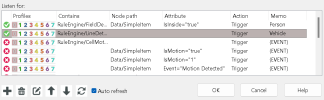
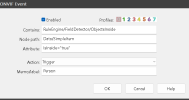
Goal of Driveway cam like most is to detect a vehicle or person. Gave up trying to ignore non-moving objects using object tracking. Any movement would cause the truck parked in the driveway to cause an alert. Now using built in camera tripwire across driveway to detect motor vehicle only along with Zone A with AI to only confirm using person. If I attempt to do this with a cloned camera which only uses ONVIF and the main just uses MS w/AI, this works but with one problem: despite having the cloned camera set to trigger the main camera, it does not do anything as logs say nothing found presumably because the AI only confirms with person. I expected the external trigger sources would not be bound by the AI but guess that’s not how it works. I’d like to have the main camera record when a vehicle enters to avoid having to go to the cloned recordings to see this. If I attempt to do both ONVIF and MS w/AI on same cam with no clone, it never alerts on ONVIF. I’ve experimented with all the various settings, but nothing does what I’m trying to achieve. After months of trial and patience, I’ve run out.
Goal of Driveway cam like most is to detect a vehicle or person. Gave up trying to ignore non-moving objects using object tracking. Any movement would cause the truck parked in the driveway to cause an alert. Now using built in camera tripwire across driveway to detect motor vehicle only along with Zone A with AI to only confirm using person. If I attempt to do this with a cloned camera which only uses ONVIF and the main just uses MS w/AI, this works but with one problem: despite having the cloned camera set to trigger the main camera, it does not do anything as logs say nothing found presumably because the AI only confirms with person. I expected the external trigger sources would not be bound by the AI but guess that’s not how it works. I’d like to have the main camera record when a vehicle enters to avoid having to go to the cloned recordings to see this. If I attempt to do both ONVIF and MS w/AI on same cam with no clone, it never alerts on ONVIF. I’ve experimented with all the various settings, but nothing does what I’m trying to achieve. After months of trial and patience, I’ve run out.