can't connect to O-Kam MW3 camera

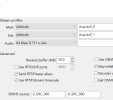
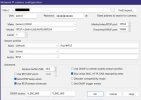
I have the first lens operation (ptz lens). I wonder how to get the second/third lens? maybe build it again? change the "/tcp/AV0_1" ?
 
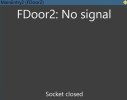
Thanks for sharing @Killer Kool - using your settings for a window cam (EVERSECU 2K Window Camera), getting "socket closed"

Works perfectly with o-kam app, just cannot for the life of me get it to link up with BI despite their documentation stating it's ONVIF compatible.

ARGH
 

Attachments

  • Screenshot 2025-12-30 at 18.31.35 Medium.jpeg
    Screenshot 2025-12-30 at 18.31.35 Medium.jpeg
    22.9 KB · Views: 3
  • Screenshot 2025-12-30 at 18.32.03 Medium.jpeg
    Screenshot 2025-12-30 at 18.32.03 Medium.jpeg
    62.8 KB · Views: 3
Works perfectly with o-kam app, just cannot for the life of me get it to link up with BI despite their documentation stating it's ONVIF compatible.

Have you tried ODM ?
If it is truly ONVIF-compliaint, when you login with ODM using the cams's IP/user/pass then the RTSP URL should be revealed on bottom right screen when you go to "Live Video" in middle screen.
 
So ODM doesn't work/find my cameras. But so far I have the video displayed BI on the first lens.(and the okam app all 3). One thing I did do is use a 9-digit password for the camera. I think you have 2 or 3 passwords in the apps and camera.