can't connect to O-Kam MW3 camera

I was searching all over the place for details on connecting a O-Kam camera via rstp. Thanks to this thread I was able to narrow down what I needed. The only missing piece to the puzzle was the username. I cant recall whera I found it but all O-Kam usernames are "admin".
So to connect your camera you use something like:
rtsp:/ admin : password @ 192.168.x.x:10554/tcp/av0_0 or av0_1

Hope this helps some of you.

Now then, my O-Kam has 3 cameras, 1 ptz and 2 static. I cant for the life of me find how to access the static cameras. If anyone has any info, please pass it on.
 
I have one with double lenses a fixed one and a PTZ one, for me it worked doing the following and thanks to what I read here, I leave the example in case it helps someone:

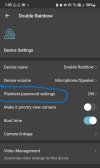
  • I activated the "Plain text password" on the app.
  • With the following URL format worked on VLC:
Screenshot_1.png

now on the part av0_0, the the digit before the underscore it's for which camera, 0=PTZ lens and 1=Fixed lens and the digit after it's the stream 1=Main and 2=Sub stream.

Now I need to test on the NVR.
 
  • Like
Reactions: ballboy
where is "plain Text password" on the app ?
I can't find anything regards "password on the phone app I'm using
 
where is "plain Text password" on the app ?
I can't find anything regards "password on the phone app I'm using
I found it on system Settings (Gear Icon top right corner of live feed), then Device Settings it's the third option "Plaintext password settings"
 
I found it on system Settings (Gear Icon top right corner of live feed), then Device Settings it's the third option "Plaintext password settings"
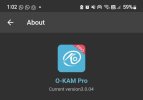
Hey, which version of the app are you using? I don't see the plaintext password option on the latest version I've got installed either.
 
Thanks for your quick reply! That's so weird, though. Mine doesn't show that option at all and it's the same app. Is the password the same as your app login password or did you have to set a separate password for the camera?
 
  • Like
Reactions: ballboy
Probably Plain text option depends on the camera model more rather than the app, the plain text pwd is different it's what is called in other systems rstp pwd.
my one is the same, same app version, but not showing "plaintext password" option
Thanks for your quick reply! That's so weird, though. Mine doesn't show that option at all and it's the same app. Is the password the same as your app login password or did you have to set a separate password for the camera?
 
  • Like
Reactions: ballboy
Probably Plain text option depends on the camera model more rather than the app, the plain text pwd is different it's what is called in other systems rstp pwd.
Which camera model do you have? I'm trying to find a solar-powered camera that works with RTSP, but it's proving to be harder than I anticipated.
 
omg omg ..I have 3 version of this camera...Can not seem to get BI to connect- Works thru the app. I have set the password up to 12345678 from the default of 888888. Once you flip "show plain text password" it request to change it from the default.

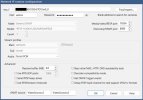
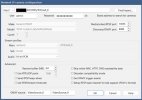
Can you please share a screenshot of the working setup?
 
I've got their window-cam version and have done everything ... plain text password enabled, cam shows up on my network (private network) and tried both 10554 and 10555 ports ... has anyone gotten this to work?
 

Attachments

  • Screenshot 2025-12-29 at 17.32.04 Medium.jpeg
    Screenshot 2025-12-29 at 17.32.04 Medium.jpeg
    61.9 KB · Views: 1
  • Screenshot 2025-12-29 at 17.32.53 Medium.jpeg
    Screenshot 2025-12-29 at 17.32.53 Medium.jpeg
    62 KB · Views: 1