Cannot view camera locally, but can view remotely. Dahua DVR

Jan 27, 2026
6
4
Earth
I've installed a cheapo POE camera (anpviz) at a location, and I added it directly on the DVR itself, not the DVR web interface, and can view the camera remotely via Smart PSS just fine, but cannot view it on the DVR itself. It appears to be live and recording. My current assumption is that this is an older model DVR or firmware and is simply too underpowered to handle the resolution of these newer cameras, but I've been able to view these same type of cameras on similar looking DVR models (can't verify they're the same, or the same firmware). What does the red lock mean? Googling it says it's an incorrect password, but I know it's not, I added the camera to the DVR itself, and can view the camera added to the DVR through SmartPSS, so is it a view permission? Because they can view older cameras just fine, and I think there may be both a mixture of IP and Coax cameras that are viewable. Are there IP specific permissions on these DVRs per account user?

I have already made a number of adjustments in the cameras web interface to lower as many settings as I can find, I've lowered the resolution from 2560x1440 to 720p/360 on both main and sub streams, I've made sure H265 is enabled, I've lowered the FPS to 15, I've changed the bit rate type from VBR to CBR, I've changed the power frequency from 60hz to 50hz, I've changed the image mode from Normal to forced frame rate, but none of these adjustments have allowed the end user to view the newly installed camera. Is there a setting I'm missing somewhere? I had the idea to adjust the encode settings on the DVR itself as well to match what I've changed in the web interface, but when viewing the encode settings on that particular channel/camera, it just says it can't get the configuration. What am I missing?
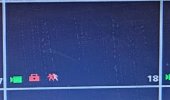

redlock.jpg
 
  • Like
Reactions: bigredfish
I've installed a cheapo POE camera (anpviz) at a location, and I added it directly on the DVR itself, not the DVR web interface, and can view the camera remotely via Smart PSS just fine, but cannot view it on the DVR itself. It appears to be live and recording. My current assumption is that this is an older model DVR or firmware and is simply too underpowered to handle the resolution of these newer cameras, but I've been able to view these same type of cameras on similar looking DVR models (can't verify they're the same, or the same firmware). What does the red lock mean? Googling it says it's an incorrect password, but I know it's not, I added the camera to the DVR itself, and can view the camera added to the DVR through SmartPSS, so is it a view permission? Because they can view older cameras just fine, and I think there may be both a mixture of IP and Coax cameras that are viewable. Are there IP specific permissions on these DVRs per account user?

I have already made a number of adjustments in the cameras web interface to lower as many settings as I can find, I've lowered the resolution from 2560x1440 to 720p/360 on both main and sub streams, I've made sure H265 is enabled, I've lowered the FPS to 15, I've changed the bit rate type from VBR to CBR, I've changed the power frequency from 60hz to 50hz, I've changed the image mode from Normal to forced frame rate, but none of these adjustments have allowed the end user to view the newly installed camera. Is there a setting I'm missing somewhere? I had the idea to adjust the encode settings on the DVR itself as well to match what I've changed in the web interface, but when viewing the encode settings on that particular channel/camera, it just says it can't get the configuration. What am I missing?


View attachment 237131

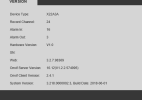
HI someguy ..

I do not know much about the DVRs, for the NVR they use a substream for the multiple camera view and the main stream for the single camera full screen view.

DVRs are analog, so I don't know what they could be doing with regards to the above ( which is IP streams, rtsp )

For analog cameras there are multiple specs.

If you have a Dahua DVR it will support Dahua specs well, and typically some Hikvision analog specs .. however it may not fully support the Hikvision resolution specs.

SO ..

you state you got a cheap PoE camera .. so are you using an analog DVR or IP based NVR ?

What model DVR ? NVR ? Camera ?
 
  • Like
Reactions: someguy5200
If your system is CPU bound, then defintiely use H264. H264 creates slightly larger files, but uses much less processing power than H265. It doesn't sound like a networking capacity issue, so the larger files shouldn't be a problem.
 

Attachments

  • xvr info 1.png
    xvr info 1.png
    13.3 KB · Views: 3
As an Amazon Associate IPCamTalk earns from qualifying purchases.
Can you login directly to the camera? On the actual camera interface not the XVR?

If so login and find encode, change to h.264

That XVR is old and doesnt support h.265
 
Can you login directly to the camera? On the actual camera interface not the XVR?

If so login and find encode, change to h.264

That XVR is old and doesnt support h.265
I can and I changed it to H.264 and it showed up at the store, thank you for the advice. I'm trying it with another camera to verify if it's only that compression setting I need to change or something else in addition to that, but it seems that was the tipping point setting to change, so thank you for pointing me in the right direction. I had considered it initially, but when I googled it it said something about reducing bandwidth so I assume it was less resource heavy and went onto looking at other settings, I didn't think that it might use up more resources to achieve that lower bandwidth. I appreciate the help.
 
I can and I changed it to H.264 and it showed up at the store, thank you for the advice. I'm trying it with another camera to verify if it's only that compression setting I need to change or something else in addition to that, but it seems that was the tipping point setting to change, so thank you for pointing me in the right direction. I had considered it initially, but when I googled it it said something about reducing bandwidth so I assume it was less resource heavy and went onto looking at other settings, I didn't think that it might use up more resources to achieve that lower bandwidth. I appreciate the help.

H.265 does reduce bandwidth, but requires more compute power and newer software / firmware for the calculations.

H.264 often can be better for software / firmware compatibility
 
  • Like
Reactions: someguy5200