Hello all,
I am currently using BI 5 and am quite satisfied. I am mainly using it to see all camera streams not necessarily to record. I therefore arranged all my cameras in a convenient way, with one camera the main cam and it is dynamically adjusted if I drag a different camera onto the spot.
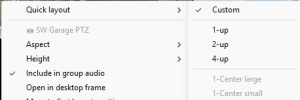
I tested BI6 and imported the exported cameras from BI5. But I was not able to set the same arrangement as I had in BI5. I only managed to arrange with large black areas in between.
Is it not possible to arrange one main camera and several others on the side neatly?
I am currently using BI 5 and am quite satisfied. I am mainly using it to see all camera streams not necessarily to record. I therefore arranged all my cameras in a convenient way, with one camera the main cam and it is dynamically adjusted if I drag a different camera onto the spot.
I tested BI6 and imported the exported cameras from BI5. But I was not able to set the same arrangement as I had in BI5. I only managed to arrange with large black areas in between.
Is it not possible to arrange one main camera and several others on the side neatly?