Camera keeps reverting to profile 0.

Cleve

Getting the hang of it
Mar 3, 2021
179
27
Alabama
Hello, I have one camera that keeps reverting to profile 0 (inactive) every time It does a profile change. I have three Profiles, Home, Away, and night. If the profile changes from away or night to home, I changes to the home profile and then goes to inactive. There is a little red zero in the top left corner of this camera. I am trying to set this camera to be inactive in profile 1 and active in 2,3. Camera changes preset like it is suppose to but when profile one is selected it does not change back to the programmed preset. Profile changes to zero. Any Ideas? Thanks
 
Either you have the global setting turned off and the camera is not following the global settings. If not that, then sounds like a corrupt camera protocol and a delete and re-add should fix.
 
Either you have the global setting turned off and the camera is not following the global settings. If not that, then sounds like a corrupt camera protocol and a delete and re-add should fix.
Thanks, I will try that
 
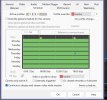
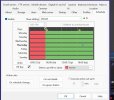
Still having problems. I completely uninstalled and deleted the camera that I thought was causing the problem. But now when the profile changes from Away to Home, it goes to the home profile with the green arrow (run) and the immediately changes to (0) inactive with the yellow pause box between the profile a shield emblem. Shield is green. I have attached two screen shots, 1st one is a camera schedule setting and the second is global.
 

Attachments

  • Screenshot 2026-03-12 200014.jpg
    Screenshot 2026-03-12 200014.jpg
    103.5 KB · Views: 6
  • Screenshot 2026-03-12 200323.jpg
    Screenshot 2026-03-12 200323.jpg
    101.2 KB · Views: 6