


Recently one of my cameras, "LowerGarden" stopped responding in BI. No recordings, and snow in the live view. No amount of camera reboots, camera restarts, or BI restarts would fix it, despite the camera's web server showed a healthy stream, as did VLC.
So I opened exported its settings in BI, created a new camera, imported its settings as LowerGarden2, and that worked immediately.
But now I can't delete the original LowerGarden from BI. When I choose Delete Camera, no matter which of the 4 options I choose:
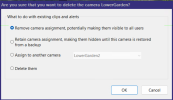
BI thinks about it for 30 seconds, and then reports,
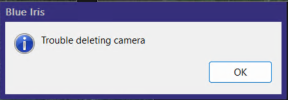
And then I can no longer choose Camera Settings for this camera, because it's grayed out. And I can't even quit BI normally. I get a spinning cursor forever, and I have to kill it with Task Manager.
Once I relaunch it I can choose Camera Settings again, but I still can't delete it.
Should I just delete it from all groups and then delete its registry entry at:
Computer\HKEY_LOCAL_MACHINE\SOFTWARE\Perspective Software\Blue Iris\Cameras\LowerGarden
Would that leave any detritus laying around?
So I opened exported its settings in BI, created a new camera, imported its settings as LowerGarden2, and that worked immediately.
But now I can't delete the original LowerGarden from BI. When I choose Delete Camera, no matter which of the 4 options I choose:
BI thinks about it for 30 seconds, and then reports,
And then I can no longer choose Camera Settings for this camera, because it's grayed out. And I can't even quit BI normally. I get a spinning cursor forever, and I have to kill it with Task Manager.
Once I relaunch it I can choose Camera Settings again, but I still can't delete it.
Should I just delete it from all groups and then delete its registry entry at:
Computer\HKEY_LOCAL_MACHINE\SOFTWARE\Perspective Software\Blue Iris\Cameras\LowerGarden
Would that leave any detritus laying around?


