Blue Iris won't load after Windows 11 update March 2026 - avnetsdk err 126

@Cow_Stretcher I just checked and it appears my systems running Windows 11 25H2 have already updated to build 26200.8037, and Blue Iris 5 and 6 are working fine. So I doubt the issue is the update itself, but something else that broke in the process.

In my case last summer, all I had to do to get Blue Iris working again was import the service entry for Msfs into the registry from a working machine and reboot.
 
  • Like
Reactions: Cow_Stretcher
Im using Amcrest configtool, ( a remasked version of Dahua's configtool ) and have been at least a couple years or more. and I have not have not had Blue Iris behave that way. Are you running win 11 Pro or Home? just curious.
1773858596950.png

Troubleshooting Errors
If you are seeing errors related to avnetsdk.dll, it typically means the file is missing, corrupted, or being blocked:
  1. Reinstall the software: Since this file is a component of a specific application (like SmartPSS), reinstalling that program is the most reliable way to restore a healthy version of the file.
  2. Security Software Interference: Some antivirus programs may flag surveillance-related DLLs as potential threats due to their networking capabilities. Check your security logs to see if it has been quarantined.
  3. Check Installation Path: The file is usually located within the application's folder in C:\Program Files\ and should not be manually moved to system folders like System32.
    Joe SandboxJoe Sandbox +3
 
Last edited:
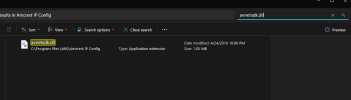
I found "avnetsdk.dll" in "C:\Program Files\SmartPSSLite" which I installed a week or so ago to test out a better method for a client that struggles to to look at her Amcrest NVR videos using a browser.
 
  • Like
Reactions: Cow_Stretcher
Im using Amcrest configtool, ( a remasked version of Dahua's configtool ) and have been at least a couple years or more. and I have not have not had Blue Iris behave that way. Are you running win 11 Pro or Home? just curious.
View attachment 240231

Troubleshooting Errors
If you are seeing errors related to avnetsdk.dll, it typically means the file is missing, corrupted, or being blocked:
  1. Reinstall the software: Since this file is a component of a specific application (like SmartPSS), reinstalling that program is the most reliable way to restore a healthy version of the file.
  2. Security Software Interference: Some antivirus programs may flag surveillance-related DLLs as potential threats due to their networking capabilities. Check your security logs to see if it has been quarantined.
  3. Check Installation Path: The file is usually located within the application's folder in C:\Program Files\ and should not be manually moved to system folders like System32.
    View attachment 240229Joe Sandbox +3
Win11 home. After going through some of the post here and chatting back more with Claude, when I installed the update something went wrong and it didn't go through fully and failed and I didn't notice it failed. When i tried to run BI, I started getting the problems connecting. Found out the win11 update failed so then I went and installed the update again successfully. Claude thinks it may have screwed up something in it during the failed update? Is this the case, i have no clue.. but its back working so theres that..
 
  • Like
Reactions: Bruce_H