Blue Iris Version 6.0.1.24 Now Supports Custom Models

I'm testing a different solution with yolov10s that looks promising.
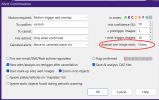
So I saw this post from @jrbeddow yesterday and it got me thinking that this may also be the root cause of occupied canceled alerts. I changed the analyze timing from progressive to 750ms and the occupied canceled alerts disappeared. Keep in mind that I'm just recoding people so YMMV if you are capturing vehicles.

Screen Shot 2026-02-07 at 5.36.44 PM.png
 
Hopefully @hapstabu will do this. I'm sure Ken is getting tired of hearing from me. :)
Unfortunately, my experience is I ask Ken a question, he answers a different question.
I'm not the only one with this issue.
If I can nail down how to get snapshots of vehicles in Frigate NVR, I'm gone from this and Windows.
In programming, controls are components of the graphical user interface (GUI) that allow the user to set parameters for the program.
Has anyone ever counted how many controls are in Blue Iris?
And how many are not described or defined in documentation?
IMO, Ken needs a technical writer to bring the help file in line with the program as it is today.
I'll work on another email images and clips to send to Ken.

 
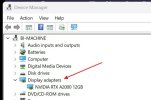
For some reason the built in ai doesn’t use my external gpu. It just sits there idle. All of the usage happens on the cpu. Anyone else have this?
 
For some reason the built in ai doesn’t use my external gpu. It just sits there idle. All of the usage happens on the cpu. Anyone else have this?
Care to share some info, like what OS platform and GPU, also the version of BI you are using? A bit tough to help with out some details. Also how are you determining that the GPU is not working?
 
Care to share some info, like what OS platform and GPU, also the version of BI you are using? A bit tough to help with out some details. Also how are you determining that the GPU is not working?
Windows 11, gpu is nvidia rtx3050 BI version 6.0.2.2. I can watch it on task manager. When a ai event happens there is no activity from the graphics card or the built in gpu. I did notice that if in the main ai settings I select the built in gpu (intel uhd 630) now the nvidia card has activity when there are ai processes. But if I select the nvidia card from the drop down it all goes to the cpu (not even the built in gpu, the actual cpu, almost like you selected no gpu.
 
Unfortunately, my experience is I ask Ken a question, he answers a different question.
I'm not the only one with this issue.
If I can nail down how to get snapshots of vehicles in Frigate NVR, I'm gone from this and Windows.
In programming, controls are components of the graphical user interface (GUI) that allow the user to set parameters for the program.
Has anyone ever counted how many controls are in Blue Iris?
And how many are not described or defined in documentation?
IMO, Ken needs a technical writer to bring the help file in line with the program as it is today.
I'll work on another email images and clips to send to Ken.

I did send an email to Ken late last night showing another canceled alert with the DAT file and multiple JPEGs of the object motion from the relevant intervals (T+0ms, T+1000ms, T+2000ms, etc...). Hopefully this is useful info for him and fingers crossed that I hear back.
 
I'll have to admit after changing all my cams to 750ms has almost eliminated my occupied alerts. I had just one since upgrading to 6.0.2.2. These two triggers were within the same minute and same cam, yet one got the dreaded occupied.


Screenshot 2026-02-13 090022.jpgScreenshot 2026-02-13 090119.jpg
 
If I can nail down how to get snapshots of vehicles in Frigate NVR, I'm gone from this and Windows.
I use Frigate to capture vehicle speeds and the snapshots leave a lot to be desired. However, you can improve these by integrating Frigate with Home Assistant and have HA handle the trigger and image capture.

Screen Shot 2026-02-13 at 7.50.44 AM.png
 
  • Like
Reactions: Skinny1
Windows 11, gpu is nvidia rtx3050 BI version 6.0.2.2. I can watch it on task manager. When a ai event happens there is no activity from the graphics card or the built in gpu. I did notice that if in the main ai settings I select the built in gpu (intel uhd 630) now the nvidia card has activity when there are ai processes. But if I select the nvidia card from the drop down it all goes to the cpu (not even the built in gpu, the actual cpu, almost like you selected no gpu.
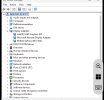
so do you show just the RTX3050 in the device manger only? I am thinking you should disable the onboard gpu in the bios. At least that is how I have mine setup.

Screenshot 2026-02-13 091333.jpg
 
  • Like
Reactions: MikeLud1
so do you show just the RTX3050 in the device manger only? I am thinking you should disable the onboard gpu in the bios. At least that is how I have mine setup.

View attachment 238119
I show 3. The 3050, uhd, and remote driver. I use the uhd for video decoding and the 3050 for the ai. That way it spreads the load. It worked perfectly well when using CPAI. I think it must be a bug in the new version of BI.

IMG_6029.jpeg

Now that I selected the UHD in BI it seems to be hitting the 3050 just fine with the AI images and it looks to be running well. I can verify by looking at the task manager.
 
I did send an email to Ken late last night showing another canceled alert with the DAT file and multiple JPEGs of the object motion from the relevant intervals (T+0ms, T+1000ms, T+2000ms, etc...). Hopefully this is useful info for him and fingers crossed that I hear back.
The responses from Ken:
"Thanks for sending that over.

The update was not squarely aimed at solving this ... this is something else. Since you are not running periodic scanning and/or not selecting to ignore static objects, othering should be marked as static ... but we see EVERYTHING is.

Which of these options are you using?"

My reply:
"It is true that I am not running the periodic scanning for static objects (I haven't found it to be particularly helpful, as the detected objects tend to come and go quite randomly, especially partially obscured vehicles: all it takes is a change in reflections or a person walking across the scene and the vehicle will appear and disappear). In addition, it was speculated that having the other option selected (checkbox for "Ignore static objects found during periodic scanning") could be problematic if we were not using the periodic AI scanning, so I turned that off as well. I would expect that having both of these options turned off would result in a more "classic" detection of just the moving objects (like the vehicle clearly moving in the sample I sent), but please tell me if I am wrong here.

Should the checkbox I referred to above essentially always remain checked "on"?

Ken's response:
"
If either is disabled (periodic AI or ignore static objects) then nothing should be marked static. There is some sort of bug obviously, but I am having trouble replicating it. I did make another relevant "sanity" change to double-check these values for the next release.

You should have both un-checked."

So, this is still a bit of a mystery, but he is working on it actively and has an extra "sanity" check that will soon be added.
 
I'll have to admit after changing all my cams to 750ms has almost eliminated my occupied alerts. I had just one since upgrading to 6.0.2.2. These two triggers were within the same minute and same cam, yet one got the dreaded occupied.


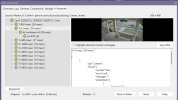
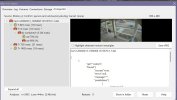
View attachment 238116View attachment 238117
While digging into this, I've noticed a couple of clear issues.
First, most of the time, the asterisk is on T=0 which I understand is the trigger. I remember we used to say to keep the program checking, you put something impossible in the To cancel text box. I do that. DoNotCancel.
But I only see the asterisk on an image later than T=0 occasionally. So it seems to me that the program decides at Trigger that the capture is static, so it just stops checking.
I have captures that at T=0 it finds two objects that are static, but later images show the moving object with high confidence and marks all of them as static.
Second, if there is a moving object that is under the desired confidence, it will identify the higher confidence object. (My car in my driveway, typically)
Again, I do see some that fix on later images, but not frequently.
I wonder if there is an issue with the code under the Motion Required list box.
 
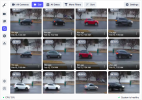
I use Frigate to capture vehicle speeds and the snapshots leave a lot to be desired. However, you can improve these by integrating Frigate with Home Assistant and have HA handle the trigger and image capture.

View attachment 238114
Is that the Frigate implementation within Home Assistant?
The Home Assistant OS?
I have a Frigate docker on Ubuntu. I was using Home Assistant to send notifications to my phone using blueprints, but I thought it was overkill.
My install works for people, but my config yaml file is a mess.