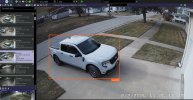
Everything in your screenshots indicates you are using the ipcam-combined model. Try removing that first.Using the built in AI in Blue Iris using Yolov8s.onnx.
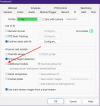
Last edited:
Everything in your screenshots indicates you are using the ipcam-combined model. Try removing that first.Using the built in AI in Blue Iris using Yolov8s.onnx.
I'll try when I get home. Isn't Primary object detection using the whole COCO list, like the default objects setting in old version 5 used to do?Everything in your screenshots indicates you are using the ipcam-combined model. Try removing that first.
View attachment 237503

Check your coco.names file in the AI Models folder, the first/early releases had everything enabled but later releases disabled most of the junk not needed for CCTV systems. FYI a - (hyphen) before the object disables it.I'll try when I get home. Isn't Primary object detection using the whole COCO list, like the default objects setting in old version 5 used to do?
Why would changing this make a difference?
Isn't
The primary object detection just works better than the ipcam-combined model.Why would changing this make a difference?
Fascinating...I've wondered the same thing about that potential paradox, but it's slightly disturbing that Ken isn't completely sure either. If he doesn't know...well who does? At least you have succeeded in making him aware and thinking about it.Went back to Primary instead of ipcam-combined. There is no difference. Still getting moving objects marked as Occupied.
Emailing with Ken, He thinks it might be having Ignore Static Objects without having Periodic AI Scan checked.
Personally, it would be nice to have an up to date help file. I know he is a one man show.
I just noticed when I checked my cancelled alerts I have some too. Not a bunch of them, but none the less, new to my system. 6.0.2.0My initial question to Ken was where is the logic that marks a detection as "Occupied".
The AI module or the Blue Iris program.
I don't know, I didn't write the program.
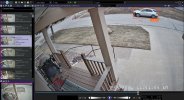
Yeah, when I was trying to get the built in AI to work, I was sitting at the computer and watching Blue Iris. A car would go by, I would see the motion detection work, and it would disappear. I finally found them in cancelled. Mostly Occupied.I just noticed when I checked my cancelled alerts I have some too. Not a bunch of them, but none the less, new to my system. 6.0.2.0
View attachment 237526
After looking into this further it appears these are occurring when AI detects an object in the frame but nothing matches whatever is in the AI "To confirm" field.I just noticed when I checked my cancelled alerts I have some too. Not a bunch of them, but none the less, new to my system. 6.0.2.0
View attachment 237526
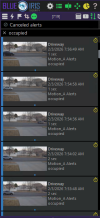
That's not what I see. I check for cars. It identifies moving cars as Occupied.After looking into this further it appears these are occurring when AI detects an object in the frame but nothing matches whatever is in the AI "To confirm" field.
In the example below I have my driveway cam setup to only confirm an alert when AI recognizes a person so every time a car drives by and there is not a person detected it cancels the alert and marks the canceled alert as occupied.
View attachment 237531
It seems logical to me so I would say these types of canceled alerts are normal and to be expected.
I didn't say that BI doesn't support custom models, I said that the included models just work better.That's not what I see. I check for cars. It identifies moving cars as Occupied.
Post in thread 'Blue Iris Version 6.0.1.24 Now Supports Custom Modelsots '
Yep, that’s a strange one. I’m sure it’s not perfect. Out of curiosity can you post the dat analysis for it?I am seeing these cancelled occupied alerts on several of my cams and appears they really started after going to 6.0.1.30 according to my log.
this one is completely goofy.
View attachment 237532
That would have helped, but everything was working great and I turned that option off. I now have it enabled on the 4 of my cams that are giving me these occupied alerts.Yep, that’s a strange one. I’m sure it’s not perfect. Out of curiosity can you post the dat analysis for it?
That would make since then because AI would be looking for something in the delivery model and not a car.I did set up a couple of my cams to use the delivery model, but could not get them to work.
Tomorrow morning I'll post some.I didn't say that BI doesn't support custom models, I said that the included models just work better.
Can you post a screenshot of your alert confirmation and an occupied canceled alert that includes a car?
The screenshots you previously posted all included a truck.
I might try rolling back.I am seeing these cancelled occupied alerts on several of my cams and appears they really started after going to 6.0.1.30 according to my log.
this one is completely goofy.
View attachment 237532
The only reason I question your configuration is that mine has been working extremely well so I'm trying to figure out what could be different.A sanity check of sorts.