Blue Iris Version 6.0.1.24 Now Supports Custom Models

I've been running Blue Onyx for AI and using it's built in IPcam-Combined.onnx model.. Updated to 6.0.1.27 and switched over to using the built in AI and installed the new Bi-combined-v5.onnx and ran a clip to through each .. I repeated the same clip several times and got the same results. Blue onyx had slightly slower analysis times, but was able to pickup a person along with car in the clip.. Using BI built in AI I was unable to pick up the person, it only picked up the car.
I copied the IPcam-Combined.onnx model from Blue Onyx to the Blue Iris model directory and switched over to that model and still was unable to pick up the person, only the vehicle .. So why in this situation is Blue onyx more accurate than the built in AI when using the same model? what am I missing?

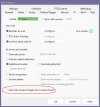
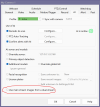
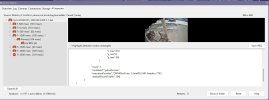
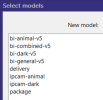
View attachment 237055View attachment 237056
Try disabling Use main stream images from a dual-stream having this enabled does not improve accuracy it just slows down the detection. It also might change on how it is detection the objects..

1769395922193.png
 

Attachments

  • 1769396040225.png
    1769396040225.png
    90.2 KB · Views: 19
Can you explain how primary and additional models works ?
Images are sent to every models at the same time ?
The detection is slow ?
For you what is the best combination to detect person day and night ?
I only used yolo11x until recent BI versions.
Thanks.
 
I noticed all the onnx stuff after the update, read through this thread, and I'm a bit confused as to what it's about. Does this built in ai replace cpai? Could I just install BI on a fresh win install and the AI works now (no trudging through installing cuda, cpai, etc)? What are the advantages vs using the not so old CPAI local server w/ yolo v5-6.2 w/ custom models?
 
Last edited:
To be fair try comparing my model against yolov11s because my model is trained using the small model.
Hi Mike, any chance you'll be releasing a version of bi-general-v5 trained on the medium models? My personal setup only calls for detection of people/persons and cars, I like the high confidence of the standard medium model but don't want the bloat of the other objects and I find your models also tend to perform better at nighttime.
 
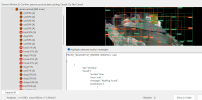
I've just tried bi-general-v5.onnx, and had this issue when using the Testing > Analyse with AI option:
1769522494192.png

However, BI is reporting v6.0.1.21, even though I'm sure I ran the update package with filename blueirisupdate_64_60125.exe, which looks to me like it should be v6.0.1.25 :idk:. Not sure if that could be part of the problem.

I am also stuck in Evaluation Mode, due to an issue where BI thinks my support contract ended the day after I first activated. Email has been sent to support about that!

 
I've just tried bi-general-v5.onnx, and had this issue when using the Testing > Analyse with AI option:
View attachment 237109

However, BI is reporting v6.0.1.21, even though I'm sure I ran the update package with filename blueirisupdate_64_60125.exe, which looks to me like it should be v6.0.1.25 :idk:. Not sure if that could be part of the problem.

I am also stuck in Evaluation Mode, due to an issue where BI thinks my support contract ended the day after I first activated. Email has been sent to support about that!
Redownload the models from the main AI setting tab and use general model that comes with the download

1769523451608.png
 
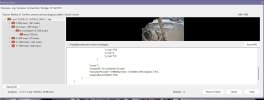
A car came by and this happened. IPCam-Combined and IPCam Animal.


View attachment 237116
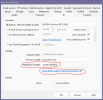
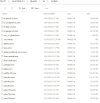
Try unchecking the Primary box. I had a phantom ipcam-combined model on my demo when there wasn't even that model in the folder. BTW, this was the latest install of the AImodelpack.exe and notice there is NO ipcam-combined.onnx file in the folder. I even deleted the folder before I ran the newest AImodelpack.exe file. I then had to go in and uncheck use custom models and then it repopulated the selection. It was the only way to get rid of the ipcam-combined model. Maybe this could be your issue?

Screenshot 2026-01-27 090717.jpg
 
Try unchecking the Primary box. I had a phantom ipcam-combined model on my demo when there wasn't even that model in the folder. BTW, this was the latest install of the AImodelpack.exe and notice there is NO ipcam-combined.onnx file in the folder. I even deleted the folder before I ran the newest AImodelpack.exe file. I then had to go in and uncheck use custom models and then it repopulated the selection. It was the only way to get rid of the ipcam-combined model. Maybe this could be your issue?

View attachment 237123
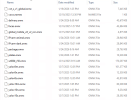
I don't run/execute those ALmodelpacks, I just open them in Winrar and manually extract the models I want. I have a total of three files in my models folder, coco.names, bi-general-v5.onnx and yolov8m.onnx - I do have the advantage of not needing faces or licence plates on my BI setup :)
 
I've just tried bi-general-v5.onnx, and had this issue when using the Testing > Analyse with AI option:
View attachment 237109

However, BI is reporting v6.0.1.21, even though I'm sure I ran the update package with filename blueirisupdate_64_60125.exe, which looks to me like it should be v6.0.1.25 :idk:. Not sure if that could be part of the problem.

I am also stuck in Evaluation Mode, due to an issue where BI thinks my support contract ended the day after I first activated. Email has been sent to support about that!


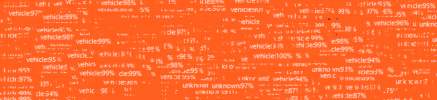
Keep in mind that the "Analyze" under "Testing" will ALWAYS perform better than live as it is after the fact and should not be used as an analysis tool to try to figure out why it didn't see and trigger for an object. It should only be used to see what AI can find in that clip, like "hmm I wonder if AI can find a toothbrush" and then walk around with a toothbrush and have it identify it. I can run this on a camera not using AI and it will show EVERYTHING that AIhas in its objects to find that it sees in the clip. This method will show you EVERY ITEM AI searches for and thus your orange screen LOL.
 
There isn't a general model included in the latest model pack.

View attachment 237130
that is correct. I had to grab those from here:


I thought Ken was going to include all of those, but some were missed. I did find that the yolov8s outperformed the ipcam-combined, maybe that's why?

 
I tried hacking my way through getting internal ai working with MikeLud1's custom v5 models, but it just isn't working. Maybe it's that I have an older p400 gpu idk, but I'm rolling back to the local cpai server running v5 6.2. The old custom models, plates, etc worked fine there.
 
  • Like
Reactions: Flintstone61
The trouble I am having is that my BI install is heavily firewalled, and does not have open access to the internet, so the model download in the AI tab is going to fail. Unless it opens in a browser for the download and I can copy / paste to another machine to download? I suspected BI downloaded it itself, although I should probably test it.

This method will show you EVERY ITEM AI searches for and thus your orange screen LOL.
Good point, I still think there must be an issue though, since if you look at the number of "vehicle" bounding boxes in my image for example, it is utterly ridiculous, there is no way that many vehicles in the frame!
 
The trouble I am having is that my BI install is heavily firewalled, and does not have open access to the internet, so the model download in the AI tab is going to fail. Unless it opens in a browser for the download and I can copy / paste to another machine to download? I suspected BI downloaded it itself, although I should probably test it.


Good point, I still think there must be an issue though, since if you look at the number of "vehicle" bounding boxes in my image for example, it is utterly ridiculous, there is no way that many vehicles in the frame!
Just dl them here then:
 
  • Like
Reactions: CrazyAsYou