
Blue Iris Question
- Thread starter Woody70
- Start date
You are using an out of date browser. It may not display this or other websites correctly.
You should upgrade or use an alternative browser.
You should upgrade or use an alternative browser.

Yes, you simply put in the IP address of each camera (that has to match the IP subnet of the NIC)
So if you have one NIC that is IP subnet 192.168.1.xxx it will see any cameras at 192.168.1.xxx and if the other NIC is subnet 192.168.2.xxx it will see any cameras on the 192.168.2.xxx subnet
But if you have two different subnets going to one NIC, it will only see the one that the subnet is tied to.
So if you have one NIC that is IP subnet 192.168.1.xxx it will see any cameras at 192.168.1.xxx and if the other NIC is subnet 192.168.2.xxx it will see any cameras on the 192.168.2.xxx subnet
But if you have two different subnets going to one NIC, it will only see the one that the subnet is tied to.
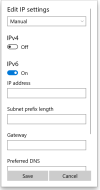
Thank you for your help. Those are the IPs you show not the subnets. I do have them on different IPs and BI don't find the second one. I don't see how to change the subnet with my Win. 10. Here is a pic of the only options that I find.
Attachments
Last edited:

Enable IP4, IP6 can be disabled.Thank you for your help. Those are the IPs you show not the subnets. I do have them on different IPs and BI don't find the second one. I don't see how to change the subnet with my Win. 10. Here is a pic of the only options that I find.
Thank you for the help. I have actually had that configuration and B.I. would not find the camera I had on the second router with that IP.Yes, you simply put in the IP address of each camera (that has to match the IP subnet of the NIC)
So if you have one NIC that is IP subnet 192.168.1.xxx it will see any cameras at 192.168.1.xxx and if the other NIC is subnet 192.168.2.xxx it will see any cameras on the 192.168.2.xxx subnet
But if you have two different subnets going to one NIC, it will only see the one that the subnet is tied to.
Thank you for the reply. I have had IP4 enabled when I was setting up this. That was just the way it was when I took the screenshot.Enable IP4, IP6 can be disabled.

Thank you for the help. I have actually had that configuration and B.I. would not find the camera I had on the second router with that IP.
So you have two routers, each with a different subnet, going to one NIC or two routers, each with a separate subnet, each going to the respective subnet NIC?
I have my router its actually an extender from the main router that's connected to the modem and it is connected to my onboard NIC. I have four cameras connected to that and they work fine. I am trying to connect a TPlink router that I have installed DDWRT firmware in, to an ad on NIC to add one more camera because if I can get it to work with Blue Iris Software I will move another camera over to that router. Hope this explains what I am actually trying to accomplish.So you have two routers, each with a different subnet, going to one NIC or two routers, each with a separate subnet, each going to the respective subnet NIC?

Broachoski
Getting comfortable
When you do a command ipconfig, are both NIC's showing on your pc. This example shows my 192.168.12.1 which is my main router and the 10.0.0.1 which goes to most cameras and to another router (no internet)
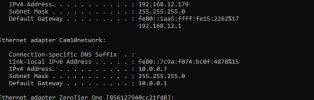
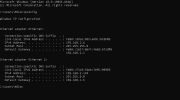
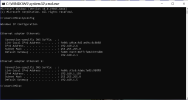
This is mine. I have tried it with both of these settings and I can't even get the camera to connect to that router now.When you do a command ipconfig, are both NIC's showing on your pc. This example shows my 192.168.12.1 which is my main router and the 10.0.0.1 which goes to most cameras and to another router (no internet)
View attachment 242477
Attachments
Last edited:

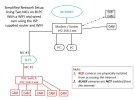
It would be nice if you posted a network topology diagram so we could actually understand your connections. See the one below that is a simplified version of an old set up. I had a few old LaView cams that required an internet connection so I had them connected like this.
Can you ping the cams that are not showing up? How are they getting power?
Can you ping the cams that are not showing up? How are they getting power?

Broachoski
Getting comfortable
Conflict in that first photo showing ethernet 2 with 192.168.2.xxx where the gateway is 192.168.1.x
Are your cameras set up with static IP's? If they are, they would have to be setup to match the gateway that you are moving them to.
Are these wifi or POE cameras powered via a switch?
Are your cameras set up with static IP's? If they are, they would have to be setup to match the gateway that you are moving them to.
Are these wifi or POE cameras powered via a switch?