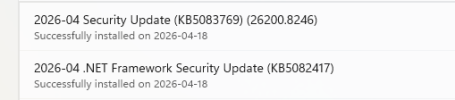
No, I'm not having any specific issues with Windows 26200.8246 so far. However, I saw serious update loop issues over the last month on multiple PCs starting with Windows 26200.8037 (which was replaced by 26200.8039 that solved the issue), and then again with Windows 26200.8117 (which replaced 26200.8116 because apparently people had problems installing it—but it worked fine for me).
By "update loop", I'm referring to Windows will download an update, automatically reboot to install it, come back online with the updated version number (for example,
winver shows the new version number reflecting that the update is now installed), but when you check Windows Update, it still shows that update as available and automatically
downloads it again, installs it, and then asks to reboot, again and again. And if you don't reboot the system, it forcefully reboots itself at some point (usually starting around midnight), only to boot back to the desktop, automatically start installing the same update again, automatically reboot again within an hour, etc. I've seen PCs automatically reboot to install the same updates a dozen times in one night! I tried pausing updates and that helped on a few PCs, but others kept doing the forced update+reboot loop again and again despite the update already being installed successfully and updates showing as paused for a week in Settings. Once morning comes, the PCs stop rebooting, only to resume again at midnight. Both times this happened, I was at the mercy of Microsoft to release another update (usually a week or more later) that flushed the bad updates (8037 and 8117) out of the system.
In Event Viewer, the offending process forcefully rebooting the computer (even with updates paused!) is C:\Windows\uus\packages\preview\AMD64\MoUsoCoreWorker.exe. Maybe next time I'll try nuking it with an IFEO rule! Hopefully Microsoft gets their act together and stops releasing updates prematurely that break things. We've had quite a doozy of beta-quality releases from Microsoft this year!