BI6 AI detects object but still reports "nothing found"

CAL7

Getting the hang of it
Nov 26, 2020
76
33
Florida
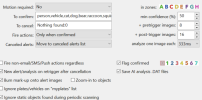
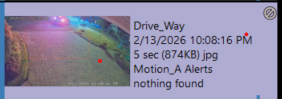
For the most part, the new AI is working well for me. But this one problem befuddles me, here's one example: In the AI Inspector it identifies a person with confidence from 55% to 81% but it still reports "nothing found".
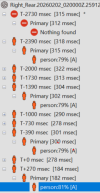
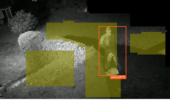
1770044523090.png
1770044567089.png

1770044641890.png
How can it identify the object, e.g. person, and still classify it as a canceled alert? Thanks for any tips on how to tweak or at least diagnose.
 
  • Like
Reactions: ticines
Try clearing the "To cancel:" field, no harm in trying this!
Also not sure why you are putting in the ":0" in that field, I though that was to specify a confidence level for objects founds to override the global confidence setting!
You could also test by just removing the ":0" in that field.
 
  • Like
Reactions: anijet
In the help for the Camera AI settings it says the following:

Labels may also be used to specifically cancel alerts. For an alert to proceed, labels (corresponding to detected objects and faces) must appear in the to confirm box (or that box may be empty), but must not appear in the to cancel box. For example, although you may specify person in the to confirm box, a specific face name in the to cancel box will cancel the alert. You may override the default confidence % for any label by appending a : and a number to the label, for example person:80. Require that an object first appear in a specific zone or zones by adding those following the optional confidence number, for example person:AB for zones A or B, or person:80AB for zones A or B with a confidence of at least 80%.

I suspect that by putting in the exact phrase the the AI uses to report nothing found, you are explicitaly telling it to cancel as soon as nothing is found!
 
  • Like
Reactions: jaydeel
Reporting back, for the most part I am getting better results after removing the "to cancel" field.

But, of course, I have another "nothing found" anomaly to fix. Here is a clip that runs 5 seconds and never sees the car. After the 5 seconds, the car proceeds fully into the frame but the clip never sees it, so it is never passed to AI processing.

1771088787791.png

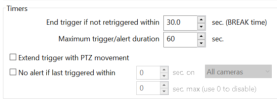
My intent was to have the clip recorded for at least 30 seconds, which is what I tried to accomplish with the following BREAK time:

1771088903484.png
Please explain to me what I am misunderstanding about BREAK time because I thought it guaranteed a 30 second clip to analyze.

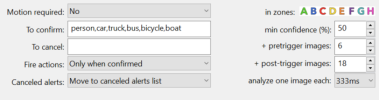
Here is the AI tab. Would extending the post-trigger images help?
1771089028646.png

I appreciate any advice. Thank you.
 
The break time is not directly related to AI analysis time, it is a separate consideration.

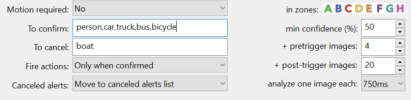
In your screenshots, you effectively have 2 seconds of pre-trigger analysis (6 x 333ms) and AT MOST 6 seconds of post-trigger analysis (18 x 333ms), but subject to shorter (less time post-trigger) if AI doesn't see increasing likelihood of a relavant object. If you want to insure that it truly analyzes for the full "expected" amount of time (# of analyses multiplied by the time between each), you need to add back a false object in the "To Cancel" box.
 
Yes, that should work (I am assuming that boat isn't one of the named objects, but you might want to double check, or use something like giraffe). Your settings now basically mimic my own, with 3 seconds of pre-trigger, and 15 seconds of post-trigger analysis.
 
Keep in mind that even your canceled alerts will all have a minimum duration of the 15-18 seconds you specified, so it will use slightly more storage per day than a shorter analysis time, but I haven't found this to be a problem as long as you keep false triggers down to some reasonable number (try not to adjust the BI motion detection to where it triggers on every leaf moving on the ground, etc...).