

BI 6.0 runaway photos on 1 of 5 cameras.

ennywohn

Young grasshopper
Nov 7, 2022
63
8
florida
New BI 6.0 owner/user here. bought BI this weekend & setup went fine except that one camera generates runaway photos: 1/minute.

even with the motion/trigger switched off (enable motion sensor - unchecked & extend trigger with PTZ movement - unchecked) BI generates a photo/minute.

the camera setting in IP CAMERA has an operational schedule of monday-sunday 24/day for motion trigger. it has saved no photos to SD since 12/18/25. nothing wrong with the camera, it is just in a low traffic area.

any ideas? thx.
 
New BI 6.0 owner/user here. bought BI this weekend & setup went fine except that one camera generates runaway photos: 1/minute.

even with the motion/trigger switched off (enable motion sensor - unchecked & extend trigger with PTZ movement - unchecked) BI generates a photo/minute.

the camera setting in IP CAMERA has an operational schedule of monday-sunday 24/day for motion trigger. it has saved no photos to SD since 12/18/25. nothing wrong with the camera, it is just in a low traffic area.

any ideas? thx.
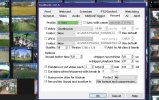
Maybe you have the JPEG box checked in the cameras RECORD section which would default to 1 min if checked.

I only record video but here is a pic of my settings for a camera.
BIJPEG.JPG
 
Maybe you have the JPEG box checked in the cameras RECORD section which would default to 1 min if checked.

I only record video but here is a pic of my settings for a camera.
duh. well thanks. duh again. idk how this was missed. none of the others had it set to continuous. that did it. thanks much.
 
  • Like
Reactions: gwminor48
I am finding here lately that when upgrading BI that it is corrupting some camera settings. I am experimenting with the built in AI on some cameras and after my last update to 6.0.1.9 I found that it enabled AI on some cameras that I know I did not do. I have also found that "find/inspect" was needed on some cameras as the file disabled some cameras substreams in the video tab.
I am not complaining as Ken is doin a fantastic job IMO but it keeps me on my toes. I have gone for over a year without upgrading but wanted to keep up with the latest since he introduced version 6.
 
I've recently had to delete and re-create a few different cameras after my v5 => v6 upgrade. They were outputting video, and BI was seeing it, but was NEVER capturing any video on motion detected or ONVIF triggers. Very disconcerting. Being able to export camera settings and re-create it by importing is a KEY FEATURE. I expect it to work properly and reliably.
 
  • Like
Reactions: gwminor48